Solved
Transfer Adobe Workspace Dashboard Ownership
Hi,
One of my team members is the owner of a dashboard in Adobe Workspace. Can you transfer dashboard ownership? We are both admin access level.
Thanks!
Hi,
One of my team members is the owner of a dashboard in Adobe Workspace. Can you transfer dashboard ownership? We are both admin access level.
Thanks!
Yes, you can transfer the ownership of dashboards (and other components too) as long as you have admin access.
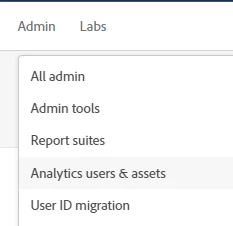
In the admin menu, go to "analytics users & assets".
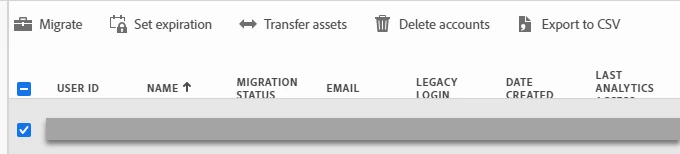
Click the checkbox beside the users name, and in the options above you should see "transfer assets".
That should take you to this view:
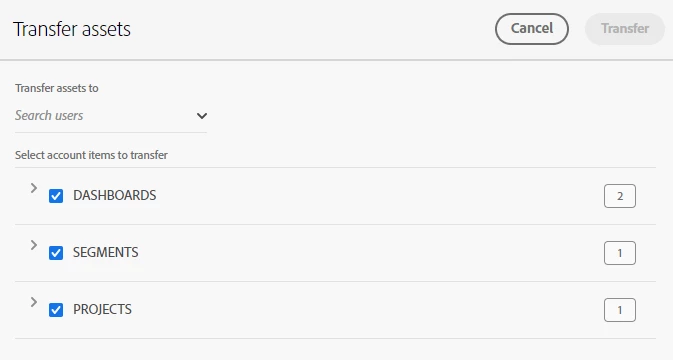
There you can see all of their dashboards, projects, segments, calculated metrics, etc. Basically everything they've created. You just need to select which items you want to transfer to another user. At the top left it says "search users". Find the user you want to transfer it to, then click "transfer" at the top right.
One thing to note, if the account you're transferring from has admin access, whoever you transfer the items to will also get the same admin rights.

Enter your E-mail address. We'll send you an e-mail with instructions to reset your password.