
Tracking Sales Attribution via dimension filtering | Community
Skip to main content
MoriE2
Level 2
September 1, 2023
Solved

Tracking Sales Attribution via dimension filtering

  • September 1, 2023
  • 2 replies
  • 1249 views

Hi there, 

Seeking your expertise to address some inquiries regarding tracking sales associated with content clicks. 

Currently, I am tracking sales metric based on two key dimensions:

  • Previous Page Name: This identifies the page where the content click occurred.
  • Component Type: This dimension verifies the type of content that was clicked.

Approach:

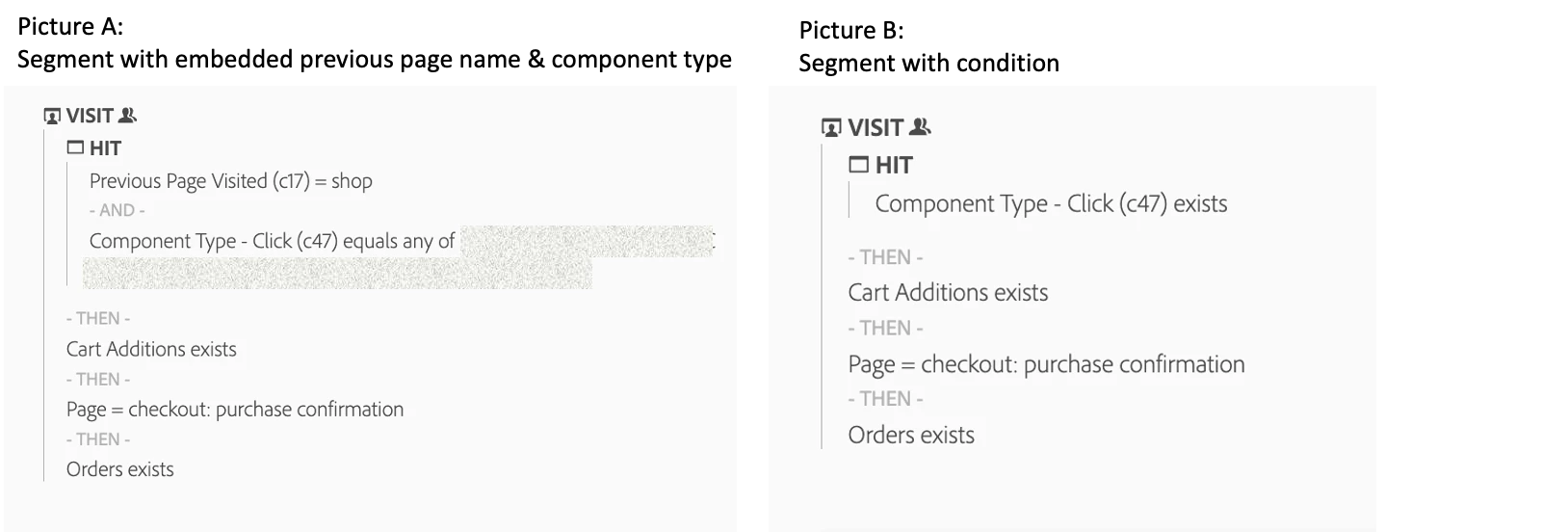
To validate this approach, I've created a segment (see Picture A) that includes both dimensions and conditions such as card additions, landing on the confirmation page, and orders. I've limited these conditions to actions that occurred after the initial content click.


My Questions:

  • Is this approach correct for attributing sales to the initial content click? At this stage, I am not looking for a complex solution like multi-touch attribution. Can you suggest any optimizations without involving modeling, and does this approach effectively minimize or remove the clicks that occurred in between?


  • I intend to track sales attribution by both page and component type. Instead of embedding the previous page name and component type dimensions within the segment, I prefer to add them as filters in the panel. However, when I create a generic condition segment as shown in Picture B and combine it with the previous page name and/or component type as filters, no results are returned. How can I resolve this issue?


This post is no longer active and is closed to new replies. Need help? Start a new post to ask your question.
Best answer by Jennifer_Dungan

Honestly, if I were you, I would consider using a "Conversion Variable Syntax" merchandising eVar (bound to the purchase event).


I am not sure how familiar you are with Products and Merchandising eVars, but normally when you set this up, you use "Product Syntax" and set the Merchandising eVars right in your Products notation...


But "Conversion Variable Syntax" allows for a stitching effect between an earlier page/action and the products later in the journey.


So for example:

  • Shop Page
    • Set eVarX (conversion syntax variable) to "Shop Page A"
    • While eVarX will send in the tracking call, you will NOT see the data for the eVar in your reporting here (this is held by Adobe until the binding event)
  • (Action) Click on Component Type
    • Set eVarY (conversion syntax variable) to "Component 1"
    • Just like above, this will be sent to Adobe, but not used yet
  • (Action) Cart Addition
  • Checkout Page
  • Purchase Event / Order (not sure if this is on the Checkout Page View, or a separate action in your implementation - your screenshot above makes it look like a separate action)
    • Whether this is part of the page, or its own action, you will be setting s.Products and the "Purchase" event (purchase will have been configured as the "binding event" for the above Context Variable
    • In the backend processing, eVarX and eVarY will be attached to the s.products list, so you now have an explicit "Shop Page A" and "Component 1" attached directly to your successful purchase action


Now you don't have to do any fancy segments, you can just correlate eVarx and eVarY to your Orders metric.

2 replies

RobertBlakeley
Community Advisor
Community Advisor
September 1, 2023

Let me take a stab at the first question. The "then" parts do care what happened between the check points. So the first criteria looks for c17- shop AND c47=<something>. If that condition is met, the next condition is that there is there is there is a cart addition. If the cart condition is met, the rule moves on. It does not matter if there were other calls between the two checkpoints as long as there was a cart addition after the shop + click condition.


Note there is the ability to time limit the "then" conditions. E.g. next hit or within 1 page etc.

Jennifer_Dungan
Community Advisor and Adobe Champion
Jennifer_DunganCommunity Advisor and Adobe ChampionAccepted solution
Community Advisor and Adobe Champion
September 2, 2023

Honestly, if I were you, I would consider using a "Conversion Variable Syntax" merchandising eVar (bound to the purchase event).


I am not sure how familiar you are with Products and Merchandising eVars, but normally when you set this up, you use "Product Syntax" and set the Merchandising eVars right in your Products notation...


But "Conversion Variable Syntax" allows for a stitching effect between an earlier page/action and the products later in the journey.


So for example:

  • Shop Page
    • Set eVarX (conversion syntax variable) to "Shop Page A"
    • While eVarX will send in the tracking call, you will NOT see the data for the eVar in your reporting here (this is held by Adobe until the binding event)
  • (Action) Click on Component Type
    • Set eVarY (conversion syntax variable) to "Component 1"
    • Just like above, this will be sent to Adobe, but not used yet
  • (Action) Cart Addition
  • Checkout Page
  • Purchase Event / Order (not sure if this is on the Checkout Page View, or a separate action in your implementation - your screenshot above makes it look like a separate action)
    • Whether this is part of the page, or its own action, you will be setting s.Products and the "Purchase" event (purchase will have been configured as the "binding event" for the above Context Variable
    • In the backend processing, eVarX and eVarY will be attached to the s.products list, so you now have an explicit "Shop Page A" and "Component 1" attached directly to your successful purchase action


Now you don't have to do any fancy segments, you can just correlate eVarx and eVarY to your Orders metric.

MoriE2
MoriE2Author
Level 2
September 2, 2023

unfortunately, at this stage I cannot build any new rules (i.e. adding new merch eVar, due to some technical reasons and devop capacities) so my option is limited to building segments : /.  is there a way to build a generic segment as "sales condition" as shown in Pic B and then apply page and component type as filter? 

Jennifer_Dungan
Community Advisor and Adobe Champion
September 2, 2023

Let me try a few things on my end, see if I can find a segment that will work..  You may not be far off on your attempts, but I sequential segments can sometimes be tricky.