Tracking Code for Exact Target | Community
Skip to main content
jeffreyg2655811
February 11, 2019
Solved

Tracking Code for Exact Target

  • February 11, 2019
  • 3 replies
  • 1983 views

How do you setup/create tracking codes for Exact Target email campaigns? We were told by SalesForce that we need to set this up in Adobe Analytics first before we can integrate it with Exact Target.
This post is no longer active and is closed to new replies. Need help? Start a new post to ask your question.
Best answer by Hyder_Ziaee
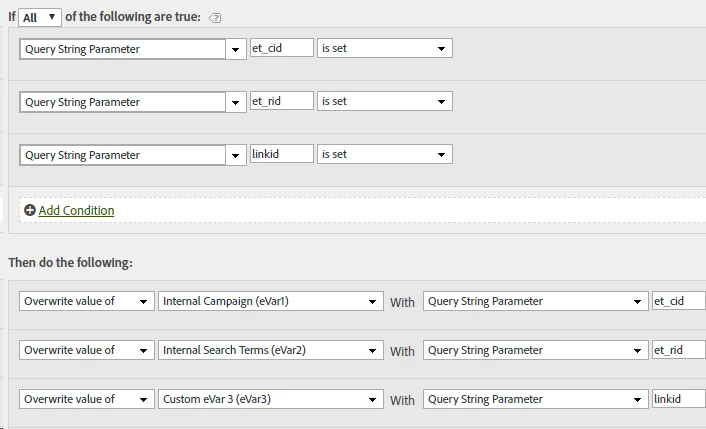
  1. Select and Configure three evars for the campaign, recipient and link IDs
  2. Setup a processing rule to check if the three query params exist, and if they do, copy the values over to their respective evars
    • Admin > Report Suite > [Select report suite] > Edit Settings > General > Processing Rules

evar1, 2, and 3 are just for examples. Select the ones you have setup.

3 replies

Gigazelle
Adobe Employee
Adobe Employee
February 15, 2019

Usually email campaigns have a query string parameter that you can track. Do you know what query string parameters you're going to use in the URL?

jeffreyg2655811
February 19, 2019

Something like this:

et_cid=%%jobid%%&et_rid=%%subscriberid%%&linkid=%%LinkName%%

That was provided by our Exact Target agent.

Hyder_Ziaee
Adobe Employee
Hyder_ZiaeeAdobe EmployeeAccepted solution
Adobe Employee
February 19, 2019
  1. Select and Configure three evars for the campaign, recipient and link IDs
  2. Setup a processing rule to check if the three query params exist, and if they do, copy the values over to their respective evars
    • Admin > Report Suite > [Select report suite] > Edit Settings > General > Processing Rules

evar1, 2, and 3 are just for examples. Select the ones you have setup.