Tracking code attribution across multiple marketing channels | Community
Skip to main content
October 14, 2020
Solved

Tracking code attribution across multiple marketing channels
  • October 14, 2020
  • 3 replies
  • 1903 views
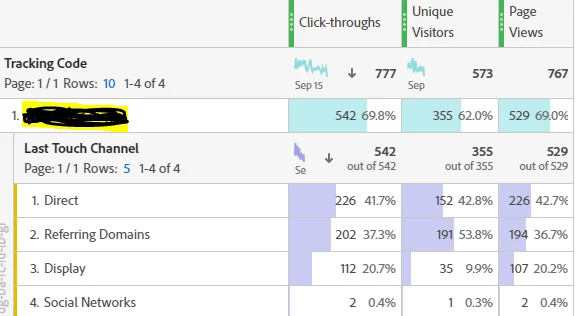
We encountered the reporting issue with the tracking code that is attributed to more than 3 different marketing channels simultaneously (see screenshot below). We are particularly confused about the “direct” channel to be #1 ( # of clickthoughs) and how it can be associated at all with a campaign tracking code in the first place. Are we missing something here? Please advise. @y-shishka


This post is no longer active and is closed to new replies. Need help? Start a new post to ask your question.
Best answer by Andrey_Osadchuk

For example, a visitor could come in September via Direct and then in October via an ad campaign (tracking code).

Can you share a screenshot when the Tracking Code is broken down by Last Touch Channel?

3 replies

Andrey_Osadchuk
Andrey_OsadchukAccepted solution
October 14, 2020

For example, a visitor could come in September via Direct and then in October via an ad campaign (tracking code).

Can you share a screenshot when the Tracking Code is broken down by Last Touch Channel?

zzaraAuthor
October 14, 2020
I have added Last Touch screenshot to my initial post. Also I have accidentally click on the Correct Answer, please disregard/ignore. Thanks.
Andrey_Osadchuk
October 14, 2020

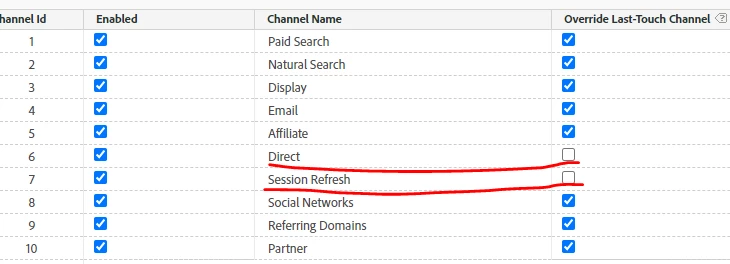
Open Report Suites > Marketing Channels > Marketing Channel Manager and check what channels have the "Override Last-Touch Channel" option enabled/ disabled. Ideally, share a screenshot.

zzaraAuthor
October 15, 2020

Thanks for your quick reply. I have checked which last-touch channels had the enabled override option, see screenshot above. As you can see, there are two channels (Direct and Session Refresh) are not enabled, but the Direct channel still shows up as #1. @y-shishka 

Andrey_Osadchuk
October 15, 2020

For further investigation check the processing rules.
