Tracking Code & UTM Summary | Community
Skip to main content
April 28, 2025
Question

Tracking Code & UTM Summary

  • April 28, 2025
  • 1 reply
  • 661 views

Hello,
is there a quick way to export for a given Virtual Report Suite ALL of the existing Tracking Codes and UTMs info such as:

- Tracking Code
utm-source

- utm-medium

- utm-campaign

- utm-content 


i'm interested to have this info in a nice table.
this would help a lot checking the existing UTMs and there various attributions for every single campaign

best,
Vincent

This post is no longer active and is closed to new replies. Need help? Start a new post to ask your question.

1 reply

bjoern__koth
Community Advisor and Adobe Champion
April 29, 2025

Hi @vincentth3 

since you are talking about dimensions, meaning string values, for each of the above, you will have to specify a little what you envision ending up with.

In general, yes, you can have them exported separately with a couple of clicks by right-clicking on your table and selecting "Download items as csv", which will include up to 50.000 lines of values for that specific dimension.

You will likely have to create individual tables per dimension though.


Cheers from Switzerland!
April 29, 2025

Hello Bjoern,

Thanks for your answer!


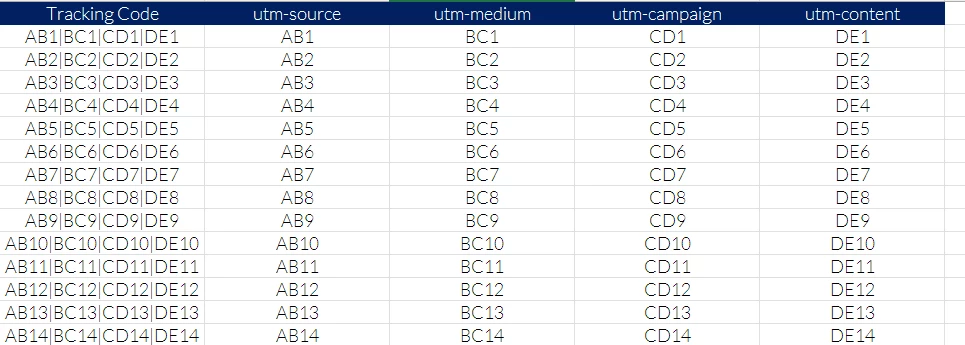
I would look for something like this: 


basically one line per Tracking code, summarizing the various utm components.


Greetings from Lausanne 🙂
Vincent

Jennifer_Dungan
Community Advisor and Adobe Champion
April 30, 2025

Workspaces (at least in Adobe Analytics... CJA is a different story) don't support "Flat Tables".


However, you could create a Data Warehouse export that looks like your sample.


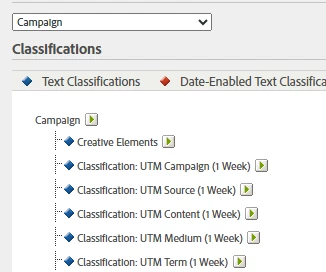
If you are using Tracking Code (keep in mind this has a 1 week attribution by default), you can create classification rules to extract each UTM into it's own classification, then you can use those classifications as columns.


So if your Tracking Code looks like "AB1|BC1|CD1|DE1", as long as you don't have column shifting like "AB1|CD1|DE1" where a missing "BC1" value would cause CD1 and DE1 to shift, simple Regex rules in classification builder can be used to parse out each value.
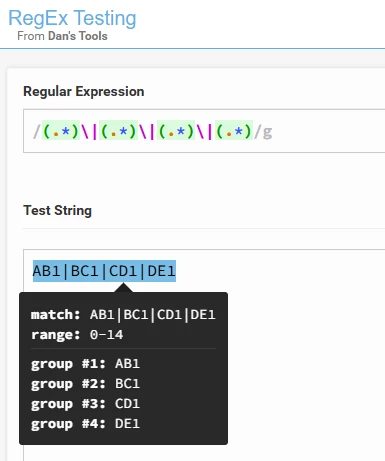


You would have to create classifications on your Tracking Code (or "Campaign"):
 

In your Classification Rule Builder, you would then set each position to the correct classification:


Then you can use these classification as part of your Workspaces or Data Warehouse exports (but again, if you need flat table, Data Warehouse is the way to go)