Time Taken to Complete a Journey in Adobe Analytics | Community
Skip to main content
November 12, 2025
Solved

Time Taken to Complete a Journey in Adobe Analytics

  • November 12, 2025
  • 1 reply
  • 209 views

Hi,

I wanted to understand if there is a way to know how much time a user took to complete a journey in Adobe Analytics.


Example: I want to know, When a User from Page A -> Clicked on CTA -> Landed on Page B -> Filled in Info -> Clicked on CTA 2 -> Success. 


I wanted to know the entire Journey time.


My approach.


Visit Container

Page Name = Page A

Then Within 1 Page View

Click on CTA

Then within 1 Page View

Click on CTA


Can I pull this Segment and Add the Average Time Spent metric?


Curious to know if someone has any answer to this.
Best answer by bjoern__koth

Hi @eurosims 

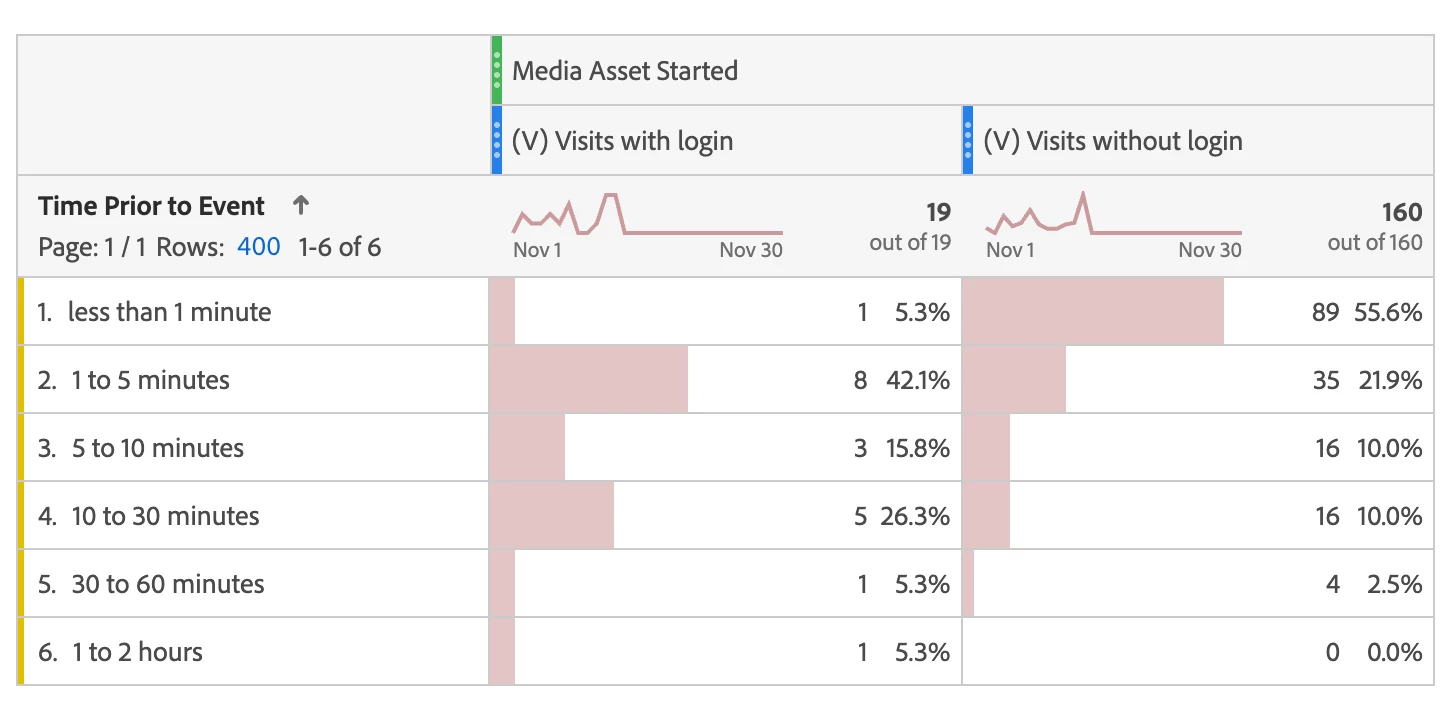
since "Time Prior to Event" is a dimension, you need a metric / success event to check it against.

Try adding your success event as freeform table column and apply the segment as column filter to it, similar to the screenshot below.


1 reply

EurosIMS
Level 3
November 12, 2025

Hi @lunawsi


You can use the Time Prior to Event dimesnion along with the 'Success' event at the end of your journey- would that be granular enough?


https://experienceleague.adobe.com/en/docs/analytics/components/dimensions/time-prior-to-event

lunawsiAuthor
November 13, 2025

Hi @eurosims 

As I have created a Segment I suppose Time Prior to Event Shall work? I have created the entire Journey in a segment. 

How will that help? 

bjoern__koth
Community Advisor and Adobe Champion
bjoern__kothCommunity Advisor and Adobe ChampionAccepted solution
Community Advisor and Adobe Champion
November 13, 2025

Hi @eurosims 

since "Time Prior to Event" is a dimension, you need a metric / success event to check it against.

Try adding your success event as freeform table column and apply the segment as column filter to it, similar to the screenshot below.


Cheers from Switzerland!