Time Spent per Visit: recalculation based on same formula gives different result | Community
Skip to main content
Level 3
August 23, 2018
Solved

Time Spent per Visit: recalculation based on same formula gives different result

  • August 23, 2018
  • 2 replies
  • 3652 views

Hi,

In the Adobe Help documentation I found the following formula for Time Spent per Visit : Total seconds spent / (visit-bounces)

It is thus possible to recalculate it based on the other metrics. This is what I exactly did.

In the next table you can see the Adobe version of the variable at the left and my own calculated metric at the right. The results are different.
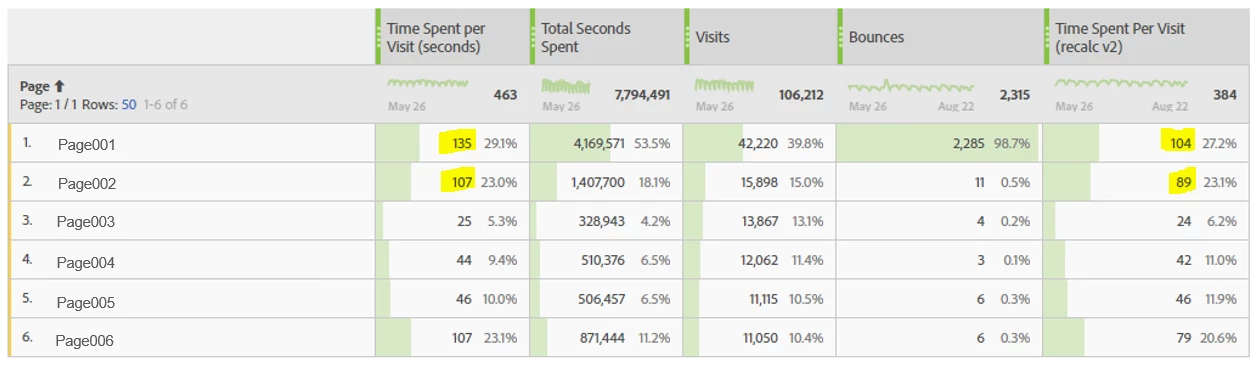
Here the calculated metric:
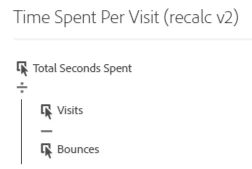
Can someone explain me why the results are different? Is this a bug?

Thanks in advance for your feedback!

Kind regards,

Sarah

This post is no longer active and is closed to new replies. Need help? Start a new post to ask your question.
Best answer by BYOID

Hi Kaushalendra,

I just checked this, but it returned exactly the same figures for both metrics (and thus the discrepancy is not only related to Analysis Workspace).

I will reach out to Customer Care to have an answer.

Thanks,

Sarah

2 replies

Kaushalendra
Adobe Employee
Adobe Employee
August 23, 2018

Hi saraht69310464​,

In my understanding, this discrepancy has to do with the difference in reporting behavior between Reports & Analytics and Analysis Workspace.

Can you try this report in Reports & Analytics and check if you get the same results?

You can also reach out to Customer Care for getting an explanation, if any attached to this behavior.

BYOIDAuthorAccepted solution
Level 3
August 24, 2018

Hi Kaushalendra,

I just checked this, but it returned exactly the same figures for both metrics (and thus the discrepancy is not only related to Analysis Workspace).

I will reach out to Customer Care to have an answer.

Thanks,

Sarah

January 6, 2020
Hi Sarah, did you manage to get an answer for this problem?