
Time Spent Per Page View - Downstream | Community
Skip to main content
skatofiabah
Level 5
August 21, 2024
Solved

Time Spent Per Page View - Downstream

  • August 21, 2024
  • 2 replies
  • 2015 views

Hi All,


I'm trying to calculate Time Spent Per Page View in our Downstream Data Lake. I was referencing the Data Columns reference to try to understand this, but unsure how to calculate it in SQL. It's my understand each row is a hit. How would I look at the average time spent on a particular page to exclude single page visits and also to average the time on a specific page, for example "Page A"? I'm trying to replicate this from my calculated metric that contains a segment as well downstream. I posted it here to reference.
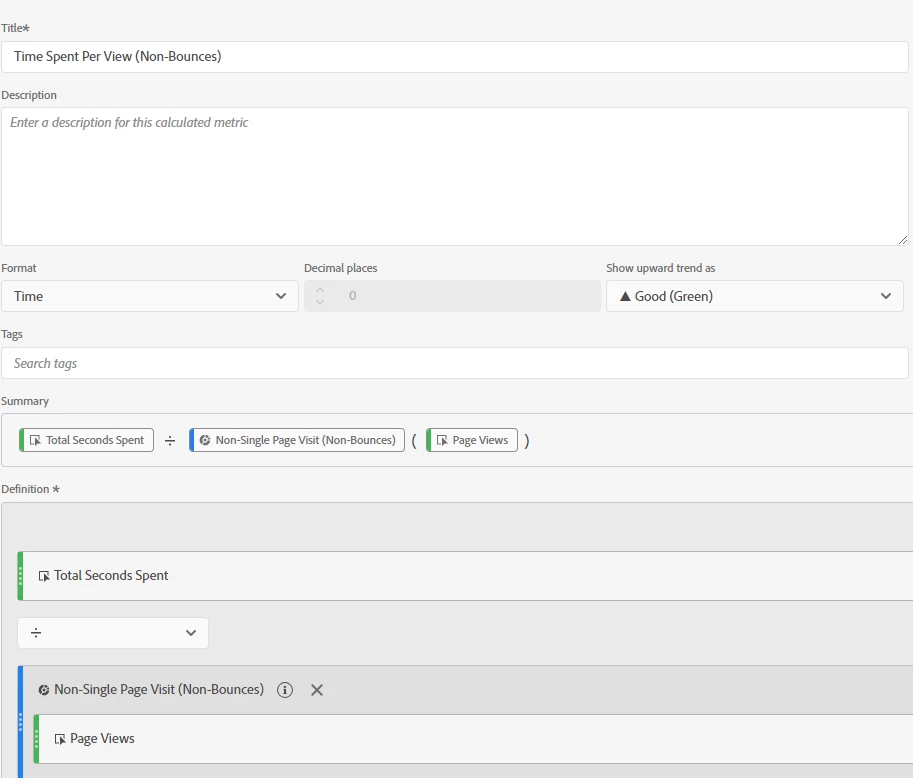


I am also trying to combine this with this time spent code: Sample SQL queries to query Adobe analytics Data feeds

SELECT CONCAT(post_visid_high, post_visid_low, visit_num, visit_start_time_gmt) as visit_id, visit_page_num, post_cust_hit_time, CASE WHEN LEAD(visit_id) OVER (ORDER BY CONCAT(post_visid_high, post_visid_low, visit_num, visit_start_time_gmt), visit_page_num) = visit_id AND LEAD(visit_page_num) OVER (ORDER BY CONCAT(post_visid_high, post_visid_low, visit_num, visit_start_time_gmt), visit_page_num) > visit_page_num THEN LEAD(post_cust_hit_time) OVER (ORDER BY CONCAT(post_visid_high, post_visid_low, visit_num, visit_start_time_gmt), visit_page_num) - post_cust_hit_time ELSE NULL END as time_spent FROM your_data_feed_name WHERE date >= 'your_start_date' AND date <= 'your_end_date'


Best answer by leocwlau

@skatofiabah, here is my SQL for the calculation. I break that into two for easy understanding.

The first one get time spent on each hit, no matter what hit type it is.

CREATE OR REPLACE TEMP VIEW time_per_hit AS select date_time, concat( post_visid_high, post_visid_low, visit_num, visit_start_time_gmt ) as visit_id, visit_page_num, page_event, -- to know if the hit is page view or not hit_time_gmt, -- using hit_time_gmt as many 0 in cust_hit_time_gmt lead(hit_time_gmt, 1) over ( partition by concat( post_visid_high, post_visid_low, visit_num, visit_start_time_gmt ) order by visit_page_num ) as next_hit_time_gmt, -- move the next hit time up for time spent calculation next_hit_time_gmt - hit_time_gmt as timespent, pagename from hit_data where date_time >= 'start_date' and date_time < 'end_date' order by visit_id, visit_page_num

The second one groups by page and gets the number of page views of each page and the total time spent on them. It can easily be converted to get the total time spent and page views for the overall average.

select pagename, SUM(timespent) AS total_timespent, COUNT( CASE WHEN page_event = '0' THEN 1 END ) AS pageviews -- get number of page views from time_per_hit group by pagename


2 replies

Jennifer_Dungan
Community Advisor and Adobe Champion
August 21, 2024

While I don't have any queries to help support this.. from a high level:


  • First, you need to identify the users and visits for those users.
  • Then you need to figure out which visits have only a single page view... (I don't know if the timestamp from "exit clicks" are taken into account in the Adobe calculations, for now, let's assume not... that only pages are factored in)
  • Now that you have visits with at least 2 pages, you will need to look at the timestamps for those page views...  


Lets assume:

  • Page A
  • Page B
  • Page C
  • Page D


Page A's time will be "Time Stamp of Page B" minus "Time Stamp of Page A"


Page B's time will be "Time Stamp of Page C" minus "Time Stamp of Page B"


Page C's time will be "Time Stamp of Page D" minus "Time Stamp of Page C"


Page D cannot be determined as there is no subsequent timestamps (however, in theory, if a user triggered an "exit" click, i.e. they clicked on an external link that trigger an automatic exit link tracking, you might be able to use that timestamp.... but if the user closed their tab or browser, or just let the session expire there will be nothing.

skatofiabah
Level 5
August 21, 2024

Hi @jennifer_dungan,


This makes sense. Thank you. I did just add the sample code and resource link in my edited post on how to calculate the time spent between 2 hits. How can this be done on the page level to only include time spent on a page with more than 1 page view and add that up and take the average to get average time spent on a given page?

leocwlau
Community Advisor and Adobe Champion
August 22, 2024

@skatofiabah, a side question on why you want to exclude single-page view visits? The "total second spent" metric, https://experienceleague.adobe.com/en/docs/analytics/components/metrics/total-seconds-spent, actually considers both page view and link tracking hits, so if there is just one-page view in the visit but some link tracking, such as exit link click, Adobe will give you a total second spent as well.

If a visit has only one single hit, the lead() calculation will automatically exclude that visit from the calculation.

leocwlau
Community Advisor and Adobe Champion
leocwlauCommunity Advisor and Adobe ChampionAccepted solution
Community Advisor and Adobe Champion
August 22, 2024

@skatofiabah, here is my SQL for the calculation. I break that into two for easy understanding.

The first one get time spent on each hit, no matter what hit type it is.

CREATE OR REPLACE TEMP VIEW time_per_hit AS select date_time, concat( post_visid_high, post_visid_low, visit_num, visit_start_time_gmt ) as visit_id, visit_page_num, page_event, -- to know if the hit is page view or not hit_time_gmt, -- using hit_time_gmt as many 0 in cust_hit_time_gmt lead(hit_time_gmt, 1) over ( partition by concat( post_visid_high, post_visid_low, visit_num, visit_start_time_gmt ) order by visit_page_num ) as next_hit_time_gmt, -- move the next hit time up for time spent calculation next_hit_time_gmt - hit_time_gmt as timespent, pagename from hit_data where date_time >= 'start_date' and date_time < 'end_date' order by visit_id, visit_page_num

The second one groups by page and gets the number of page views of each page and the total time spent on them. It can easily be converted to get the total time spent and page views for the overall average.

select pagename, SUM(timespent) AS total_timespent, COUNT( CASE WHEN page_event = '0' THEN 1 END ) AS pageviews -- get number of page views from time_per_hit group by pagename


skatofiabah
Level 5
August 22, 2024

Hi @leocwlau,


See my response to your first response for additional clarity!