Time Comparison QTD Last Year vs. QTD This Year | Community
Skip to main content
July 27, 2022
Solved

Time Comparison QTD Last Year vs. QTD This Year

  • July 27, 2022
  • 1 reply
  • 1271 views

I am looking for a way compare my data using the following time ranges:

Fiscal QTD Last Year (Aug - Oct) vs. Fiscal QTD This Year (Aug - Oct) 


How can I set this up?

Help much appreciated.

This post is no longer active and is closed to new replies. Need help? Start a new post to ask your question.
Best answer by Jennifer_Dungan

You can create some permanent custom date ranges that support your needs:
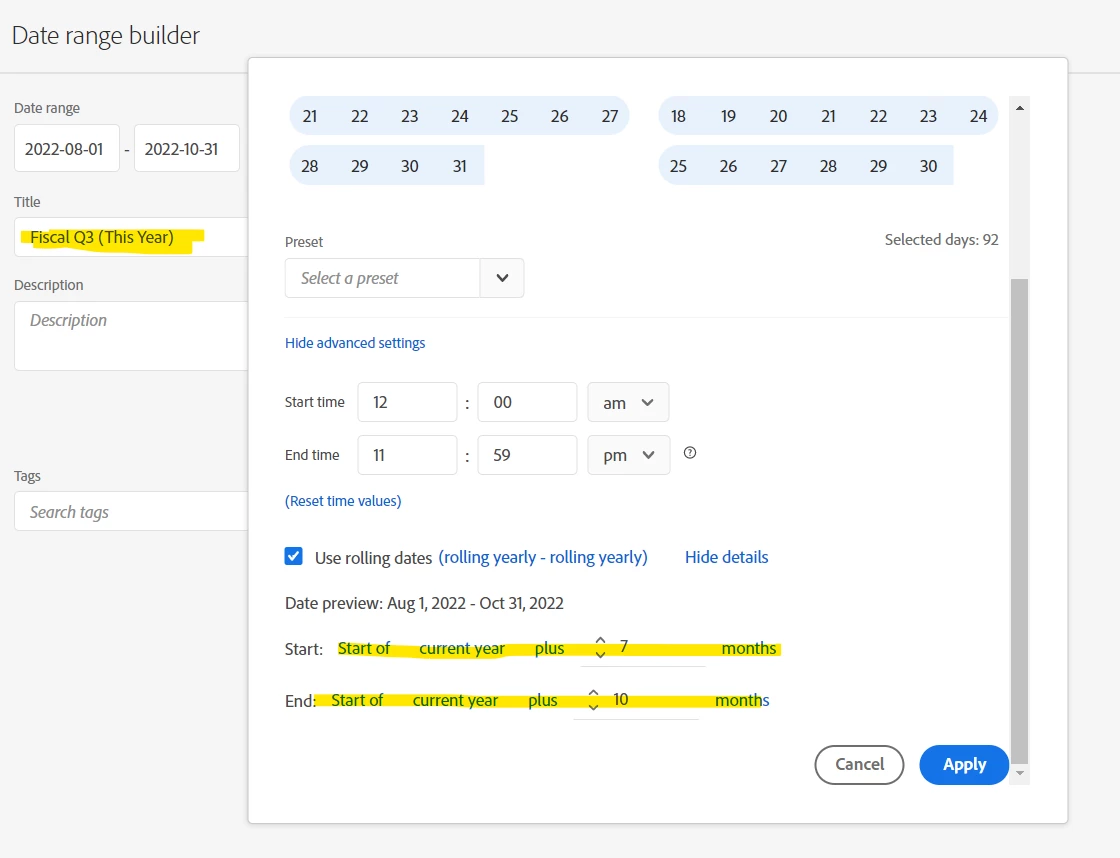


You will probably want to set up 4 such Date Ranges, your custom 4 quarters for this year, and last year (rolling) so that you can re-use these for multiple reports.

1 reply

Jennifer_Dungan
Community Advisor and Adobe Champion
Jennifer_DunganCommunity Advisor and Adobe ChampionAccepted solution
Community Advisor and Adobe Champion
July 27, 2022

You can create some permanent custom date ranges that support your needs:


You will probably want to set up 4 such Date Ranges, your custom 4 quarters for this year, and last year (rolling) so that you can re-use these for multiple reports.

July 27, 2022

Hi Jennifer,

thank you. But there is probably no way to hard-code this into the AA UI, correct?


Regards,

Marc

Jennifer_Dungan
Community Advisor and Adobe Champion
July 27, 2022

If you create your own custom ranges, they will be available to all users in the "preset dates" on your workspace panels and they will be available as permanent Date Ranges to be dragged and dropped from the components panel.


I didn't want to shift the config for my suite "week" from the default, so I created my own custom ranges.


You can see them in the presets:


They also show in the components:


You could also try the Customize Calendar in the suite settings (I "assume" that this will also change the quarter definitions - I've never tried)


Standard:


If you use "Modified Gregorian Calendar", you can choose the "First Month of the Year" and "First Day of the Week":


This should make the default quarter rules adjust to your customized calendar