Target Activity - Metrics still firing in adobe reporting, even though the event is turned off. | Community
Skip to main content
Level 2
April 26, 2024
Question

Target Activity - Metrics still firing in adobe reporting, even though the event is turned off.

  • April 26, 2024
  • 1 reply
  • 1279 views

Hello!


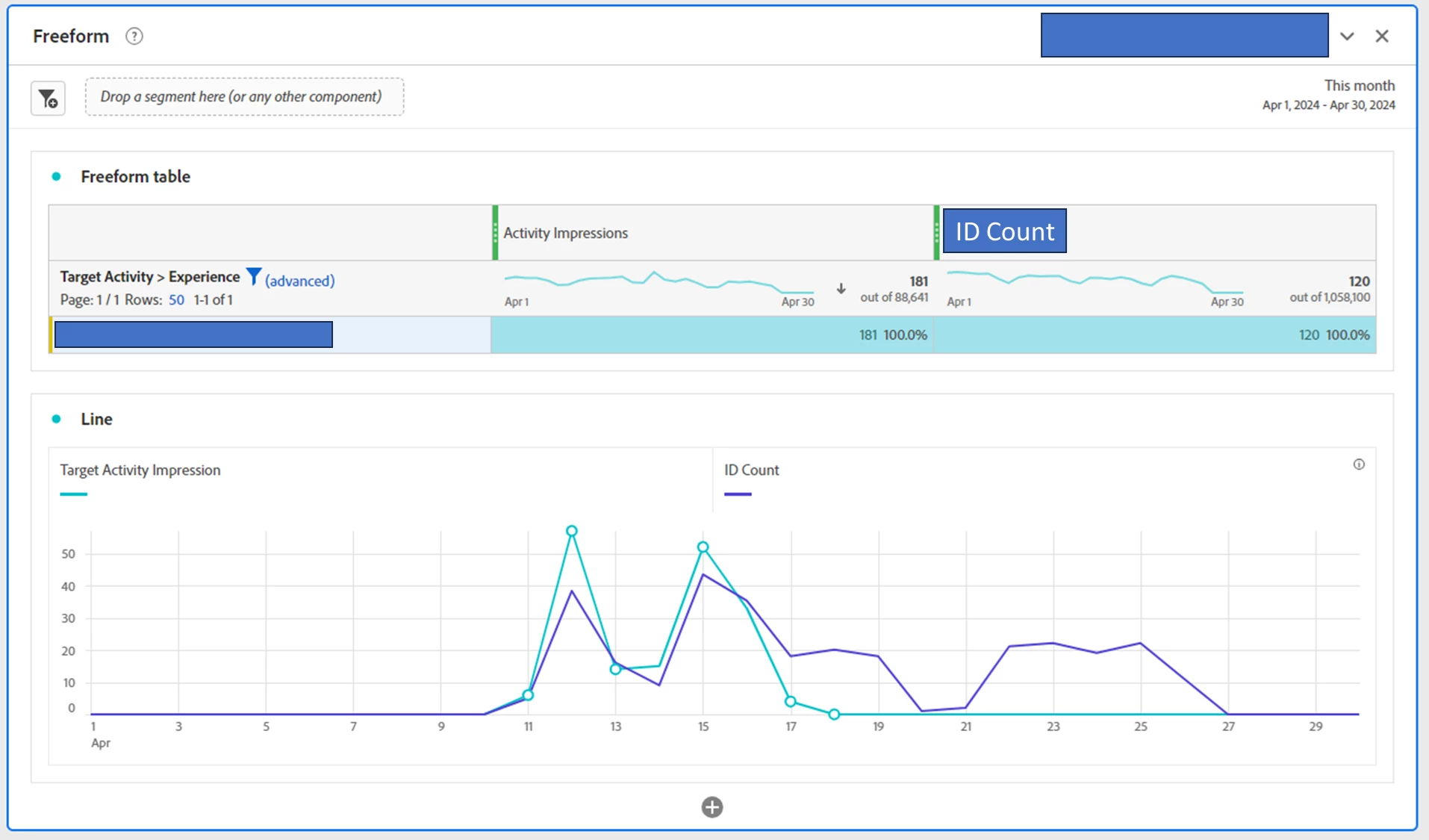
My team launched a new adobe target activity that happened from 4/11 - 4/17. I'm able to see the "Target Activity" and "Experience" show up in dashboards, and when I pull in the "Activity Impressions" metric I can see impressions during that time period.


However, when I use other metrics, that don't look to be built for the adobe target experiences, I'm seeing they are still showing up on days after the target activity was turned off (e.g. 4/18 and later).

Does anyone know why this is happening and a workaround? I'd like to include other metrics, in this example I have an "ID Count" which counts the distinct number of IDs.

Thanks so much!
 

This post is no longer active and is closed to new replies. Need help? Start a new post to ask your question.

1 reply

Damonwhall
Adobe Employee
Adobe Employee
April 26, 2024

Hello @nikester , 


There are some metrics that persist because of the nature of "hit, visit, and visitor" based persistence.  

"Target Activity Impressions" is a very hit based metric and will only endure as long as the activity is actually visually displaying to the visitor.  


"Visit" and "Visitor" metrics will persist longer because this is based off the user ECID.  Think of it as the visitor is defined as an audience that qualified for this activity at one point in their past.


As long as they do not clear their cookies and the ECID that is associated with the activity still is applied to said visitor, they will continue to show attribution for that activity.  


See the below image: 

NikesterAuthor
Level 2
April 26, 2024

Hi @damonwhall 

Thank you for that explanation! That is helpful to understand that the other metric continued because it is likely at that Visit/Visitor level.

Do you know if there is a way to get around this in a report? 


I played around with filtering my Visit/Visitor based metric, "ID Count", by a hit level segments (e.g. hit level where "Target Activity > Experience = Experience Tag") but that didn't seem to solve the issue.


Thanks so much!

pradnya_balvir
Community Advisor
Community Advisor
April 30, 2024

Thanks @jennifer_dungan and @pradnya_balvir and @damonwhall 

I've created the following segment. I didn't see an option to include the Activity Impression in the segment itself. When I search for it in the search bar, it doesn't come up as an option. So instead, I went the route of hit level segment where (Target Activity > Experience = Experience Tag)


I then applied it to the report I was looking at, at a panel level and I'm still seeing that the other metrics persist past the date the target experience was turned off.


The workaround of "filter by date" would be great, but I'm still concerned about using that method as even within the experience, people can be kicked out. For example... 

  • On day 1 you are eligible, if complete the main CTA, you are then no longer eligible.
  • So on day 2 if you come back, you won't see the experience, but sounds like you could still fire a Visit metric as if you were seeing the experience.

Really appreciate the thoughts shared here. I have learned a lot so far.

It sounds like other non-adobe target metrics simply don't work with the adobe target dimensions if they're at a different level (e.g. hit/visit/visitor), which is a bummer.


@nikester Happy to help you:)