Sort by one metric then another in table | Community
Skip to main content
November 15, 2022
Solved

Sort by one metric then another in table

  • November 15, 2022
  • 1 reply
  • 642 views

Hi there, 


Is there a way to first filter a table by the top X of one dimension, and then sort by another metric? 


eg: I want to sort by conversion rate, but only looking at the top 100 ordered products, for example. 


Thank you!

Sonia

This post is no longer active and is closed to new replies. Need help? Start a new post to ask your question.
Best answer by Jennifer_Dungan

The closest you can get is to sort by one metric on the first level of dimensions, then sort on the breakdown dimensions by another metric.


For example,


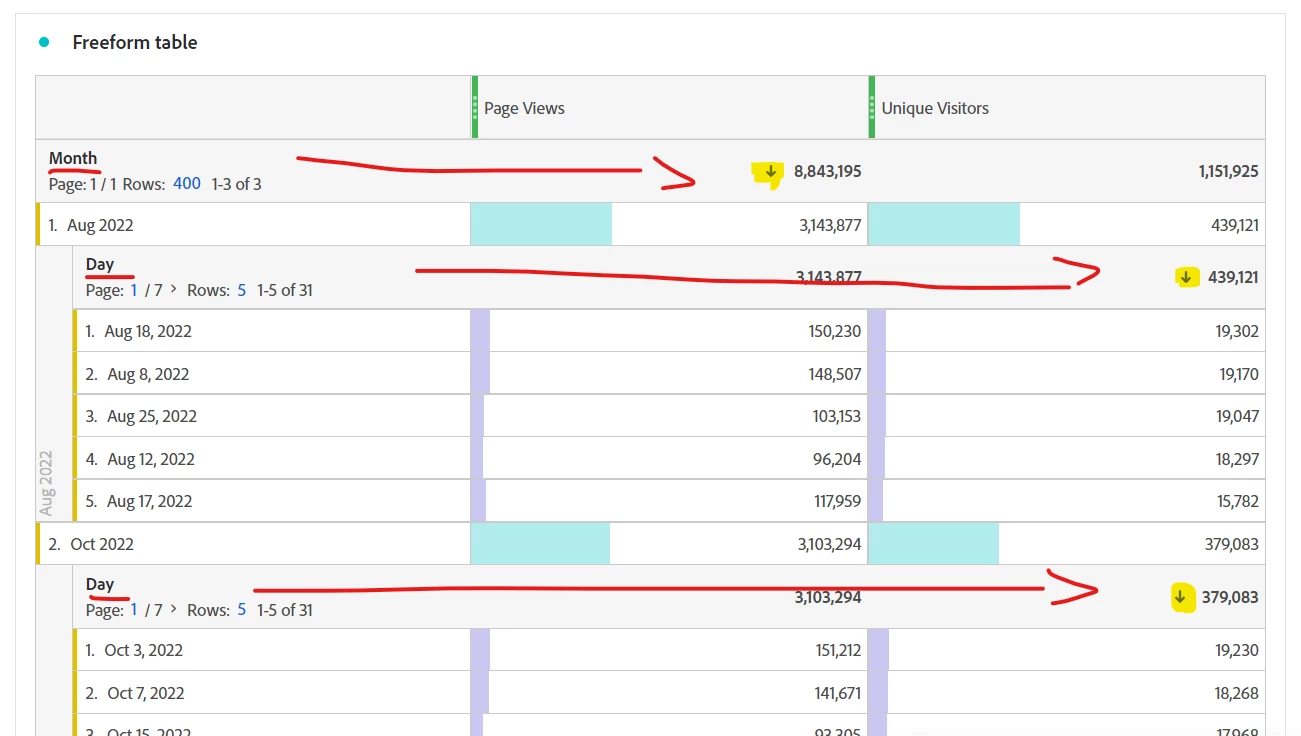
I have have a report which is broken down by Month, then by Day.


My Months are sorted by Page Views, then I sorted the Days inside the Months by Unique Visitors:


But sadly, there is no "sort first by Metric A, then in the case of Metric A being the same, sort next by Metric B"....


If you want to do that, you may need to use Report Builder to pull the data into Excel that will allow for multiple column sorting.


1 reply

Jennifer_Dungan
Community Advisor and Adobe Champion
Jennifer_DunganCommunity Advisor and Adobe ChampionAccepted solution
Community Advisor and Adobe Champion
November 15, 2022

The closest you can get is to sort by one metric on the first level of dimensions, then sort on the breakdown dimensions by another metric.


For example,


I have have a report which is broken down by Month, then by Day.


My Months are sorted by Page Views, then I sorted the Days inside the Months by Unique Visitors:


But sadly, there is no "sort first by Metric A, then in the case of Metric A being the same, sort next by Metric B"....


If you want to do that, you may need to use Report Builder to pull the data into Excel that will allow for multiple column sorting.