Set Previous Page Variable for 404 pages when source is external to owned site. | Community
Skip to main content
soumiaz
Level 2
October 18, 2017
Solved

Set Previous Page Variable for 404 pages when source is external to owned site.

  • October 18, 2017
  • 2 replies
  • 7171 views

Hello.

     I am trying to find the best way to track the the previous page URL for 404 pages when the source is external to my owened site. To find the previous page URL , I set a variable using JavaScript via Dynamic Tag Manager:

var ex=document.referrer

which allows me to get the previous page URL, however this function does not always work as sometimes the link comes from external sources (email, banner, google search ...)

What is the best way to proceed. 
This post is no longer active and is closed to new replies. Need help? Start a new post to ask your question.
Best answer by Issao_Shoji

Hello,

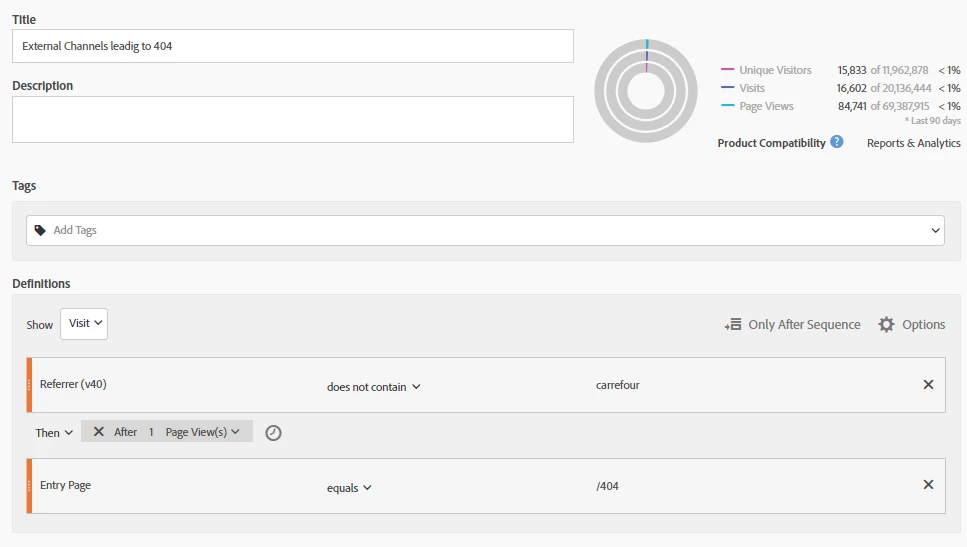
If your metric its really working as well, you can create a segment that: your "eVar" does not contain "your domain" the operator: "Then After 1 Page view" Entry page=/404. Do not forget to choose the option: "Only before the sequence". There's an example:

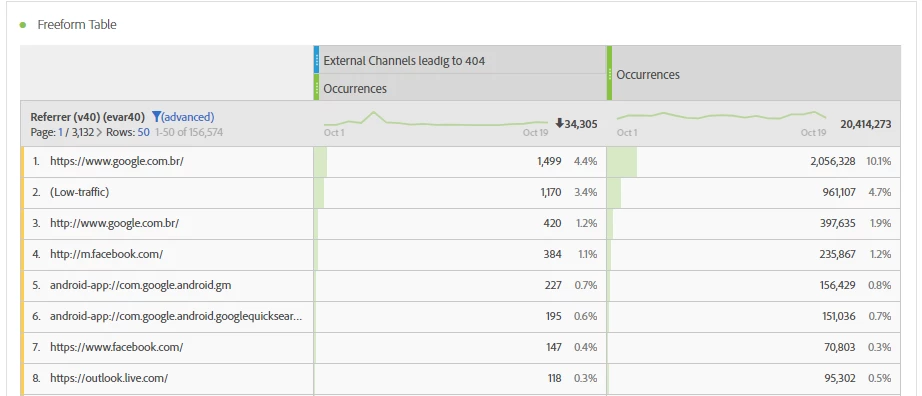
So, after that you can go to workspace and use your segment, with your eVar, that you still need to filter the data, using "Does not contain: mycompany.com" (This is important). To have a better comparison, you can use the metric "Ocurrences" in the side:

As you can see there's no relevance in external links to 404 error in my company website.

Regards,

Mauricio Shoji

2 replies

Issao_Shoji
Issao_ShojiAccepted solution
Level 2
October 19, 2017

Hello,

If your metric its really working as well, you can create a segment that: your "eVar" does not contain "your domain" the operator: "Then After 1 Page view" Entry page=/404. Do not forget to choose the option: "Only before the sequence". There's an example:

So, after that you can go to workspace and use your segment, with your eVar, that you still need to filter the data, using "Does not contain: mycompany.com" (This is important). To have a better comparison, you can use the metric "Ocurrences" in the side:

As you can see there's no relevance in external links to 404 error in my company website.

Regards,

Mauricio Shoji

soumiaz
soumiazAuthor
Level 2
October 20, 2017

Sounds good Issao Shoji​ . I will be doing that and I used the following documentation in order to store the previous pagename value in a cookie.

Thanks for your help.