Segment to display only pages with more than 100 pageviews. | Community
Skip to main content
Level 2
August 21, 2023
Solved

Segment to display only pages with more than 100 pageviews.

  • August 21, 2023
  • 1 reply
  • 1797 views

Hi! 

I would like to build a freeform table that displayed only blog article pages that have more than 100 pageviews. However, the segment I'm creating does not contain any data. 

Please find below how I build my segment. 


Thanks in advance for the help. 


This post is no longer active and is closed to new replies. Need help? Start a new post to ask your question.
Best answer by Jennifer_Dungan

Well the problem here is that your segment is looking at "HIT" level, so you cannot have 100 or more "page views" on a single hit.


Visit and Visitor Segments also won't work for you, as those are locked to a single user's Visit (i.e. that page must have been viewed 100 times in the same visit) or to a single Visitor's lifetime (i.e. that page must of been viewed 100 times by the same user).


I don't think there is a way to segment this specifically....


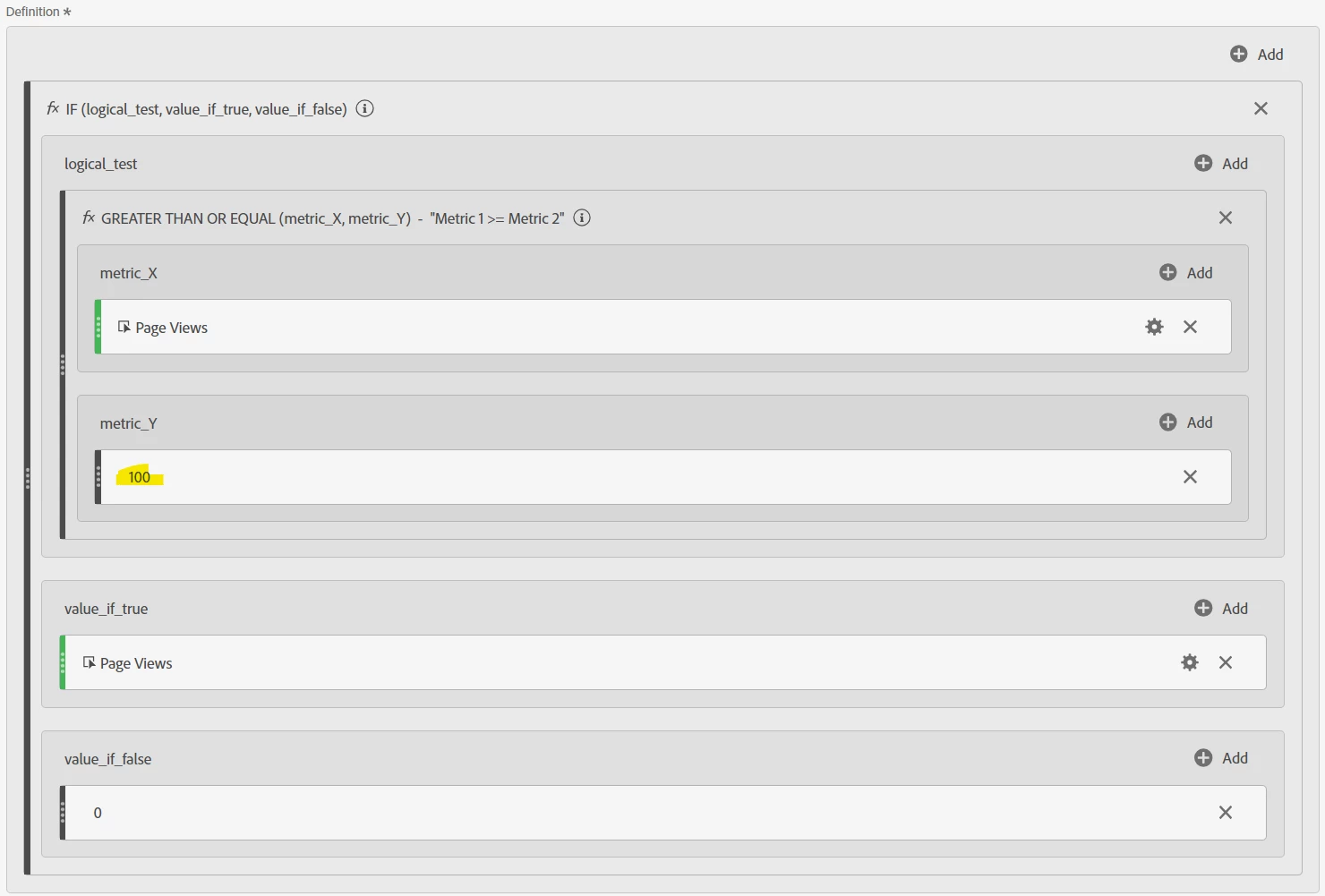
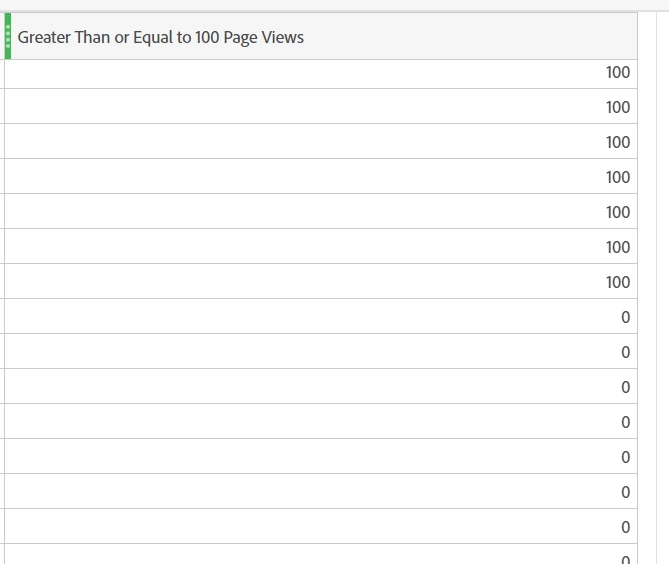
Now, one thing you can do (but it's not the most ideal), is to use a calculated metric using an IF statement and GREATER THAN OR EQUAL statement to restrict the page views for items over X (in your case 100), then if it's not, show "0", however, the pages will still show in the list in your table, but their PV count won't be included in the total.


Again, this may not be the intended display you are looking for... but this is the closest I can think of to get you what you want.

1 reply

Jennifer_Dungan
Community Advisor and Adobe Champion
Jennifer_DunganCommunity Advisor and Adobe ChampionAccepted solution
Community Advisor and Adobe Champion
August 21, 2023

Well the problem here is that your segment is looking at "HIT" level, so you cannot have 100 or more "page views" on a single hit.


Visit and Visitor Segments also won't work for you, as those are locked to a single user's Visit (i.e. that page must have been viewed 100 times in the same visit) or to a single Visitor's lifetime (i.e. that page must of been viewed 100 times by the same user).


I don't think there is a way to segment this specifically....


Now, one thing you can do (but it's not the most ideal), is to use a calculated metric using an IF statement and GREATER THAN OR EQUAL statement to restrict the page views for items over X (in your case 100), then if it's not, show "0", however, the pages will still show in the list in your table, but their PV count won't be included in the total.


Again, this may not be the intended display you are looking for... but this is the closest I can think of to get you what you want.

Level 2
August 31, 2023

Thanks a lot Jennifer! The pages are still show in the list in my table. However, their PV count are included in the total for me. 

Jennifer_Dungan
Community Advisor and Adobe Champion
August 31, 2023

Oh, you are right.. probably cause the total is above "100"...


In which case, to get the total, you will need to do a separate calculated metric using the IF / Greater than or equal to 100 all inside a "Column Sum" function....


Or take this out of Adobe and use Report Builder in Excel for now, where you can apply Excel formulas to get just the display you need....