Segment not collecting data | Community
Skip to main content
August 2, 2018
Solved

Segment not collecting data

  • August 2, 2018
  • 3 replies
  • 2937 views

Hello,

I am trying to track metrics from one of our company pages (partners.panduit.com). 

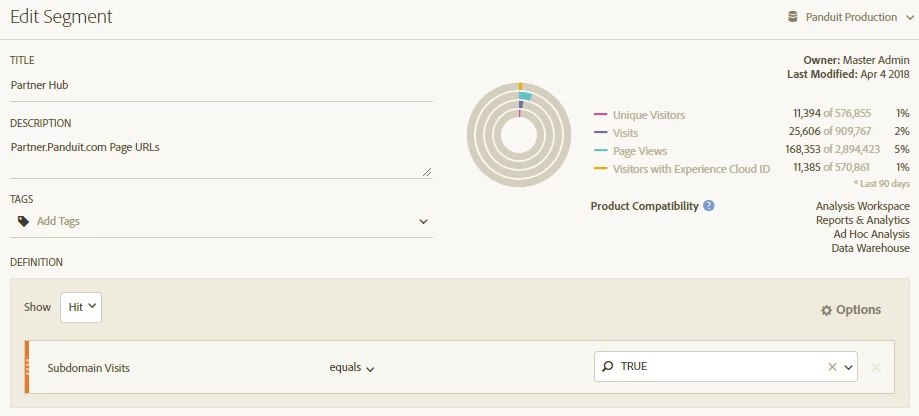
The Subdomain Visits dimension is showing data for various metrics as shown below in segment builder, however I am not seeing data being collected in Workspace.

Any thoughts on why I cannot see metrics in Workspace?
This post is no longer active and is closed to new replies. Need help? Start a new post to ask your question.
Best answer by Hyder_Ziaee

Hi Robert,

You may want to check your data first in the table without the segment. I checked, and the data drops to zero starting from July 21st.

It looks like an implementation issue.

3 replies

PratheepArunRaj
Community Advisor and Adobe Champion
August 3, 2018

Dear Robert,

Make sure that you are not selecting any dimensions like Pages, URLs, Locales etc.

Try to select only the metrics Page Views, Visits and Unique Visitors by month as dimension. On selecting, if you can see numbers, then the dimension you have selected didn't involve in the segmentation.

Thank You

Arun

Hyder_Ziaee
Adobe Employee
Hyder_ZiaeeAdobe EmployeeAccepted solution
Adobe Employee
August 3, 2018

Hi Robert,

You may want to check your data first in the table without the segment. I checked, and the data drops to zero starting from July 21st.

It looks like an implementation issue.

August 3, 2018

Thank you for the responses!  I believe I have a solution based on the information provided