Segment is not filtering visits properly | Community
Skip to main content
Level 4
October 7, 2019
Solved

Segment is not filtering visits properly

  • October 7, 2019
  • 11 replies
  • 9786 views

Hi Team,

You can refer project here: https://sc5.omniture.com/x/5_9yvti

I have a created a segment for particular campaign as shown below:
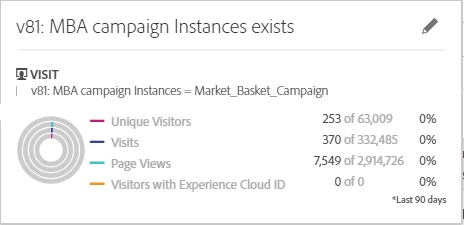
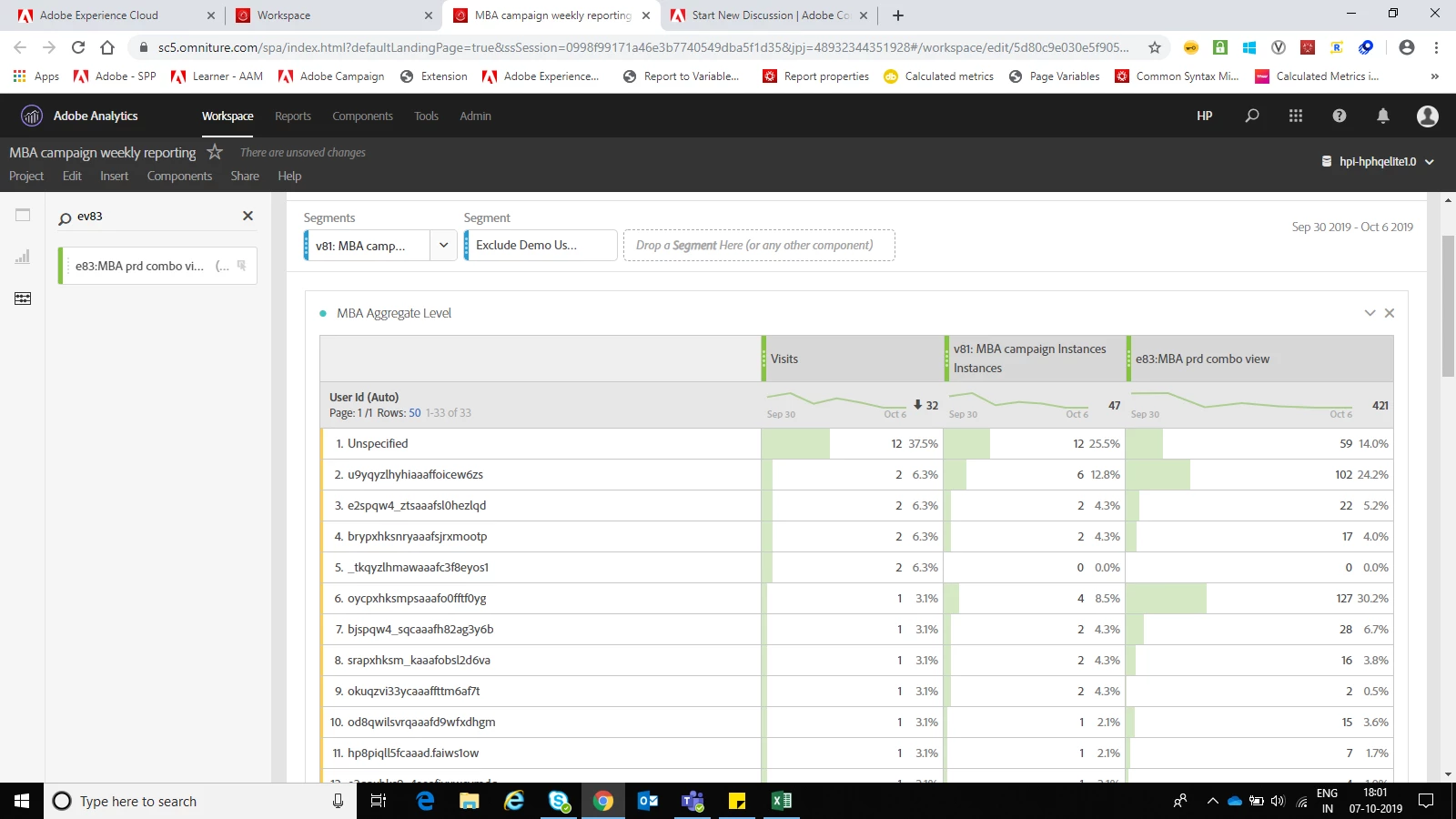
I am using the above segment to filter out the campaign visits from overall visits. v81 fires only when user see the banner(campaign). Along with v81, I am firing event83 as a counter.  As in the below screen shot, row#5 has 2 visits, v81 = 0, e83= 0. How is this possible? when v81 = 0 (means v81 not fired for that particular visits) how come Segment named v81: MBA campaign is allowing that visits in the report. I think row#5 should not be present in the below table. Please help me here.
This post is no longer active and is closed to new replies. Need help? Start a new post to ask your question.
Best answer by Urs_Boller

but did the visits without the zero-numbers on the right disappear with the new segment?

btw: what is your evar81 expiry?

and a last comment about the orders: you're right, you can't add the standard "orders" metric. but you could create another {visit segment with hit-container (order exists and eVar81=Market_Basket_Campaign)}. just add this segment as new row with visits counter and you should see how many visits with order you had (even in the overall hit-segmentation).

11 replies

Urs_Boller
Community Advisor
Community Advisor
October 7, 2019

your segment is looking for VISITS where the eVar81 matches SOMEWHERE within the visit. that means the user in row 5 had the login/userID set AFTER the eVar81 has been set. sounds possible?

the easiest fix would be to change the segment to HIT container where "eVar81 instances = 1" (only get hits where you have eVar81 on the hit)

Level 4
October 8, 2019

Hi,

My campaign is running on Product detail page(PDP) which can be accessed only after login to the website. So when user comes to PDP page & make scroll to the banner then only v81 will fire.

Level 4
October 8, 2019

Hi ursboller,

I changed the segment to HIT, but still issue exist. PFB the screen shot.

Thanks,

Dinesh

Urs_Boller
Community Advisor
Community Advisor
October 8, 2019

is it possible that the user changes the login (breakdown) after eVar81 is set?

Level 4
October 8, 2019

Yes they can change login by impersonating user function.

Urs_Boller
Community Advisor
Community Advisor
October 8, 2019

can you try the following segment (in the dropdown):

HIT-segment where

- eVar81 = Market_Basket_Campaign

  AND

- eVar81 Instances (green metric) equals 1

if that doesn't solve the issue, what happens if you put the same segment above/below the "visit" metric in the table? does that change anything?

Level 4
October 9, 2019

Hi ursboller,

Thanks you!

If I use  HIT level segment then I will not be able to capture the Order placement by the customer. My campaign is on PDP page, if user adds the banner(camp) product to cart then he has to go order submit page to buy it. By HIT segment, I will loose order count.

Also there is no change if I move the segment above/below the visits metric.

Regards,

Dinesh

Urs_Boller
Community Advisor
Urs_BollerCommunity AdvisorAccepted solution
Community Advisor
October 9, 2019

but did the visits without the zero-numbers on the right disappear with the new segment?

btw: what is your evar81 expiry?

and a last comment about the orders: you're right, you can't add the standard "orders" metric. but you could create another {visit segment with hit-container (order exists and eVar81=Market_Basket_Campaign)}. just add this segment as new row with visits counter and you should see how many visits with order you had (even in the overall hit-segmentation).

Level 4
October 10, 2019

but did the visits without the zero-numbers on the right disappear with the new segment? --  Yes, it solved my issue.

btw: what is your evar81 expiry? -- Visit

Urs_Boller
Community Advisor
Community Advisor
October 10, 2019

ok, I think it has something to do with account logins: if user changes the account after hitting the campaign, the user would appear as visit but without eVar Instances (because the instances happened for another login account). you could check this in your original table by investigating a single "unique visitor" and see if this user had more than one login...