Segment creation- identifying traffic exposed to content vs not | Community
Skip to main content
Level 2
August 25, 2022
Solved

Segment creation- identifying traffic exposed to content vs not

  • August 25, 2022
  • 2 replies
  • 1032 views

We would like to create a segment that looks at visits where a visitor had page views on a section of content (site section 2) at some point before visiting a specific page "x". They could have looked at the section a) right before page "x" or b) they could have viewed the section and then other pages before finally landing on specific page "x".


We created a segment but want to make sure that it accounts for both scenarios "a" and "b". The segment uses the following rules:


Include: visits

where site section 2 equals "value a"

Then specific page url equals "id for page x"


options=Include everyone


We are also interested in how to best create the opposite segment where visit did NOT include the specific site section 2 before landing on the specific page "x"


Thanks!
 

This post is no longer active and is closed to new replies. Need help? Start a new post to ask your question.
Best answer by Jennifer_Dungan

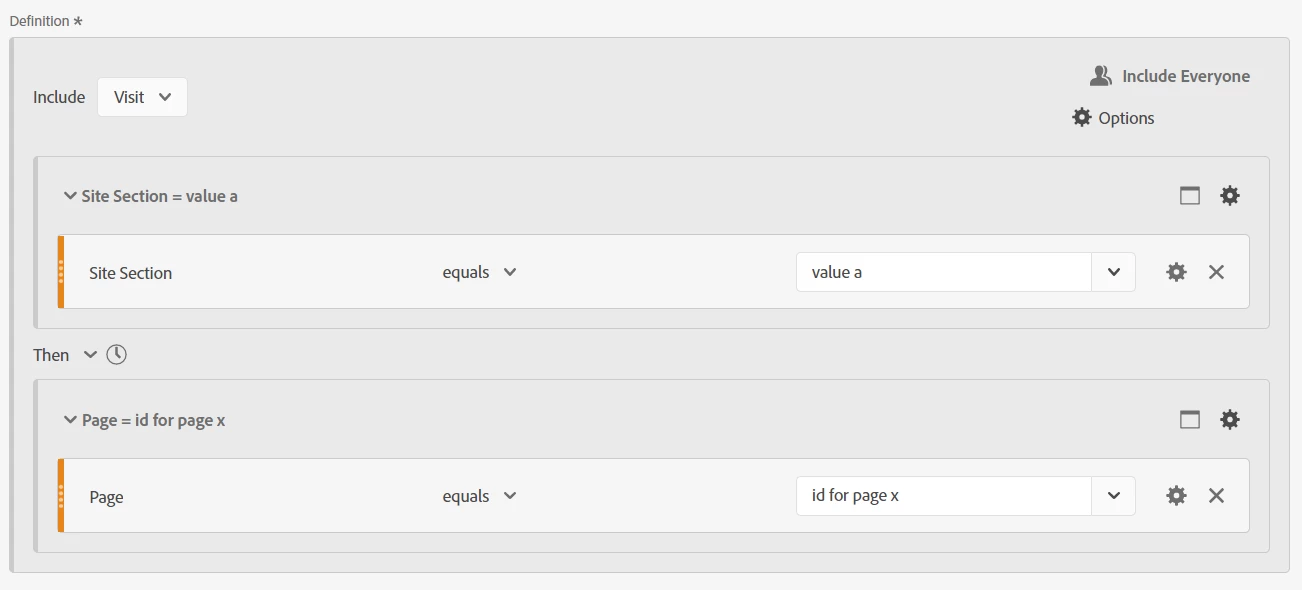
Hi, building your segment like this, should achieve your first goal... a then b


You should note that I set the segment to Visit level, but I left the containers at Hit Level... I also didn't specify any time frame on the "Then" operator (so that this shouldn't be direct or within any time or number of hits). You could also use Then "Within 1 Visit"


As for the opposite... where the visit gets to page b, but did not hit a... this one is trickier, but still doable:


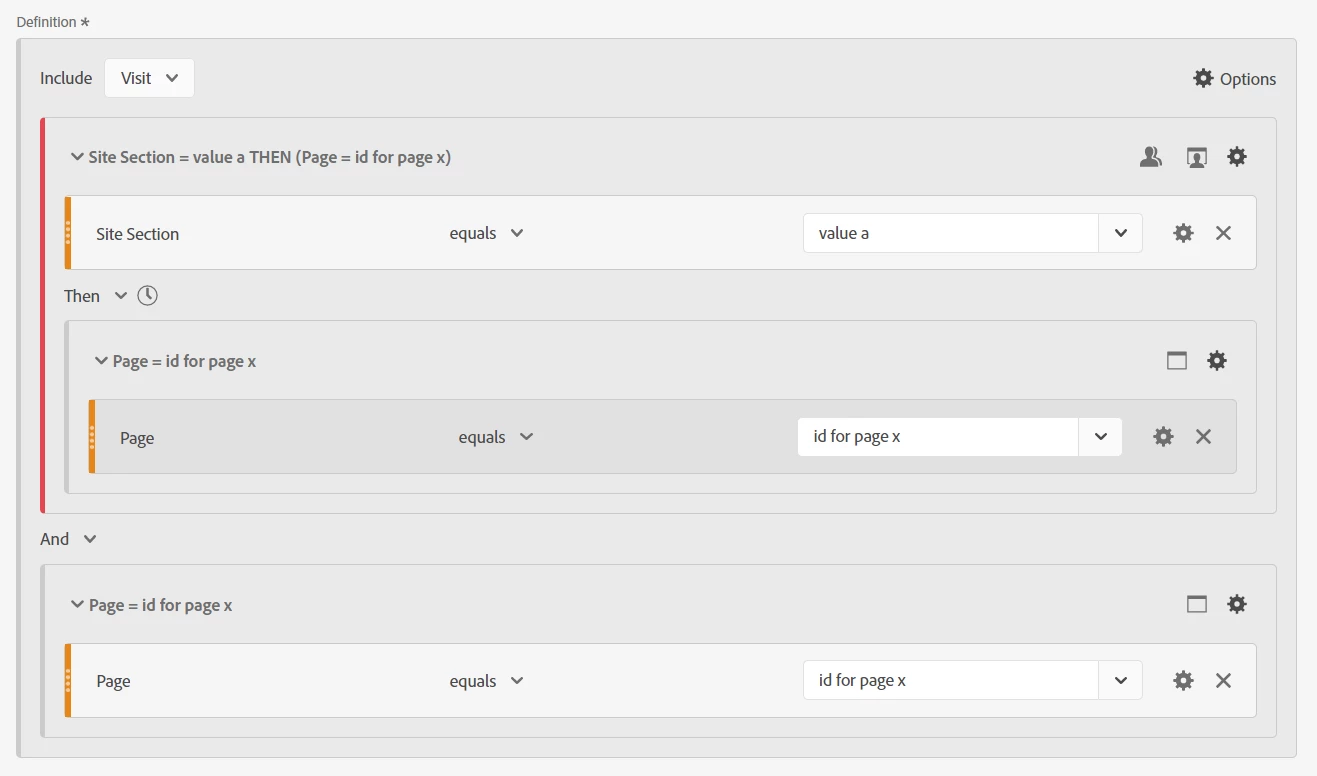
Here, I set the entire Definition to visit. Then I added two containers. The first is also set to visit, but also set as an "exclude" container. I put the exact definition from the first segment in (including the two sub-containers)... section=value a THEN page=id for page x

(Essentially excluding any visits that have that flow).


Then in the second container, I just look for page=id for page x


These two main containers should use the AND operator.


This should now find ALL visits that have your Page X, but exclude any visits where the user hit section A then page X.


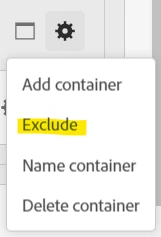
If you aren't sure how to make a container an "exclude" container, you can do so with the gear:


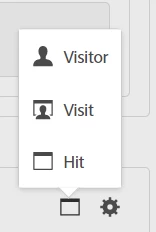
And you can change the scope of a container with the icon (that changes to reflect the chosen option) that is next to the Gear:


2 replies

Jennifer_Dungan
Community Advisor and Adobe Champion
Jennifer_DunganCommunity Advisor and Adobe ChampionAccepted solution
Community Advisor and Adobe Champion
August 25, 2022

Hi, building your segment like this, should achieve your first goal... a then b


You should note that I set the segment to Visit level, but I left the containers at Hit Level... I also didn't specify any time frame on the "Then" operator (so that this shouldn't be direct or within any time or number of hits). You could also use Then "Within 1 Visit"


As for the opposite... where the visit gets to page b, but did not hit a... this one is trickier, but still doable:


Here, I set the entire Definition to visit. Then I added two containers. The first is also set to visit, but also set as an "exclude" container. I put the exact definition from the first segment in (including the two sub-containers)... section=value a THEN page=id for page x

(Essentially excluding any visits that have that flow).


Then in the second container, I just look for page=id for page x


These two main containers should use the AND operator.


This should now find ALL visits that have your Page X, but exclude any visits where the user hit section A then page X.


If you aren't sure how to make a container an "exclude" container, you can do so with the gear:


And you can change the scope of a container with the icon (that changes to reflect the chosen option) that is next to the Gear:


jelleno11Author
Level 2
August 29, 2022

thank you!

Jennifer_Dungan
Community Advisor and Adobe Champion
August 29, 2022

You're welcome 🙂

Meghan_Powers
Community Advisor and Adobe Champion
August 25, 2022

Hello!  
It looks like you set your segment up correctly to capture both scenarios that you mentioned (because you did not specify an 'after' or 'within' parameter).
To do the opposite, just make a copy of that segment, and make the container an 'exclude' container.
Hope this helps!