Scheduled Projects External Email Recipients | Community
Skip to main content
Adobe Employee
March 6, 2023
Solved

Scheduled Projects External Email Recipients

  • March 6, 2023
  • 1 reply
  • 1233 views

Hi,


I'm working with a customer who is having issues trying to send a scheduled project to manually entered email recipients. External recipients are users who are not currently setup as a user in the admin console.  Users who are setup within the console, and added to the distribution list, are able to receive the report. Based on the documentation this should work. We have checked with IT to confirm the emails are not being blocked. We also looked into AEM security settings as well.  Any ideas on why this is not working? 


Thanks


https://experienceleague.adobe.com/docs/analytics/analyze/analysis-workspace/curate-share/t-schedule-report.html?lang=en

 4 - Add recipients or groups. Email addresses can also be entered.


This post is no longer active and is closed to new replies. Need help? Start a new post to ask your question.
Best answer by Jennifer_Dungan

Given how often this issue comes up, I am going to guess that this is the issue they are seeing?


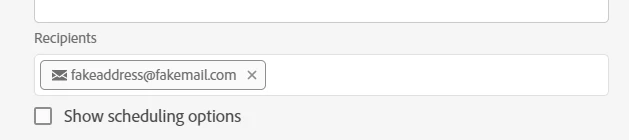
If you add an email, you must hit enter to actually complete this as being an email object:


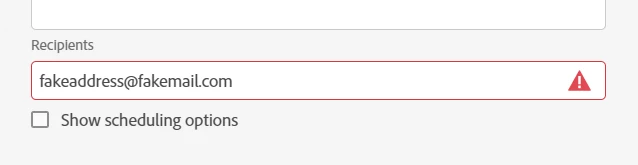
If you have a list of users, then an email that has not been finalized, the email won't actually send.

1 reply

Jennifer_Dungan
Community Advisor and Adobe Champion
Jennifer_DunganCommunity Advisor and Adobe ChampionAccepted solution
Community Advisor and Adobe Champion
March 7, 2023

Given how often this issue comes up, I am going to guess that this is the issue they are seeing?


If you add an email, you must hit enter to actually complete this as being an email object:


If you have a list of users, then an email that has not been finalized, the email won't actually send.

mra32Adobe EmployeeAuthor
Adobe Employee
March 7, 2023

Thank you Jennifer! That was the issue. 

mra32Adobe EmployeeAuthor
Adobe Employee
March 7, 2023

You're welcome 🙂


Myself and Mandy George were talking about this issue, and logged this Idea to improve the error messages to help people with this very issue.. it would be helpful if you added an upvote (like) on that idea to try and get this added to the roadmap: https://experienceleaguecommunities.adobe.com/t5/adobe-analytics-ideas/provide-more-details-about-errors/idc-p/575498


Done