Schedule File Export is not working for future dates from Adobe Analytics Workspace. | Community
Skip to main content
April 22, 2025
Solved

Schedule File Export is not working for future dates from Adobe Analytics Workspace.

  • April 22, 2025
  • 1 reply
  • 733 views

Hi,

I am facing issues while scheduling file export for a later date.

The ask is to schedule a Workspace report from starting from June every 90 days.

I am trying to set it up by using the below option from Share > Schedule File Report.
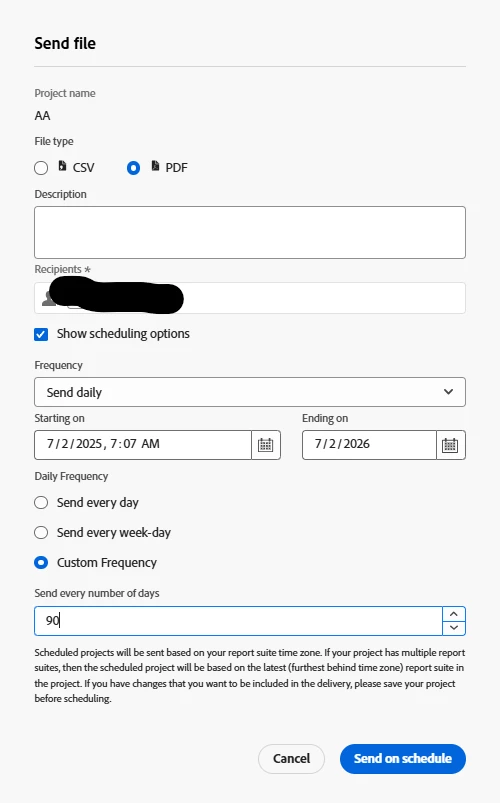
 

It is showing me the below error while I am trying to hit "Send on Schedule"

 

If I try to set it from today onwards it is getting saved, but the above error appears if we try to select future dates.

I wanted to know is there anything I am missing out on? And are we not allowed to schedule reports later with a custom frequency in Adobe Workspace?

Best answer by FarazHusain

The daily deliveries expire in a month, so in this case, if you use custom frequency set to 90 days, it won't work. It will work with 31 but not 90.

1 reply

Level 5
April 22, 2025

Have you tried using the same future start date but an end date that is within a year of today? According to the documentation, "The end date must be within a year from the day the schedule is created or modified." In your case, this means a July 7, 2025, start date and an end date of something like April 21, 2026.

SoumyaMi1Author
April 22, 2025

Hi @brentrad ,

Thank you for the above suggestion. 

However I tried to adjust the end date within a year of today April 21, 2026. The issue still persists with the below combination.


Regards,

Soumya

FarazHusain
Adobe Employee
FarazHusainAdobe EmployeeAccepted solution
Adobe Employee
April 22, 2025

The daily deliveries expire in a month, so in this case, if you use custom frequency set to 90 days, it won't work. It will work with 31 but not 90.