SAINT Classifications -Variable product comes from? | Community
Skip to main content
Level 4
November 20, 2018
Solved

SAINT Classifications -Variable product comes from?

  • November 20, 2018
  • 5 replies
  • 3339 views

Hello, everyone,

can someone tell me where the variable product comes from?

SAINT Classifications?

BR,

Vitali
This post is no longer active and is closed to new replies. Need help? Start a new post to ask your question.
Best answer by Roshanchauhan

You can set s.products in the 'Customize Page Code' editor within the tool settings, or in the editor in the Adobe Analytics section of a rule. The syntax is written as follows:

s.events="ProdView"

s.products="Category;Product"

To incorporate data elements, the following syntax logic can be used:

s.events="ProdView"

s.products = _satellite.getVar("myCategory") + ";" + _satellite.getVar("myProduct")

For more examples, check out Jenn Kunz's guide here: https://www.digitaldatatactics.com/index.php/dtm-reference-tools/

For more information on the product string, reference the s.products documentation here: https://marketing.adobe.com/resources/help/en_US/sc/implement/products.html

5 replies

Roshanchauhan
Level 3
November 20, 2018

Classifications (SAINT) are one of the enduring features of SiteCatalyst. SAINT (SiteCatalyst Attribute Import Naming Tool) allows for user-defined uploads of metadata within SiteCatalyst. The Adobe Marketing Cloud knowledge base outlines ‘A classification is a way of categorizing SiteCatalyst variable data, then displaying the data in different ways when you generate reports.

You will get all the clarification in in following link - Revisiting a SiteCatalyst Classic: Classification Fundamentals (SAINT) | Adobe Blog

Hope that helps!

Level 4
November 20, 2018

Hello roshanc44331495 ,

Thank you, but I'm looking for an answer to my question:

How do I create a variable?

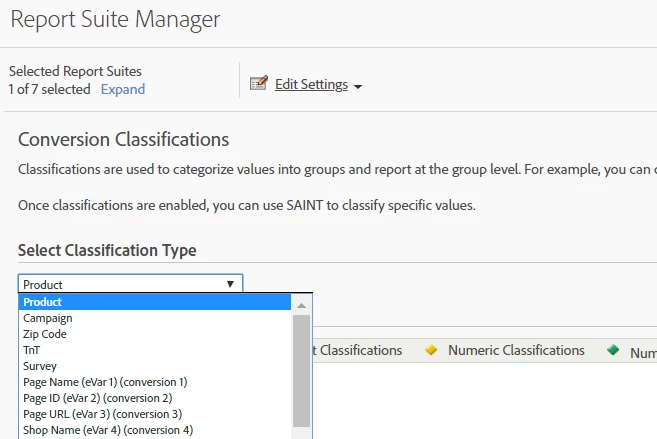
In the picture you can see the variable Product.

I can classify, but how to create this variable is not described anywhere.

Pablo_Childe
Community Advisor
Community Advisor
November 20, 2018

This is a prop you or a developer need to build. it has to be coded and would be found in the code in a format like: s.products

I would first look at dev environment you are in, have a developer look at how analytics data is setup and how you can add new variables to it.

You will need to understand the data layer as well as for product info you will have several product related metrics you will need to capture.

This link is one of several to start to help you understand:

Implementing a Merchandising Variable

GLTU

Roshanchauhan
RoshanchauhanAccepted solution
Level 3
November 20, 2018

You can set s.products in the 'Customize Page Code' editor within the tool settings, or in the editor in the Adobe Analytics section of a rule. The syntax is written as follows:

s.events="ProdView"

s.products="Category;Product"

To incorporate data elements, the following syntax logic can be used:

s.events="ProdView"

s.products = _satellite.getVar("myCategory") + ";" + _satellite.getVar("myProduct")

For more examples, check out Jenn Kunz's guide here: https://www.digitaldatatactics.com/index.php/dtm-reference-tools/

For more information on the product string, reference the s.products documentation here: https://marketing.adobe.com/resources/help/en_US/sc/implement/products.html

Level 4
November 21, 2018

Thank you very much for the good explanation.

I will try.

Have a nice day