s.products well-defined in the image but unspecified in Workspace | Community
Skip to main content
Level 2
October 28, 2020
Solved

s.products well-defined in the image but unspecified in Workspace

  • October 28, 2020
  • 4 replies
  • 2455 views

Hello, 


We're experiencing an issue which leaves us clueless. 


In Workspace, on some pages we have our variable "Products" with a lot of "Unspecified" (nearly 98%). 

This issue only occurs on iOS - on Android we have no "Unspecified" at all on the same pages. 
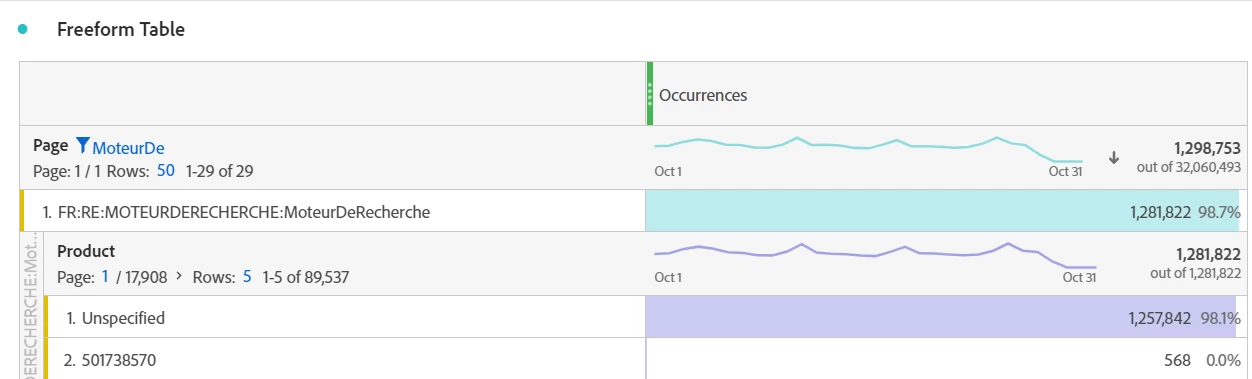
 

So we decided to test the app (Android and iOS) and the string sent in the s.products variable is exactly the same for both except that it can be retrieved in Workspace/DataFeeds for Android but not iOS (for iOS, product_list/post_product_list is empty in datafeeds). 

Example of s.products : 
;537980384;;;;eVar32=1_1_24,;538222602;;;;eVar32=1_2_24,;537527220;;;;eVar32=1_3_24,;523846355;;;;eVar32=1_4_24,;538681739;;;;eVar32=1_5_24,;537911103;;;;eVar32=1_6_24,;537914587;;;;eVar32=1_7_24,;538221332;;;;eVar32=1_8_24,;537994565;;;;eVar32=1_9_24,;539941621;;;;eVar32=1_10_24,;537977149;;;;eVar32=1_11_24,;538408733;;;;eVar32=1_12_24,;537902112;;;;eVar32=1_13_24,;539970792;;;;eVar32=1_14_24,;538221329;;;;eVar32=1_15_24,;538741389;;;;eVar32=1_16_24,;539970650;;;;eVar32=1_17_24,;523924051;;;;eVar32=1_18_24,;531378557;;;;eVar32=1_19_24,;537527177;;;;eVar32=1_20_24,;537980381;;;;eVar32=1_21_24,;537980386;;;;eVar32=1_22_24,;528961717;;;;eVar32=1_23_24,;533041352;;;;eVar32=1_24_24


Any help would be really appreciated,

Thanks, 


Alex

This post is no longer active and is closed to new replies. Need help? Start a new post to ask your question.
Best answer by khurshid

Can you breakdown the Unspecifieds with Device Type and see if they call go to iOS devices?

Also, can you share sample image requests containing the product list from iOS and Android device?

4 replies

khurshid
Adobe Employee
khurshidAdobe EmployeeAccepted solution
Adobe Employee
October 28, 2020

Can you breakdown the Unspecifieds with Device Type and see if they call go to iOS devices?

Also, can you share sample image requests containing the product list from iOS and Android device?

yuhuisg
Community Advisor
Community Advisor
October 29, 2020

I noticed that you used the "Occurrences" metric, which is the default metric when you build a Freeform Table in Analysis Workspace.

So my question is: when a user opens that particular Page, is s.products always tracked? Because if it's not, then those "Unspecified" occurrences are precisely because there were hits from that page where s.products was not set, and what you see is the correct result.

aduhemAuthor
Level 2
October 29, 2020
Hello yuhuisg,
aduhemAuthor
Level 2
October 29, 2020

Hello khurshid, 


Thanks for your answer. 


Yes, on the Workspace provided, there is a segment applied and all of Unspecified is from iOS.

Image requests are exactly the same on both platforms iOS and Android, and the variable s.products is written as in my first post. 


 We're checking that with devs to ensure it is well written on their side : 

https://docs.adobe.com/content/help/fr-FR/mobile-services/ios/analytics-ios/products-variable/products.html
If it wasn't, could we see it directly on a tool like Fiddler or not ? 

Thanks
yuhuisg
Community Advisor
Community Advisor
October 31, 2020
You should be able to see the output of the s.products string with Fiddler by inspecting the AA network hit, just as you would in a web browser's Network console.
jantzen_b
Adobe Employee
Adobe Employee
February 3, 2021
Do any of the answers below answer your initial question? If so, can you select one of them as the correct answer? If none of the answers already provided answer your question, can you provide additional information to better help the community solve your question?