s.campaign data element | Community
Skip to main content
Level 2
March 13, 2023
Solved

s.campaign data element

  • March 13, 2023
  • 2 replies
  • 2833 views

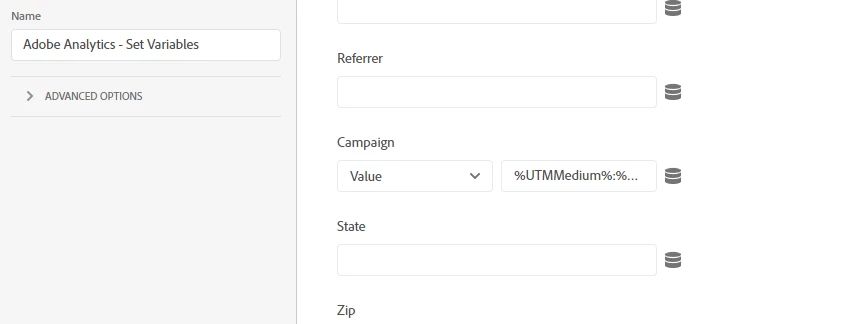
I have s.campaign captured as a data element as bellow and I am using that data element in pageLoad rule. But, I am getting s is not defined in console. How can I resolve below? or if there is a better way of implementing below code


var campaign; if(s.Util.getQueryParam('utm_medium')){ campaign=s.Util.getQueryParam('utm_medium')+":"+s.Util.getQueryParam('utm_source')+":"+s.Util.getQueryParam('utm_campaign')+":"+s.Util.getQueryParam('utm_content')+":"+s.Util.getQueryParam('utm_term'); } return campaign;
 

This post is no longer active and is closed to new replies. Need help? Start a new post to ask your question.
Best answer by Jennifer_Dungan

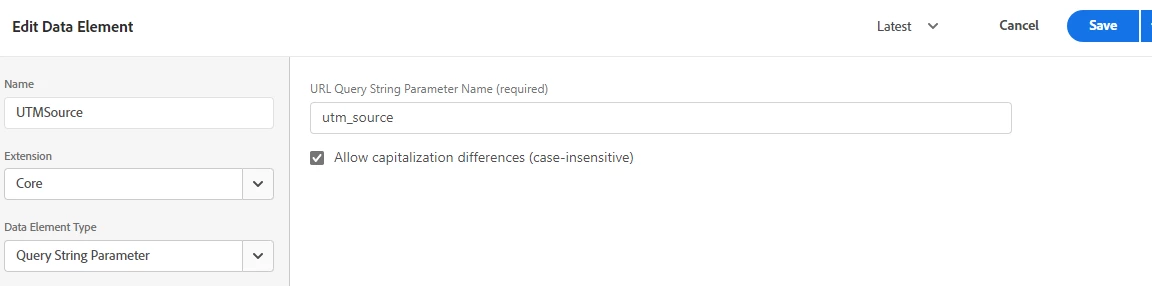
Technically, you don't have to pull the individual UTMs with one script any longer.. you can create individual data elements for each UTM...


Then you could concatenate those data elements into your campaign variable (but I recommend not to.. as you will always end up with a bunch of ":" on every other use):


This is where I normally create a "campaign" Data Element, and add logic to check for values in each of the individual UTM data elements. You can pull the value of the individual items like so:

_satellite.getVar("dataElementNameHere")


I can see in your original code, you are only tracking campaigns if you have UTM Medium... if that is truly the logic you want, you can build that logic in...or you can check for values in each UTM and concatenate as needed.

2 replies

Hemang35
Level 5
March 13, 2023

This error is occurring because the "s" variable is not defined in the context of the code you're using. The "s" variable is typically used in the Adobe Analytics code implementation, which is loaded separately from your custom code.

One possible solution is to use the "localStorage" or "sessionStorage" API to store the campaign data in the user's browser and retrieve it in your pageLoad rule. For example: // Store the campaign data in localStorage if(s.Util.getQueryParam('utm_medium')){ var campaign = s.Util.getQueryParam('utm_medium')+":"+s.Util.getQueryParam('utm_source')+":"+s.Util.getQueryParam('utm_campaign')+":"+s.Util.getQueryParam('utm_content')+":"+s.Util.getQueryParam('utm_term'); localStorage.setItem("campaign", campaign); } // Retrieve the campaign data in your pageLoad rule var campaign = localStorage.getItem("campaign");


Jennifer_Dungan
Community Advisor and Adobe Champion
March 13, 2023

I agree about the s object not being available in the data element context...  but I would be very careful about using session or local storage for this usage... especially since campaigns are already set up to have a specific expiry date in Adobe... you want to be able to distinguish between the "instance" (where the utms exist in the url) from where the values are retained due to the campaign retention...


If you set the values into storage items, then they will be tracked as instances every time a page loads (so long as the storage item is populated...) session storage will clear with the session... local storage doesn't... this could cause a lot of potential harm to your campaign attribution.... 

Jennifer_Dungan
Community Advisor and Adobe Champion
Jennifer_DunganCommunity Advisor and Adobe ChampionAccepted solution
Community Advisor and Adobe Champion
March 13, 2023

Technically, you don't have to pull the individual UTMs with one script any longer.. you can create individual data elements for each UTM...


Then you could concatenate those data elements into your campaign variable (but I recommend not to.. as you will always end up with a bunch of ":" on every other use):


This is where I normally create a "campaign" Data Element, and add logic to check for values in each of the individual UTM data elements. You can pull the value of the individual items like so:

_satellite.getVar("dataElementNameHere")


I can see in your original code, you are only tracking campaigns if you have UTM Medium... if that is truly the logic you want, you can build that logic in...or you can check for values in each UTM and concatenate as needed.

Level 2
March 13, 2023

Thanks.. I was able to implement using that way as it would be much easier to do that way.


if (document.location.search.indexOf("utm_") != -1 && (!s.campaign || s.campaign === "")){ let utm_campaign=_satellite.getVar("utmCampaign") || ""; //grab from the data element (which pulls from the query param), unless the data element returns "undefined", in which case set a blank string let utm_source=_satellite.getVar("utmSource")|| "" ; let utm_medium=_satellite.getVar("utmMedium")|| "" ; let utm_content=_satellite.getVar("utmContent")|| ""; let utm_term=_satellite.getVar("utmTerm")|| "" ; s.campaign= utm_campaign + ":" + utm_source + ":" + utm_medium + ":" + utm_content + ":" + utm_term; if(s.campaign === "::::"){s.campaign = ""} } }
Jennifer_Dungan
Community Advisor and Adobe Champion
March 13, 2023

If you are already pulling the UTMs via Data Elements, you no longer need to look at the URL.. you can simplify this more:


// if you set a default value of nothing to your UTM Data Elements, if there is no utm_xxx in your URL, the data elements will already return "" (so you don't have to write all the extra logic) let utm_campaign=_satellite.getVar("utmCampaign"); let utm_source=_satellite.getVar("utmSource"); let utm_medium=_satellite.getVar("utmMedium"); let utm_content=_satellite.getVar("utmContent"); let utm_term=_satellite.getVar("utmTerm"); let campaign = utm_campaign + ":" + utm_source + ":" + utm_medium + ":" + utm_content + ":" + utm_term; if(campaign === "::::"){campaign = ""} return campaign;


Or even:

let campaign = _satellite.getVar("utmCampaign") + ":" + _satellite.getVar("utmSource") + ":" + _satellite.getVar("utmMedium") + ":" + _satellite.getVar("utmContent") + ":" + _satellite.getVar("utmTerm"); if(campaign === "::::"){campaign = ""} return campaign;


Then just set campaign in your Set Variables rules with referencing this Data Element