s.apl in adobe analytics implementation vs Web SDK | Community
Skip to main content
Franc_G
November 22, 2024
Solved

s.apl in adobe analytics implementation vs Web SDK

  • November 22, 2024
  • 4 replies
  • 2903 views

Hi all, in the existing adobe set up we use the s.apl plugin to populate s.events. It is very handy as you put conditional statements and its easy to structure the events. In Web SDK, it seems like, we have to set each every single event separately and attach conditional statement for each event. Example below.


Question - does anyone have a way to replicate the same s.apl functionality in Web SDK set up ? Thank you.


function anon() { var events = s.events; try { if (window.dataLayer.instruction) { var reference = Bootstrapper.data.resolve(60351); var timeTaken = Bootstrapper.data.resolve(60382); var instructionType = Bootstrapper.data.resolve(67045); events = s.apl(events, "purchase", ",", 1); if (timeTaken > 0) events = s.apl( events, "event108=" + timeTaken + ":" + reference, ",", 1 ); switch (instructionType) { case "add_cash": events = s.apl(events, "event75=1:" + reference, ",", 1); events = s.apl(events, "event88:" + reference, ",", 1); break; case "withdraw_cash": events = s.apl(events, "event76:" + reference, ",", 1); events = s.apl(events, "event77:" + reference, ",", 1); break; default: break; } } } catch (e) {} return events || ""; }


vs 


xdm._experience.analytics.event101to200.event108.id = if (window._dl.instruction) { var reference = Bootstrapper.data.resolve(60352); var timeTaken = Bootstrapper.data.resolve(60389); var instructionType = Bootstrapper.data.resolve(67043); if (timeTaken > 0) events = s.apl( events, "event108=" + timeTaken + ":" + reference, ",", 1 ); } // Above needs to be done very single event 😞
 

This post is no longer active and is closed to new replies. Need help? Start a new post to ask your question.
Best answer by bjoern__koth

Thanks for the above. I am trying to implement the setup hoping that it will be used for CJA (this use case is being considered). 


I guess the question is whether to use the direct mapping

xdm._experience.analytics.event101to200.event108.id = (function anon() { if (window._dl.instruction) { var reference = Bootstrapper.data.resolve(60352); var timeTaken = Bootstrapper.data.resolve(60389); var instructionType = Bootstrapper.data.resolve(67043); if (timeTaken > 0) return timeTaken + ":" + reference; } })();


OR 


push everything as is in adobe currently into data._adobe.analytics properties. 


@jennifer_dungan if I understand correctly, you are implying that the CJA requires direct mapping ?


HI @franc_g 

tbh, lately I am only using the second approach. The schema Adobe came up with to fill the AA object is an example how you can completely overengineer stuff.


So, with the Web SDK "Update Variable" action, you can define many things like with the old App Measurement interface, BUT you can also have a piece of custom code which lets you define and work with your dedicated "s" object.


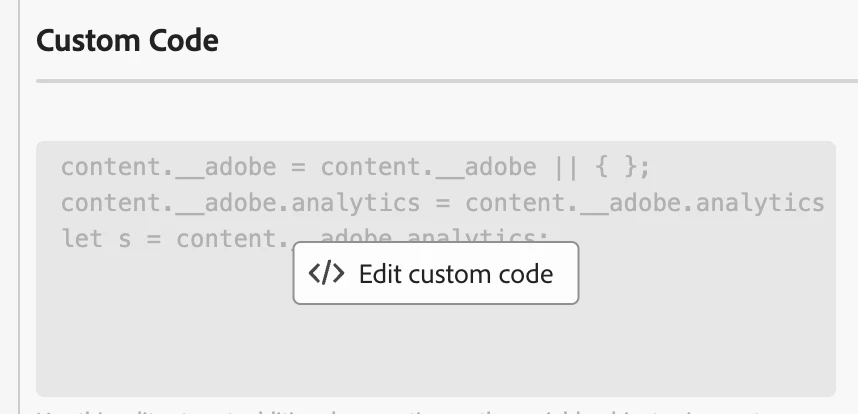
content.__adobe = content.__adobe || { }; content.__adobe.analytics = content.__adobe.analytics || { }; let s = content.__adobe.analytics; s.prop99 = "hello"; s.eVar10 = "world"; s.events = "event10"; // not more s.linkTrackVars or s.linkTrackEvents


My approach is

  • create a Web SDK data variable for Analytics
  • have a central rule with a Web SDK "update variable" that triggers on my page view AND interaction events that first clears existing data and sets the commonly to be sent data
  • in my page view / interaction rules
    • have an Web SDK "update variable" action that sets the event-specific data
    • have a Web SDK "send event" action that sends the Web SDK variable as data

4 replies

Jennifer_Dungan
Community Advisor and Adobe Champion
November 22, 2024

To be honest, I don't bother with most of the plugins, I just append using simple JS (I am using App Measurement currently).


In AppMeasurement, I just do:

s.events = s.events ? s.events + ",event1=" + someVariable : "event1=" + someVariable;

Basically, this is a short form IF Statement... I check if s.events is populated with anything, if it is, then I take the existing value of s.events and add my delimiter (,) and the new event I want to push (adding the numeric value if needed, or just a simple ",event1" if not)... and if there is no event data, then I just set s.events to my event (without the delimiter)


So instead of using a plugin, can you not use a similar simple JS function to append the values together?

If the shortform notation is confusing, you can break it out into a long form IF statement, which I can see you are already familiar with as per your example.

Franc_G
Franc_GAuthor
November 22, 2024

@jennifer_dungan  what about the Web SDK ? There are plenty of options in the appMeasurement, but it seems like in the web sdk we have to set each event separately. ie, you can't simply append and return one events variable.

Jennifer_Dungan
Community Advisor and Adobe Champion
November 22, 2024

No, you're right.. I thought that maybe you were trying to use the append to concatenate the serialization values...  and that you wanted a literal "event108" as part of that serialization....


No, as far as I am aware, all events do have to be set separately... the s.apl can be used to append any values technically... since you had the 

xdm._experience.analytics.event101to200.event108.id

I figured this was already there..


So, are you asking how to create an appended event list in WebSDK, rather than setting the events into the schema?


First off, do you have any needs or plans to use CJA in the future? Because if you are just switching your technology to use WebSDK, but don't actually need the proper SDK Schema, there is the option to send data as is, in Analytics format, using the "analytics" field group.


https://www.youtube.com/watch?v=D9eouvCtNRU


You can continue to send all your data with the "prop1", "eVar1", "events", etc designations... and these will be automatically mapped to your analytics instance.

Franc_G
Franc_GAuthor
November 22, 2024

Apologies, mistake in the code. Can't edit the post for some strange reason.

xdm._experience.analytics.event101to200.event108.id = (function anon() { if (window._dl.instruction) { var reference = Bootstrapper.data.resolve(60352); var timeTaken = Bootstrapper.data.resolve(60389); var instructionType = Bootstrapper.data.resolve(67043); if (timeTaken > 0) return timeTaken + ":" + reference; } })();
Jennifer_Dungan
Community Advisor and Adobe Champion
November 22, 2024

Ah, ok, I was wondering about some of the original code, lol 

Thanks for the update.

bjoern__koth
Community Advisor and Adobe Champion
November 23, 2024

Hi @franc_g 

you can download the source of the plugin here https://experienceleague.adobe.com/en/docs/analytics/implementation/vars/plugins/apl


and with a tiny adjustment adapt it to e.g. work on your _satellite instance. 
I typically do that in a library loaded event custom code.

Instead of function apl, just do a _satellite.apl = function ... (essentially paste the whole block).


and use _satellite.apl() instead of s.apl()


works like a charm 

Cheers from Switzerland!
Franc_G
Franc_GAuthor
November 25, 2024

@bjoern__koth thanks for the above. If I understand it correctly, you are suggesting to load the apl plugin as custom code (as part of alloy.js base code) ? There is a custom code section, so we can put it in there. We have another property available, so will put it in there (see screenshot provided). 


Question - I am changing the execution context in here - function declaration vs expression. Anything to watch out for ? Thanks 


bjoern__koth
Community Advisor and Adobe Champion
November 25, 2024

No, I am basically creating a functionality outside of the Analytics/WebSDK instance that can be reused everywhere.

The code itself has no depencies to AppMeasurement or the Adobe world.


If you want to not have any plugin dependencies, you can also write your own helper function


const apl = (list, item, delimiter) => { if (typeof list !== "undefined" && typeof list !== "string") { _satellite.logger.debug(">>> apl: list is of an unexpected type, ", list); return item; } list = list || ""; delimiter = delimiter || ","; // If the list is empty, return the item if (list === "") { return item; } else { list = list.split(delimiter); if (!list.includes(item)) { list.push(item); } return list.join(delimiter); } } // testing let list = ""; list = apl(list, "foo"); list = apl(list, "bar"); // 'foo,bar'


But as @jennifer_dungan mentioned, you can probably also just make your life easy and use her one-liner.


I just reuse the _satellite.apl every now and then in different other custom code locations.

Cheers from Switzerland!
Franc_G
Franc_GAuthor
November 26, 2024

@bjoern__koth  @jennifer_dungan  thank you both for the valuable input, much appreciated 🙌