s.affiliate check is not a function | Community
Skip to main content
Level 4
October 14, 2022
Solved

s.affiliate check is not a function

  • October 14, 2022
  • 2 replies
  • 674 views

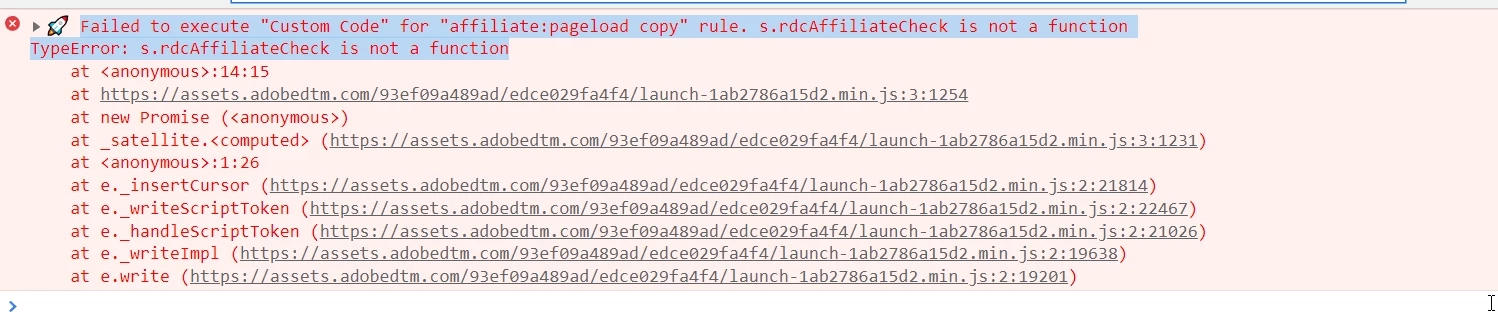
I have the below code implemented in the custom code section for "Core - Library Loaded (Page Top)" of the rule . I have already implemented the helper function below in the code block. But, it shows in the console that  "s.rdcAffiliateCheck is not a function" . See screenshot. Can u point as to what I am doing wrong?


s.useURL=''; s__tempUseURL = document.location.href.toLowerCase(); var s__qpLink = s.Util.getQueryParam("link",s__tempUseURL) || s.Util.getQueryParam("ip_link",s__tempUseURL); if(s__qpLink||s.Util.getQueryParam("u",s__tempUseURL)||s.Util.getQueryParam("prti",s__tempUseURL)||s.Util.getQueryParam("ext",s__tempUseURL)||((document.referrer||"").indexOf(document.location.hostname)==-1)){ s.useURL=document.location.href; }else{ s.useURL=document.referrer||""; } s.useURL=s.useURL.toLowerCase(); if(s.Util.getQueryParam("prti",s.useURL)&&!s.Util.getQueryParam("ext",s.useURL)){ s.tempPRTI=s.Util.getQueryParam("prti",s.useURL); s.tempAff=s.rdcAffiliateCheck(s.tempPRTI,s.cjAffiliateLookup); if(s.tempAff==="1"){ s.tempPID=s.Util.getQueryParam("pid",s.useURL)?s.Util.getQueryParam("pid",s.useURL):"pid missing"; s.tempAID=s.Util.getQueryParam("aid",s.useURL)?s.Util.getQueryParam("aid",s.useURL):"aid missing"; s.eVar75="af_cj_"+s.tempPID+"_"+s.tempAID; } else{ s.tempAff=s.rdcAffiliateCheck(s.tempPRTI,s.directAffiliateLookup); if(s.tempAff==="1"){ s.tempRAID=s.Util.getQueryParam("raid",s.useURL); if(s.tempRAID){s.eVar75="af_direct_"+s.tempPRTI+"_"+s.tempRAID;} else{s.eVar75="af_direct_"+s.tempPRTI;} } } } s__qpLink = s.Util.getQueryParam("Link",s.useURL) || s.Util.getQueryParam("link",s.useURL) || s.Util.getQueryParam("ip_link", s.useURL); if(!s.eVar75) { if(s__qpLink){s.eVar75="em_"+s__qpLink;} else if(s.Util.getQueryParam("u",s.useURL)){s.eVar75="em_"+s.Util.getQueryParam("u",s.useURL);} } s.cjAffiliateLookup=window.gblCJList; s.directAffiliateLookup=window.gblDirectList; /* * Helper Function: rdcAffiliateCheck v1.0 */ s.rdcAffiliateCheck=function(a,b){ if(a&&b){ var i,p=parseInt(a),v; for(i=0;i<b.length;i++){ if(b[i]===p){v=true;break;} } if(v===true){return '1';} else{return '0';} } else{return '';} }


This post is no longer active and is closed to new replies. Need help? Start a new post to ask your question.
Best answer by Jennifer_Dungan

Could we get some context as to what this code is doing? I can see that you have a number of QueryParams that are being used... what parameters are you passing and what is the expected outcome?


Most of this is custom Javascript, and while I am happy to help you with this; its a little out of the scope of normal support issues... this is helping to debug your custom code implementation... and to do that efficiently, it would be better if I know what you are trying to do/accomplish... there may be an easier way to do this....


Also, you should know that you don't have to use the s object for all your custom code needs... this looks like it's making things much more complex than they need to be.....


2 replies

Jennifer_Dungan
Community Advisor and Adobe Champion
Jennifer_DunganCommunity Advisor and Adobe ChampionAccepted solution
Community Advisor and Adobe Champion
October 14, 2022

Could we get some context as to what this code is doing? I can see that you have a number of QueryParams that are being used... what parameters are you passing and what is the expected outcome?


Most of this is custom Javascript, and while I am happy to help you with this; its a little out of the scope of normal support issues... this is helping to debug your custom code implementation... and to do that efficiently, it would be better if I know what you are trying to do/accomplish... there may be an easier way to do this....


Also, you should know that you don't have to use the s object for all your custom code needs... this looks like it's making things much more complex than they need to be.....


yuhuisg
Community Advisor
Community Advisor
October 17, 2022

It's unusual to "overload" the Analytics "s" variable with your own custom code like this. I suspect that the person who did so saw it as a convenient way to include that custom code without "polluting" the JavaScript global namespace.

Since you're calling it at Library Loaded, it's possible that the Analytics "s" variable has not been created yet at the moment when this rule runs. In that case, none of the modifications being made to the "s" variable would have any effect.

You can try moving this code into the custom code in your Analytics extension, since the "s" variable would definitely be available there and the code would still run when the page is loaded.

xcode2295Author
Level 4
October 19, 2022

Thank you. I removed the s and also moved the custom code from the main to the custom rule and implemented it in code and it started working fine. Yes, I think "s" was not created and that was causing the confusion.