Report on pdf links | Community
Skip to main content
JyotiSharmaV
Community Advisor
Community Advisor
September 28, 2022
Solved

Report on pdf links

  • September 28, 2022
  • 1 reply
  • 3532 views

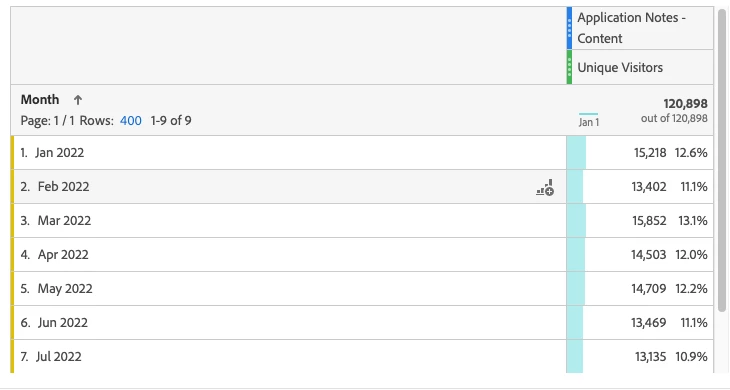
I am using the "Download Link" Dimension to report on pdf links like data sheets, app notes, guides and manuals that are getting downloaded by users on my site. Doing like shown in below screenshot. However, I don't know why I am seeing some pdfs in "Page" Dimension also. Can you tell how to report on pdfs


This post is no longer active and is closed to new replies. Need help? Start a new post to ask your question.
Best answer by Jennifer_Dungan

@jennifer_dungan I dont see any manipulations as such. For reporting can you pls help and suggest how should we see pdf downloads? 


Should we just measure downloads using the Download Link dimension? And should I use the instance metric or unique visitor metric for correct data points?


Well, as far as the "PDF" downloads are concerned, the Download Link dimensions should be fine.


Instance or Unique Visitor have relevance... depending on what you are trying to see...


For instance, if you want to know just how many users are downloading PDFs... using UVs would rollup all the unique visitors as a de-duplicated total (when looking at a breakdown of all the PDFs)... however, it will not give you the raw today of downloads (or tell you if the same person ends up downloading the same PDF multiple times). If you are trying to get a sense of how many users are accessing this content, this would be a good way to pull it.


Using Instances will tell you in absolute terms how many PDFs were downloaded, including ones that were downloaded multiple times by the same user....


They are both correct and legitimate metrics to use... it really depends on what you are trying to report on.


However, I am still concerned that you mentioned you have PDFs showing up in your Pages Report... that sounds like something is still wrong, and that you could have inflated PVs... but it's so hard to diagnose without seeing it.....

1 reply

Jennifer_Dungan
Community Advisor and Adobe Champion
September 29, 2022

Without seeing your implementation of tracking PDFs, it would be hard to say for sure... 


Are you forcing a pageName value on your action via Processing Rules? Are you triggering something on your download rule that is being misinterpreted as a Page View?

JyotiSharmaV
Community Advisor
Community Advisor
September 29, 2022

@jennifer_dungan I dint understand your question. Can you direct me on how can I check my configuration and where?


For me right now I could see pdf pages in Page as well as Download Link dimension both. Can you tell me where should they exactly be?

Jennifer_Dungan
Community Advisor and Adobe Champion
September 29, 2022

I assume you are using Adobe Launch?


The first thing I would do is check the rule that is tracking your PDFs... make sure it's properly configured for s.tl calls


Next, I would use the Cloud Debugger to watch the tracking signals when a PDF is downloaded (make sure there is only one tracking call, and make sure that it is a proper "link" call (has LinkType and LinkName, etc)


If all looks good there, then I would check your Processing Rules... This is in the Report Suite Admin area (Edit Settings > General > Processing Rules)


If you have a lot of rules, this can be tricky... but basically, you may need to check every rule and see if there is some criteria that would both "catch" your PDF download rule, and is setting pageName and/or Page URL.... if these are set in processing rules, it will count the hit as a page view (which you don't want)