Report Builder protected cell or sheet error | Community
Skip to main content
Level 2
June 4, 2024
Question

Report Builder protected cell or sheet error

  • June 4, 2024
  • 4 replies
  • 5284 views

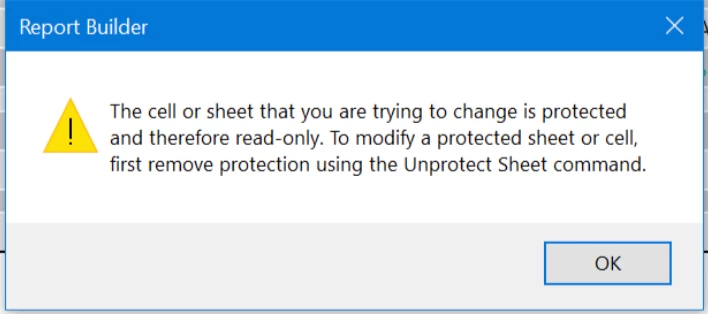
Hi, did anyone experience the below Report Builder error?
It's been happening since yesterday (3rd June 2024) on all Excel files and it's affecting all team members who are using Report Builder.
Many thanks

This post is no longer active and is closed to new replies. Need help? Start a new post to ask your question.

4 replies

FarazHusain
Adobe Employee
Adobe Employee
June 4, 2024

Hey @jivo, Unless there's a macro someone has accidentally triggered, protection doesn't just turn on as far as I know, but this can be checked with the client care with the help of a workbook which is throwing an error; you might also need to provide them with access such that they can try to reproduce and get the report builder logs. I also tested this in my test org as well just to see if this is some sort of generic error, but it works as expected. 


IñakideBilbao
Level 2
June 4, 2024

Hi, I have the same problem. Since 3rd of June every time I try to refresh the report builder the same error occurs " The shell o shet is protected...". I have checked and I have everything correct...

Level 2
June 4, 2024

Just adding that I have the same problem. I uninstalled the Report Builder version I was using and installed the latest version (5.6.56.0) and the problem is still there. Other members of my team using the same version of Report Builder are not encountering the issue.

Jennifer_Dungan
Community Advisor and Adobe Champion
June 4, 2024

I'm having the exact same problem... nothing is locked or protected, but it sure seems to think it is!


The issue seems to coincide with an update that was just pushed to Office 365 (I got the update on one computer and started getting problems, so I tried another computer with the same file... after rebooting I got the update and the second computer had the same issue....)


However, if you hit "okay" for every request error, it will actually run and update the cells.......

Jennifer_Dungan
Community Advisor and Adobe Champion
June 4, 2024

I should have said "there was no issue on the second computer at first... only after office got the update"

July 23, 2024

The new version has been released and is available for download from Analytics -> Tools -> Report Builder.


@farazhusain Will this update be pushed or do we have to reinstall RB all together?