Regarding the Activity Map, it is possible to retrieve the href value of the link | Community
Skip to main content
Level 2
November 22, 2023
Question

Regarding the Activity Map, it is possible to retrieve the href value of the link

  • November 22, 2023
  • 1 reply
  • 1843 views

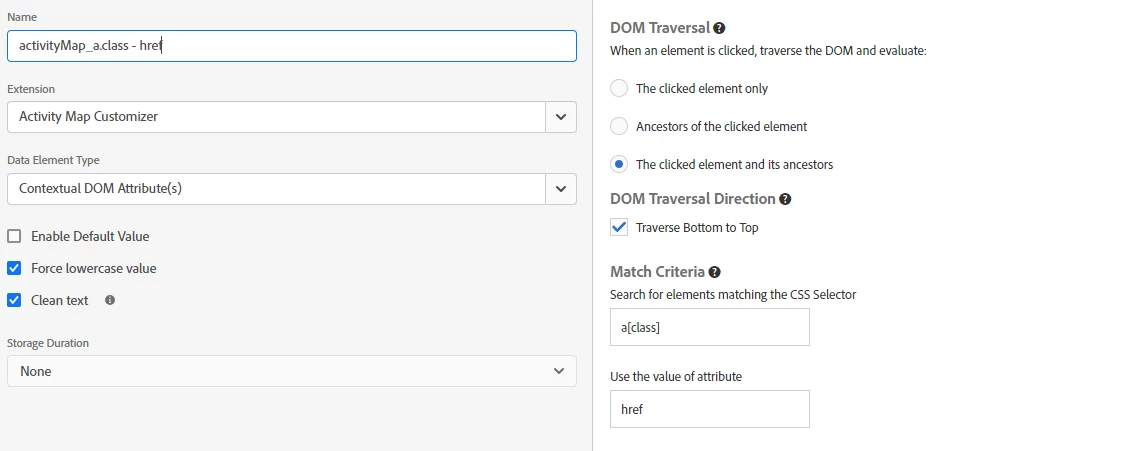
Hello, we are using Activity Map, and when clicking on a CTA, we want it to capture the href value of the link rather than the button's name. We have employed a dataElement with the Activity Map customizer extension, but it retrieves the entire URL, and we need to exclude parameters from the button's URL. Is it possible to achieve this? Thank you.
This post is no longer active and is closed to new replies. Need help? Start a new post to ask your question.

1 reply

Jennifer_Dungan
Community Advisor and Adobe Champion
November 22, 2023

It should be possible.. but full disclosure, I've never used this extension...


I have done all my Activity Map customizations via code in the Analytics extension custom code area....


https://experienceleague.adobe.com/docs/analytics/analyze/activity-map/link-tracking/activitymap-link-tracking-methodology.html?lang=en


So basically, I modified our tracking to take the link name from links, the button text from buttons, and the alt text from images wrapped in anchor tags (where there was no "link text").


Starting with the basic code:


s.ActivityMap.link = function(clickedElement) { var linkId; if (clickedElement && clickedElement.tagName.toUpperCase() === 'A') { // This will take the "title attribute" linkId = clickedElement.getAttribute('title'); } return linkId; }


Obviously, this isn't what you want, but you should be able to take the href attribute instead of the title...


You can then add some JS to remove parameters if they exist, something like:


s.ActivityMap.link = function(clickedElement) { var linkId; if (clickedElement && clickedElement.tagName.toUpperCase() === 'A') { // This will take the "href attribute" linkId = clickedElement.getAttribute('href'); if (linkId && linkId.indexOf('?') > -1){ linkId = linkId.substr(0, linkId.indexOf('?')); } } return linkId; }


This can just be added to the top of the custom code in your extension, it does not need to be called in s_doPlugins.


When the Analytics script is loaded, this code will run and manipulate how Activity Map reads the clicked elements.


You will want to test this obviously, and maybe make additional tweaks to the code.

ExO_SpainAuthor
Level 2
December 4, 2023

Hi Jennifer,

Thank you very much for your reply.
Unfortunately, the solution cannot be applied as it overwrites the original function found in Adobe Analytics, i.e. it modifies the functionality of the extension. We are trying to create a code where a new dataElement is created that calls the functionality of the Adobe Analytics extension and removes the parameters from the URL.
Any help is welcome.
Thanks

Level 3
March 4, 2025

Hi @davidlu17,


Yep, I just confirmed the same... even though the Click URL is captured, the data doesn't appear to make it to the Processing Rules to be usable in a rule.


On a page with an oid value, I tried pulling up s_objectID in the console.. I wasn't able to get it to work, it just came back empty (I imagine it might not be retrievable in this context).. but by all means, see if you can... What about trying to use "D=oid"; using dynamic variables the same way I use D=mid to capture the ECID / MID value into a dimension.. Using "D=" followed by the payload param is supposed to copy that value into your dimension....

I use D=mid to get the value of mid, and D=g to get a duplication of the current URL into a custom dimension...


In theory s.eVar98="D=oid" might work? You can try coding this right into the Set Variables area:


To be fair though, Activity Map is more designed for page to page navigation (not so much for click tracking on buttons)...


If your flow is literally Page A > Page B (with no actual tracking on the click)... you already have the URL via the tracking that happens on Page B, assuming you have a dimension set up to track the URL on every page.


Activity Map captures the information about the link that was clicked, on what page, in what region of the page...


If in your reporting you want to see where it went, you can simply correlate your activity map data with your eVar1.


However, if you have "click" tracking on the link, that is where things get tricky, since the "current URL" isn't the destination, but the current page where the tracking is triggered.


In my implementation, I only have a few special "click tracking" elements, and since I know where those elements go, I've never really needed to capture the destination... 


I hear what you are saying, personally, I actually dislike GA's use the URL as the primary identifier... this means I have to either do extra work to capture the parameters as separate dimension (which due to GA's limitation of 2 levels of breakdowns means I can't really do a lot of deep dives), or I have to leave the params in, but now every variation creates a new row... so I can't see at a glance all the tracking to a page...  But I get it, coming from the GA side of things, this is a shift in thinking... 


Thanks, Jennifer, for your thoughtful replies. I'll have to get hands-in and play with it with my dev. May go with custom JS anyway, not that hard. Will report back here when we have something that works.