Regarding the Activity Map, it is possible to retrieve the href value of the link | Community
Skip to main content
Level 2
November 22, 2023
Question

Regarding the Activity Map, it is possible to retrieve the href value of the link

  • November 22, 2023
  • 1 reply
  • 1843 views

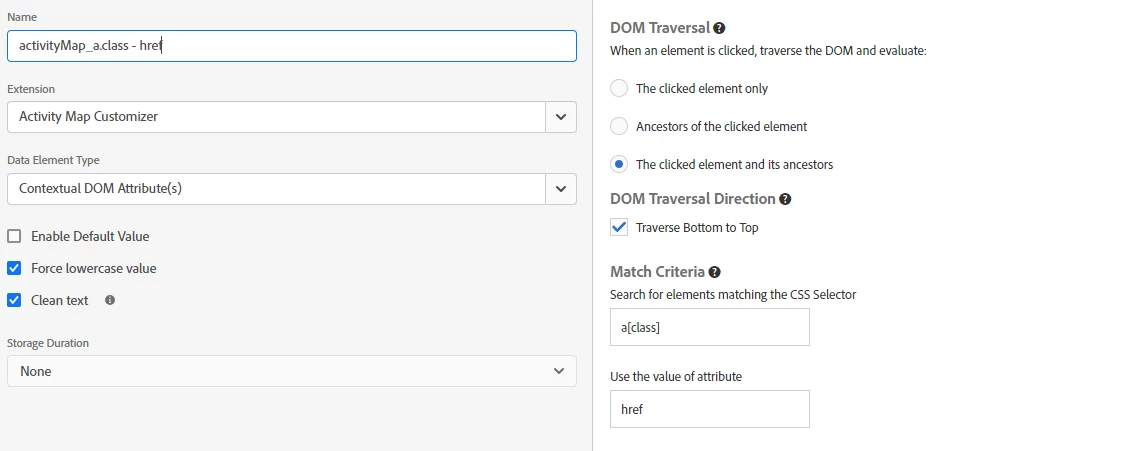
Hello, we are using Activity Map, and when clicking on a CTA, we want it to capture the href value of the link rather than the button's name. We have employed a dataElement with the Activity Map customizer extension, but it retrieves the entire URL, and we need to exclude parameters from the button's URL. Is it possible to achieve this? Thank you.
This post is no longer active and is closed to new replies. Need help? Start a new post to ask your question.

1 reply

Jennifer_Dungan
Community Advisor and Adobe Champion
November 22, 2023

It should be possible.. but full disclosure, I've never used this extension...


I have done all my Activity Map customizations via code in the Analytics extension custom code area....


https://experienceleague.adobe.com/docs/analytics/analyze/activity-map/link-tracking/activitymap-link-tracking-methodology.html?lang=en


So basically, I modified our tracking to take the link name from links, the button text from buttons, and the alt text from images wrapped in anchor tags (where there was no "link text").


Starting with the basic code:


s.ActivityMap.link = function(clickedElement) { var linkId; if (clickedElement && clickedElement.tagName.toUpperCase() === 'A') { // This will take the "title attribute" linkId = clickedElement.getAttribute('title'); } return linkId; }


Obviously, this isn't what you want, but you should be able to take the href attribute instead of the title...


You can then add some JS to remove parameters if they exist, something like:


s.ActivityMap.link = function(clickedElement) { var linkId; if (clickedElement && clickedElement.tagName.toUpperCase() === 'A') { // This will take the "href attribute" linkId = clickedElement.getAttribute('href'); if (linkId && linkId.indexOf('?') > -1){ linkId = linkId.substr(0, linkId.indexOf('?')); } } return linkId; }


This can just be added to the top of the custom code in your extension, it does not need to be called in s_doPlugins.


When the Analytics script is loaded, this code will run and manipulate how Activity Map reads the clicked elements.


You will want to test this obviously, and maybe make additional tweaks to the code.

ExO_SpainAuthor
Level 2
December 4, 2023

Hi Jennifer,

Thank you very much for your reply.
Unfortunately, the solution cannot be applied as it overwrites the original function found in Adobe Analytics, i.e. it modifies the functionality of the extension. We are trying to create a code where a new dataElement is created that calls the functionality of the Adobe Analytics extension and removes the parameters from the URL.
Any help is welcome.
Thanks

Level 3
February 14, 2025

You can attempt to use the s_object attribute on your buttons.. someone else was having issues with this, but it may have been specific to other parts of their implementation...


https://experienceleague.adobe.com/docs/analytics/implementation/vars/page-vars/s-objectid.html?lang=en


This will of course require your developers to add this attribute to all of the elements that you need modified.


Hi Jennifer, ExO - 
At Summit '23, Rockstar Tips, the same session you presented some tricks with segmentation and relative date ranges, Victoria Stapleton at Acronym Media showed how to create a custom dimension for the Activity Map Link destination URL as an add-on to the existing AM dimensions.

https://business.adobe.com/summit/2023/sessions/2023-adobe-analytics-rockstars-top-tips-and-tricks-s101.html

2023 Adobe Analytics Rockstars: Top Tips and Tricks

Her how-to-guide

https://www.acronym.com/adobe-summit/

https://docs.acronym.com/analytics/adobe-analytics/activity-map-destination

It's a bit above my pay grade. I tried to talk our Analytics owners & IT into it, didn't make the cut. My workaround is to break down AM Link by Page or Page URL, which is the destination page - NOT AM Page, that's the page the link was clicked on.

I still think the custom AM dimension has value for condensing many into one (i.e., same link but different text, e.g., translations) and splitting one into many (e.g., micro/button text like "Learn More" that may point to a number of different pages in different contexts).

Looking into the AEM debugger, I see that the Click Map Object ID is the destination URL congruent to the AM Link, but I don't see it in Workspace, so maybe that could be put into a standard conversion variable, not related to AM Map, and an easier ask.

Or maybe you can set up a Custom Link tracking per element, e.g., s.tl(this, "o", linkID) instead of s.ActivityMap.link, the code in Jennifer's first reply, more documentation here) in App Measurement, or maybe adapt s.ActivityMap.link to a rule that only fires in certain regions or on certain elements, for example, where you currently have Activity Map gaps. I'd like to look into both of these solutions when I have time.