Referring Domain Report Showing Google,yahoo,bing and other internal region websites. | Adobe Higher Education
Skip to main content
Level 2
March 15, 2022
解決済み

Referring Domain Report Showing Google,yahoo,bing and other internal region websites.

  • March 15, 2022
  • 1 の返信
  • 1055 ビュー

Hi all,

Recently i pulled  referring domain report but i am very curious about few things:

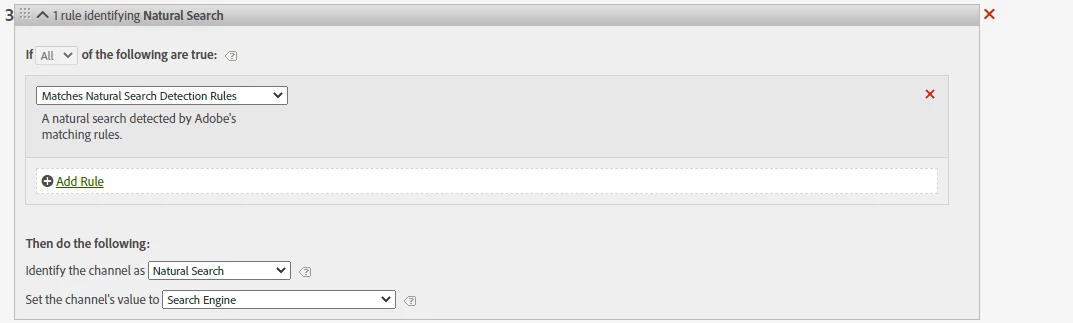
1. Search engine(Google.com,yahoo.com,bing.com) are showing under this report, but i hope those need to

come under natural search bucket how can i achieve that what will the processing rule for it.

Existing natural search processing rule
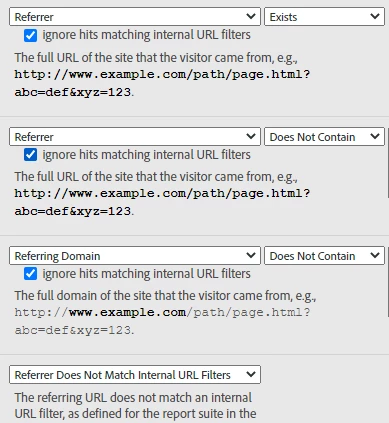
2.Trffic from other region's are coming under Referring domain but those traffic i need to bucket under internal / session refresh.so kindly help any one how we can send the traffic into right bucket.

Existing Referring domain processing rule:
このトピックへの返信は締め切られました。
ベストアンサー Hyder_Ziaee

The out of the box Traffic Sources report (Referring domain, Search Engine, etc) are based on the Internal URL Filter that you have setup. Google will come under referring domain, as it is a referring domain to your site. 


The Marketing Channel reports are separate from the above reports, and are highly customizable, as you have shared the screenshots of the rules. To classify the traffic correctly, (1) review your conditions, and (2) review your order of conditions. If this is properly setup, your marketing channel should be fine. 


For correcting your internal domains, I would suggest bringing the internal channel condition above referring domain condition.

1 の返信

Hyder_Ziaee
Adobe Employee
Adobe Employee
March 15, 2022

The out of the box Traffic Sources report (Referring domain, Search Engine, etc) are based on the Internal URL Filter that you have setup. Google will come under referring domain, as it is a referring domain to your site. 


The Marketing Channel reports are separate from the above reports, and are highly customizable, as you have shared the screenshots of the rules. To classify the traffic correctly, (1) review your conditions, and (2) review your order of conditions. If this is properly setup, your marketing channel should be fine. 


For correcting your internal domains, I would suggest bringing the internal channel condition above referring domain condition.