"Unspecified" in - Search Keywords - Paid Report | Community
Skip to main content
jayakrishnaap53
Level 3
February 14, 2018
Solved

"Unspecified" in - Search Keywords - Paid Report

  • February 14, 2018
  • 2 replies
  • 2285 views

Hello Team,

We are getting "unspecified" on our "Search Keywords - Paid Report" under site catalyst. We have implemented/added both the

Marketing Channel Processing Rules and Paid Search Detection on the respective report suite.

Marketing Channel Processing Rule :
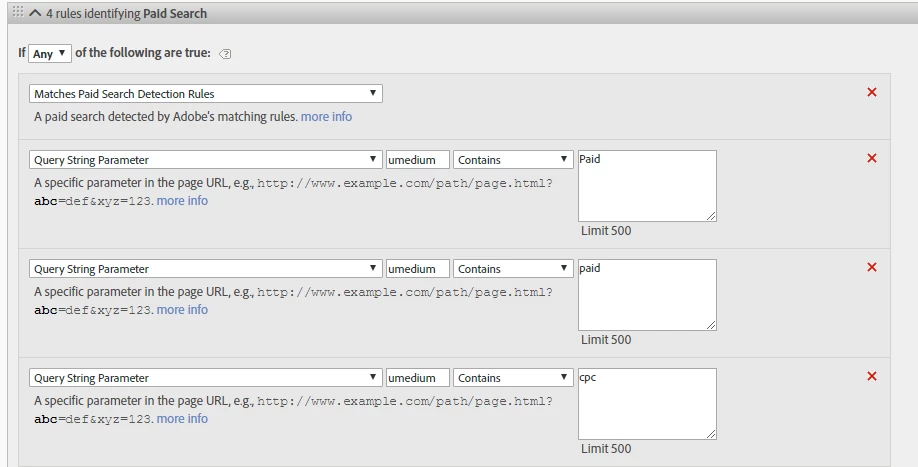

Paid Search Detection :

However, still we see the unspecified which is not our expectation. Also, the campaign URL's are live and it is implemented on the production as well.

So, this would be really helpful if some one can help on this issue and please let me know if any.

This post is no longer active and is closed to new replies. Need help? Start a new post to ask your question.
Best answer by ryanpraski

Here is a link to an Adobe post that provides a "Partial Fix for Losing Google’s Paid Search Terms"

You add the Google AdWords ValueTrack parameters to the destination URLs for your Google Paid Search Ads and can capture:

  • AdWords keyword that caused the ad to appear
  • Match type option of the keyword that triggered the ad
  • Ad position of your ad when it was clicked (e.g., “1t2″ is equivalent to page 1, top, pos 2)
  • Site where the visitor clicked your ad

Ryan

@ryanpraski

2 replies

Dave_Gatdula
February 14, 2018

Likely, the "Unspecified" is the amount of traffic/metrics that are not allocated to that specific paid search report. everything else that DOES match that rule will have values.

Hope that helps!

ryanpraski
ryanpraskiAccepted solution
Level 4
February 14, 2018

Here is a link to an Adobe post that provides a "Partial Fix for Losing Google’s Paid Search Terms"

You add the Google AdWords ValueTrack parameters to the destination URLs for your Google Paid Search Ads and can capture:

  • AdWords keyword that caused the ad to appear
  • Match type option of the keyword that triggered the ad
  • Ad position of your ad when it was clicked (e.g., “1t2″ is equivalent to page 1, top, pos 2)
  • Site where the visitor clicked your ad

Ryan

@ryanpraski