Products Variable configuration in Adobe Analytics | Community
Skip to main content
July 28, 2023
Solved

Products Variable configuration in Adobe Analytics

  • July 28, 2023
  • 1 reply
  • 4045 views

Hi, 


We Implemented products variable in our app based on this article, https://developer.adobe.com/client-sdks/documentation/adobe-analytics/product-variable/#products-variable-with-merchandising-evars-and-product-specific-events and App developer has been Implemented the Products Variable code. How to configure Products variable in Adobe Analytics or AEP mobile SDK?


Thanks!


This post is no longer active and is closed to new replies. Need help? Start a new post to ask your question.
Best answer by Jennifer_Dungan

Hi @jennifer_dungan 


Ok, Let me explain our actual requirement.


When the user changes two or more lines at a time with the same plan(product). We need to capture those line numbers in eVar21


Example: 1879 is the Plan(product) and if the user changes two lines, the Quantity will be 2, and Price of each line is 45.00. So, total will be 90.00 and in eVar21 we need to capture 2 line numbers as per below snapshot.
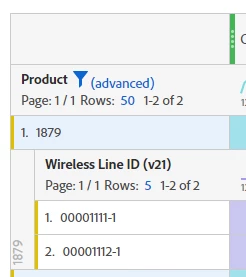
 

Thanks!



In this case, you would have to track each line separately, also, if each line is "45" you would have had to track "45" as the Price... Adobe multiplies the quantity and price together into you Revenue, so doubling the value in your code would have ended up as $180 in your Revenue instead of $90 - Price is price per unit... 2 items at $45 = $90 in the final Revenue):


However, if you need to itemize "Wireless Lines", then you should track like this:


changePlanDataMapTest["&&products"] = ";1879;1;45.00;;eVar21=00001113-1,;1879;1;45.00;;eVar21=00001113-3,;1880;1;15.00;;eVar21=00001113-2";


Basically:

  • Product 1
    • [no category]
    • Product ID: 1879
    • Quantity: 1
    • Price: 45.00
    • [no event]
    • Merchandising eVars
      • eVar21: 00001113-1
  • Product 2
    • [no category]
    • Product ID: 1879
    • Quantity: 1
    • Price: 45.00
    • [no event]
    • Merchandising eVars
      • eVar21: 00001113-3
  • Product 3
    • [no category]
    • Product ID: 1880
    • Quantity: 1
    • Price: 15.00
    • [no events]
    • Merchandising eVars
      • eVar21: 00001113-2


Make sense?

1 reply

Jennifer_Dungan
Community Advisor and Adobe Champion
July 28, 2023

So when the developer sets up code in the app like:

cdata.put("&&events", "event1"); cdata.put("&&products", ";Running Shoes;1;69.95;event1=5.5;eVar1=Merchandising,;Running Socks;10;29.99");


There's not much more that you need to do.


Unlike passing context variables (which need to be mapped using processing rules), this should pass the event and Product Data (and all merchandising eVars) directly into your tracking... in fact, Processing Rules cannot see or update the Products List at this time (which is why you need to send it directly, and also why any paired events for products need to be send this way too...  since you probably won't be able to identify specifically which events need to be set to go with products - all other events can still be set using processing rules.)


Now, I am going to assume you are familiar with the Products List itself, and how to set up all the eVars as "Product Syntax" merchandising eVars... as long as all of these are configured; I am going to assume that you are tracking your mobile app into the same suite as your website, and using all the same dimensions; if so, everything should be configured.


Are you seeing missing data after making this update?

July 31, 2023

Hi @jennifer_dungan,


We are not using events in our code.


My Code Syntax: 

cdata.put("&&products", "Category;Product;Quantity;Price;;eVar1=Merchandising eVar,Category;Product;Quantity;Price;; eVar1=Merchandising eVar ");


Example:

contextdata.put("&&products", ";1879;2;90.00;;eVar21=wirelessLineId,1880;1;15.00;; eVar21=wirelessLineId ");

We are tracking data in different reportsuites for Mobile App and Website.


Thanks.


August 17, 2023

You cannot capture multiple values into an eVar... what you have there, that comma is indicating the end of the product and the start of a new one, so if we look at your code above with each "item" broken into a lisy of items (i.e. I am removing the commas and semi-colons and displaying as a list of items):


  • Product 1
    • [no category]
    • Product ID: 1879
    • Quantity: 2
    • Price: 90.00
    • [no event]
    • Merchandising eVars
      • eVar21: 00001113-1
  • Product 2
    • Category: 00001113-3
    • [no product]
    • [no quantity]
    • [no price]
    • [no events]
    • [no eVars]
  • Product 3
    • [no category]
    • Product ID: 1880
    • Quantity: 1
    • Price: 15.00
    • [no events]
    • Merchandising eVars
      • eVar21: 00001113-2


I am unsure why you need to pass two eVar21 values in one product call?


If this is like a package deal, surely that combined package would have it's own value for the package (or if these values represent different things, why not have eVar21 for X and another eVar for Y???...


but for whatever reason, if this is not the case both values absolutely must be passed into eVar21, then you are going to have to pass the ids conjoined as a single value, then use classifications later to split them.


If you are doing that, you will have to avoid standard Products List delimiters like commas, semi-colons and pipes; as well as delimiters that could be part of the values in your eVar21 data, currently I only see the use of dashes (but I don't want to assume anything).


So at this point, I would maybe use a delimiter like underscore (_) or colon (:)

Such that your eVar21 will look like:

eVar21=00001113-1_00001113-3

or

eVar21=00001113-1:00001113-3


So as to not trigger Adobe's processing (split on comma, semi-colon and pipe), and to make it easier for you to create a Classification Rule on eVar21 where you can then split the eVar21 into multiple values (but you will still need 2 classifications, so why not just split it into multiple eVars to begin with??)


To pass multiple eVars (going to use eVar21 and eVar22 as an example):


changePlanDataMapTest["&&products"] = ";1879;2;90.00;;eVar21=00001113-1|eVar22=00001113-3"


In either case you will need to access "00001113-1" and "00001113-3" in different eVars, or in different classifications (i.e. basically a sub-eVar).. or you will just have to deal with a conjoined "00001113-1:00001113-3" in your data.


Hi @jennifer_dungan 


Ok, Let me explain our actual requirement.


When the user changes two or more lines at a time with the same plan(product). We need to capture those line numbers in eVar21


Example: 1879 is the Plan(product) and if the user changes two lines, the Quantity will be 2, and Price of each line is 45.00. So, total will be 90.00 and in eVar21 we need to capture 2 line numbers as per below snapshot.


Thanks!