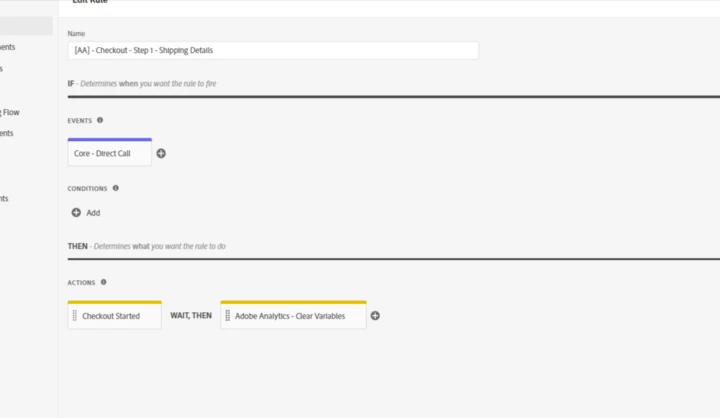
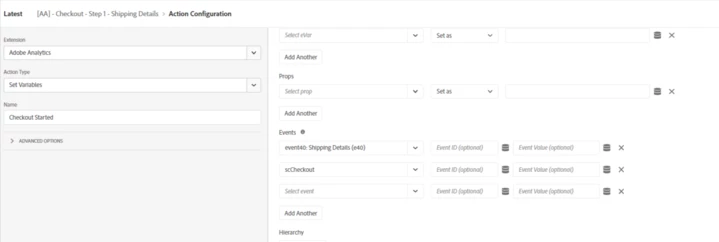
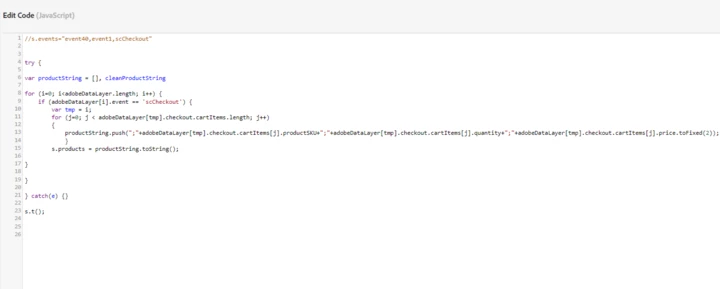
In your custom code, you're traversing through the ACDL to build your s.products string for the "scCheckout" event. Based on that and your problem statement, I suspect that your website is a Single Page Application (SPA) that does not have any so-called "physical" web pages.
If that is correct, then your ACDL basically keeps getting pushed with new events with every user interaction and "virtual" web page. It never gets reset to an empty array. So when you traverse your ACDL in your code, all of the old data still exist in ACDL, including the "scCheckout" one, which then causes your problem.
If that is correct, then you should use adobeDataLayer.getState() to get the computed data layer object, instead of traversing the adobeDataLayer array. Reference: https://github.com/adobe/adobe-client-data-layer/wiki#getstate
I suggest re-doing your Launch setup:
- Install the ACDL extension, if you haven't already.
- Move your custom code into its own data element, but only the "for" loop portion. Basically, that data element returns the s.products string that has been built from your "adobeDataLayer.getState().checkout.cartItems" array. Note the use of "adobeDataLayer.getState()" here, because you should use the computed data layer state to access your data layer, instead of traversing the adobeDataLayer array directly.
- Assuming you have a Checkout rule, trigger that rule with a ACDL "Data Pushed" event, specifying "scCheckout" as the Specific Event's Key. Include your AA Set Variables action in that rule, specifying s.products to have the value from your data element in step 2. You can also include the AA Send Beacon action if you have set all of the necessary AA variables in that same rule.
As you may have noticed, my suggestion involves a lot of re-work in your Launch setup, including replacing custom code like "s.t()" with a Send Beacon action from the AA extension. So this isn't a trivial suggestion to implement.