Processing rules require escaping special characters? | Community
Skip to main content
OscarMartinezM
June 14, 2022
Solved

Processing rules require escaping special characters?

  • June 14, 2022
  • 3 replies
  • 3385 views

Hi community, 

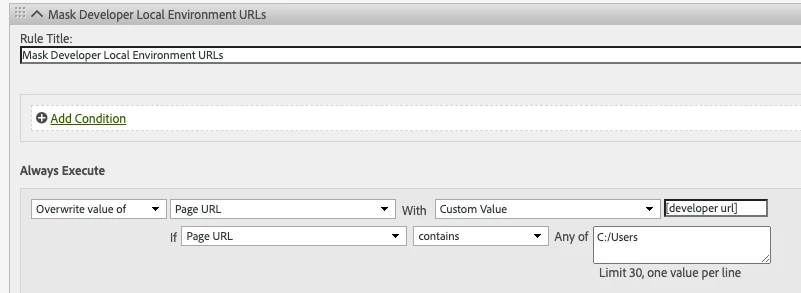
I want to filter the Page URL because sometimes I got local developer URLs in reports. I created this processing rule in order to have a common value for all of them to filter it in Virtual Report Suites later. But the rule is not working. One option in here I think is because the value "C:/Users" will required an escaping of special character.

If this is not the issue, what could be wrong on here?


Thank you!

This post is no longer active and is closed to new replies. Need help? Start a new post to ask your question.
Best answer by Jennifer_Dungan

No, there are not. This is the last rule of the list.


Hi, sorry for taking so long to get back to you.... 


I tested this in my QA environment and my rule worked... the only difference is that my eVar uses "D=g" for tracking... and I wasn't sure if that would execute before or after the processing rule...


So I used the following:


I used the absolute "Page URL" as my condition (and I didn't need to encode anything for the values), and then I overwrote my eVar with the custom value.


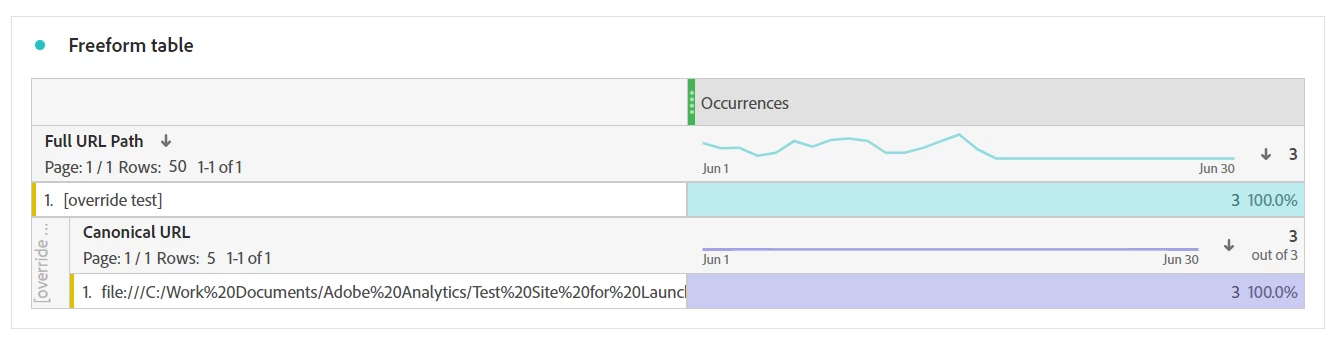
Since I track both "full url" and "canonical url", I correlated the two together to see the values of the Local File URL and the Override:


Maybe try using Page URL for you condition, then just override the value of the eVar?

3 replies

Jennifer_Dungan
Community Advisor and Adobe Champion
June 14, 2022

Hi, 


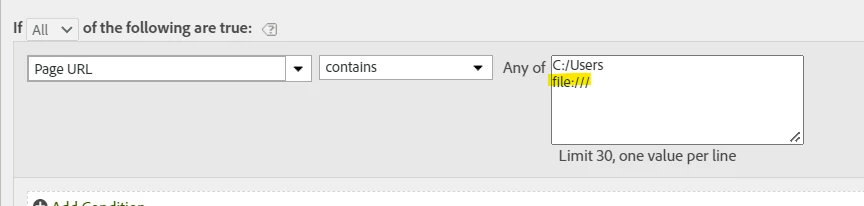
I think the issue is that you didn't add an overall Condition to the rule.... basically there is nothing telling the system to even start this rule...  Try moving the IF condition from the Execution Line to the Rule Conditions like so:


 Also note, this may capture more than just your developer urls... Most people get a few of these from real users who save copies of their websites to their hard drive and open the HTML Locally... but that's probably not a big concern... you may also want to add an addition context of "file:///" to capture ANY local hard drive path (not just "C:/Users" - but I will leave that to you to make that call)


OscarMartinezM
June 15, 2022

I changed it, but the same, URL is not being captured.


Jennifer_Dungan
Community Advisor and Adobe Champion
June 15, 2022

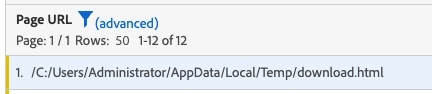
Ah... I wasn't sure if the Page URL you were trying to change was the one that is available in raw data and data warehouse.....


The "Page URL" in processing rules is the URL that is only available in the raw data; but is not actually available in your Workspace..... it looks like you have a custom Prop or eVar called "Page URL" which might be causing the confusion....


If you are trying to see this in your workspace, you must change both the condition and the rule to use the custom parameter (prop/evar) instead of the raw URL. (this will also leave your raw url alone if you ever need to correlate the original value)

Anmol_Bhardwaj
Community Advisor
Community Advisor
June 15, 2022

Hi @oscarmartinezm ,


Can you try escaping the '/' & ':'. It is poosible that they are not getting read properly during the execution of the rule.

I would suggest you try the encoded value for this.

C%3A%2FUsers
OscarMartinezM
June 16, 2022

Hi @anmol_bhardwaj. Thank you for your answer.

It didn't work, neither. Still getting no processed value.

yuhuisg
Community Advisor
Community Advisor
June 17, 2022

What if you change your "Page URL" contains value from "C:/Users" to just "Users"?

Jennifer_Dungan
Community Advisor and Adobe Champion
June 17, 2022

That rule could be very dangerous... if they have any urls that contain "users" (since processing rules are not case sensitive) that could misidentify real pages in their site.


I don't know the nature of their site, but "users" could be a common folder for user related pages (login/manage profile/etc) or if it's a site that contains blogs or article any content aliases containing the word users (i.e. "things-all-facebook-users-need-to-know") would be captured by such an open ended rule.....

yuhuisg
Community Advisor
Community Advisor
June 17, 2022

Yes, that's true. That's why I had written my reply as a question for OP to consider.  😀