Power BI & Adobe Analytics Connector Maximum retry count reached Error | Adobe Higher Education
Skip to main content
Level 2
February 23, 2024
Répondu

Power BI & Adobe Analytics Connector Maximum retry count reached Error

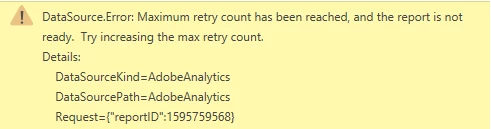
Hi, can anyone help me please with advice on this error, I can't even get data for a couple of days. I am using 3 Dimensions type of data and 6 Metrics type of data. I know what the error means but not how to fix it, thanks!
 

Ce sujet a été fermé aux réponses.
Meilleure réponse par Doubleks42

I found the cause in my case. An evar was renamed by my admin after the report was originally built and the PowerBI source was still using the old name. This caused the request to fail, and then retry over and over hitting the retry max. So examine the config of the query to Adobe and make sure all the references are current/correct.

3 commentaires

Josh Stephens
Community Advisor
Community Advisor
February 23, 2024

I've run into similar issues with connectors and it can be frustrating.  If possible, I'd try to break your data into multiple sources and keep each one as simple as possible.  


June 18, 2024

I am getting this too on a report that worked fine before and hadn't been refreshed in awhile. 

OLE DB or ODBC error: [DataSource.Error] Maximum retry count has been reached, and the report is not ready. Try increasing the max retry count..


Where do I find the max retry count?

Doubleks42Réponse
June 21, 2024

I found the cause in my case. An evar was renamed by my admin after the report was originally built and the PowerBI source was still using the old name. This caused the request to fail, and then retry over and over hitting the retry max. So examine the config of the query to Adobe and make sure all the references are current/correct.

Josh Stephens
Community Advisor
Community Advisor
June 22, 2024

Thanks for sharing the cause!  That's always helpful for the next person who runs into a similar issue!