Pause or stop scheduled WS | Community
Skip to main content
July 28, 2021
Solved

Pause or stop scheduled WS

  • July 28, 2021
  • 3 replies
  • 1492 views

Hi,


I have a daily WS report (goes out as PDF) that I have scheduled for the team. Now I want to pause/ stop the report since it's no longer required. How to do that?

This post is no longer active and is closed to new replies. Need help? Start a new post to ask your question.
Best answer by khurshid

You can go to Components > Scheduled Projects, select the Project from the list and hit "Delete" button.

3 replies

meghat43023313
Adobe Employee
Adobe Employee
July 29, 2021

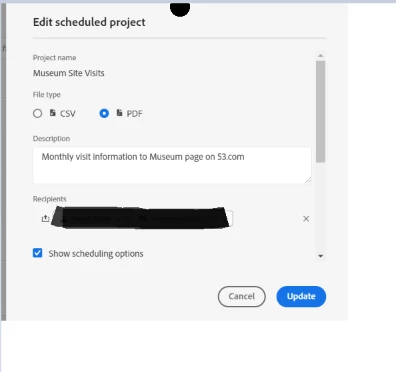
@dasparomita1984  - To stop receiving the Scheduled Projects, you need to remove your email from the Recipients.


Go to Analytics > Components > Scheduled Projects> Edit scheduled project > Update


August 2, 2021
Really helpful for updating WS scheduled reports. Thanks!
khurshid
Adobe Employee
khurshidAdobe EmployeeAccepted solution
Adobe Employee
July 29, 2021

You can go to Components > Scheduled Projects, select the Project from the list and hit "Delete" button.

Level 4
July 30, 2021

Hi,


Go to components ->scheduled projects->select the project and then hit delete the project.