Pass entire array option in productListItem array | Community
Skip to main content
November 30, 2023
Solved

Pass entire array option in productListItem array

  • November 30, 2023
  • 2 replies
  • 3624 views

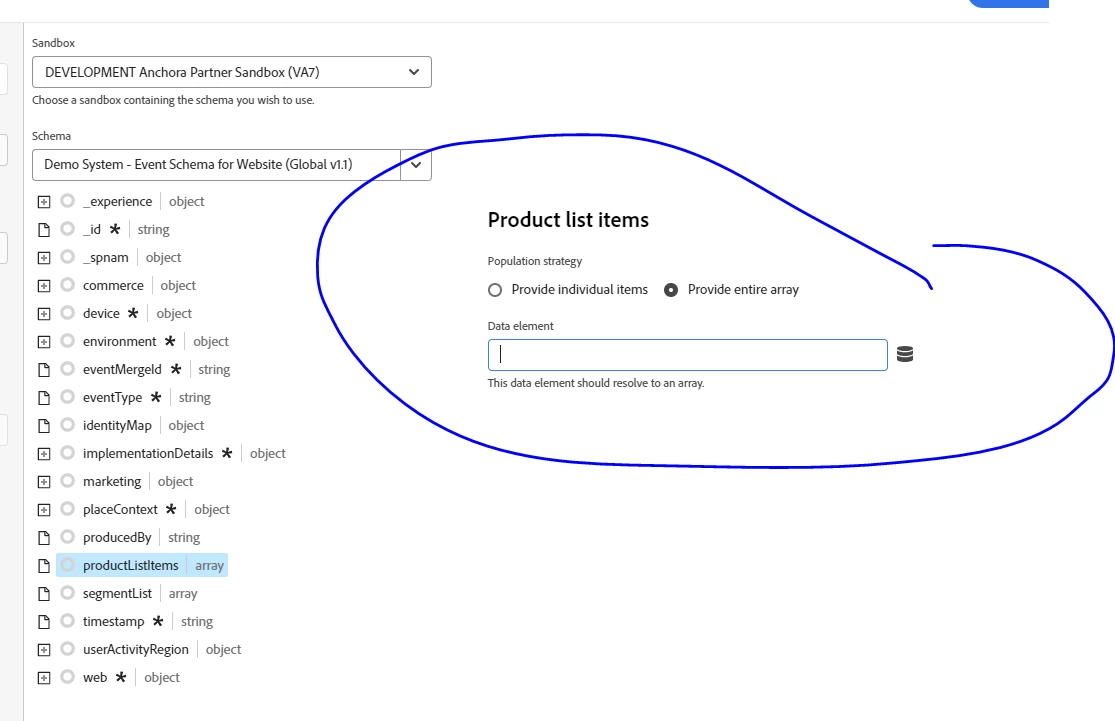
During analytics implementation using websdk I am getting a product array using ACDL on website for commerce events and want to fetch those value in launch and pass it as entire array in xdm data element mapping. Also, need to pass some of the values as evars and events in product string. What should be the best practice or sample code to traverse through the array and create an object that can be directly mapped as array. 

sample datalayer code:


window.adobeDataLayer.push({
product: {
"productListItems": [
{
"Qty": 18,
"brand": "ABC",
"category": "DEF",
"StarRating": 4.4792,
"sku": "12345",
"stockStatus": "in stock",
}

{
"Qty": 20,
"brand": "ABCD",
"category": "GHIJ",
"StarRating": 4.4,
"sku": "12345",
"stockStatus": "in stock",
}
]
}
});
Best answer by abhinavbalooni

Hey @chiragma 


You can grab the productlistitems array from the datalayer and put it into another array using the code below. This script can be used in custom code of a data element (let's call it prodList) within Launch.


// Access the productListItems array from the object const productListItems = window.adobeDataLayer[0].product.productListItems; // Initialize an array to store the extracted data const extractedData = []; // Check if productListItems is an array and not empty if (Array.isArray(productListItems) && productListItems.length > 0) { // Loop through the productListItems array and extract data productListItems.forEach((item, index) => { const extractedItem = { index: index + 1, Qty: item.Qty, brand: item.brand, category: item.category, StarRating: item.StarRating, sku: item.sku, stockStatus: item.stockStatus, }; // Push the extracted data into the new array extractedData.push(extractedItem); }); } else { console.log("productListItems is either not an array or is empty."); } // Now you have the extracted data in the `extractedData` array return extractedData;

 Once you have the above array of productlistitems, you can then map this to another data element of type, XDM Object. Once you specify the schema in the data element, you would map the prodList data element from above in the productListItem.

Please ensure you are sticking to the values you are allowed in the product list items field group. You can refer to the below: https://github.com/adobe/xdm/blob/master/docs/reference/datatypes/productlistitem.schema.json

Once you've done that, you would also need to update the commerce object for the specific ecommerce event you are passing the information for.


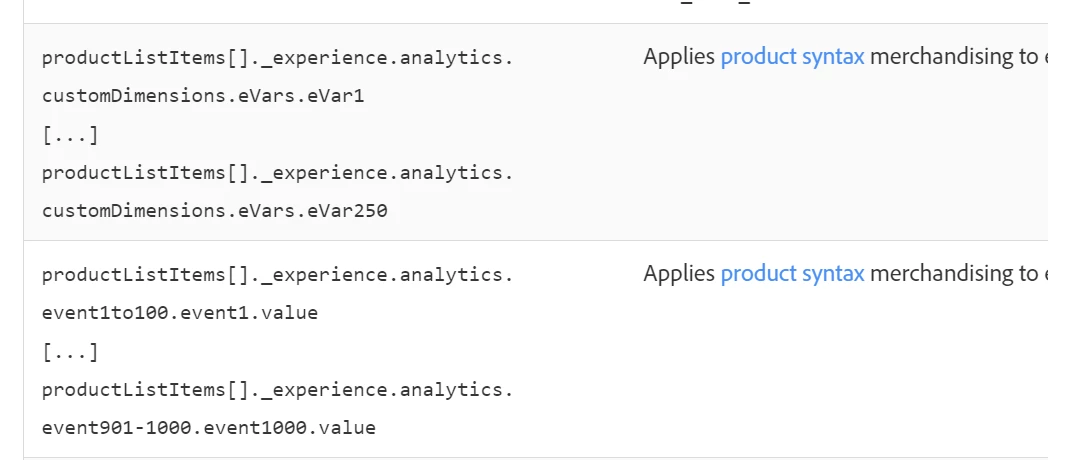
As for the merchandising eVars, you would need to use the Adobe Analytics Experience Event Template field group. Within that field group, you have a productlistitems array which has eVars in it. Populating eVars within this array object would function similar to merch eVars in AA.


Here's a link to detailed information around this field group.


https://experienceleague.adobe.com/docs/analytics/implementation/aep-edge/variable-mapping.html?lang=en


Hope the above should give you a start.


Reach out if you need any further information around it.


Cheers,

Abhinav


2 replies

abhinavbalooni
Community Advisor
abhinavbalooniCommunity AdvisorAccepted solution
Community Advisor
November 30, 2023

Hey @chiragma 


You can grab the productlistitems array from the datalayer and put it into another array using the code below. This script can be used in custom code of a data element (let's call it prodList) within Launch.


// Access the productListItems array from the object const productListItems = window.adobeDataLayer[0].product.productListItems; // Initialize an array to store the extracted data const extractedData = []; // Check if productListItems is an array and not empty if (Array.isArray(productListItems) && productListItems.length > 0) { // Loop through the productListItems array and extract data productListItems.forEach((item, index) => { const extractedItem = { index: index + 1, Qty: item.Qty, brand: item.brand, category: item.category, StarRating: item.StarRating, sku: item.sku, stockStatus: item.stockStatus, }; // Push the extracted data into the new array extractedData.push(extractedItem); }); } else { console.log("productListItems is either not an array or is empty."); } // Now you have the extracted data in the `extractedData` array return extractedData;

 Once you have the above array of productlistitems, you can then map this to another data element of type, XDM Object. Once you specify the schema in the data element, you would map the prodList data element from above in the productListItem.

Please ensure you are sticking to the values you are allowed in the product list items field group. You can refer to the below: https://github.com/adobe/xdm/blob/master/docs/reference/datatypes/productlistitem.schema.json

Once you've done that, you would also need to update the commerce object for the specific ecommerce event you are passing the information for.


As for the merchandising eVars, you would need to use the Adobe Analytics Experience Event Template field group. Within that field group, you have a productlistitems array which has eVars in it. Populating eVars within this array object would function similar to merch eVars in AA.


Here's a link to detailed information around this field group.


https://experienceleague.adobe.com/docs/analytics/implementation/aep-edge/variable-mapping.html?lang=en


Hope the above should give you a start.


Reach out if you need any further information around it.


Cheers,

Abhinav


ChiragMaAuthor
November 30, 2023

Thanks Abhinav this is very helpful.

I tried to create a similar code by taking additional evars into consideration and designed an array to match productListItem array structure. Can you see below code and confirm if this works and merch evars will get mapped properly. Also, is it can we manipulate product string in report suite if we pass data in custom field group and fields rather than using auto mapped variables.


var product = adobedatalayer.product.productItems;
var productItem = [];
product.forEach(function(item, index, array){
productItem.push({
"SKU": item.sku,
"name":item.title,
"quantity":qty,
"priceTotal":price,
//"_experiance.analytics.customdimensions.eVars.eVar1" : item.category
"_experience": {
"analytics": {
"customDimensions" : {
"eVars" : {
"eVar1" : item.category,
"eVar2" : item.subCategory
}
},
"event1to100" : {
"event4" : {
"value" : item.unitPrice
},
"event10" : {
"value" : item.originalPrice,

}
}
}}


});
});
return productItem;

abhinavbalooni
Community Advisor
Community Advisor
November 30, 2023

Hey @chiragma 


The code looks good. Did you give it a shot ? Should work based on what I can see. As for the modifications in the report suite, what do you mean by that ? 


Also, as of now, I think you would have to use the automatic mapping for the merch eVars if you are going the web SDK way.


Cheers.

December 1, 2023

Hi @chiragma ,


Try below code, i'm using this code for one of my client and it is working fine on Production, use this code in Data Element and pass that data element to productList array data element.


var products = _satellite.getVar("product");

for (var i = 0; i < products.length; i++) {
var product = products[i];
var name = product.productName;
var sku = product.productVariantId;
var quantity = product.productQuantity;
var priceTotal = product.productSalePrice;
var price = product.productPrice;
var category = product.productCategory;
var discount = product.discountPercentage;
var size = product.productSize;
var stock = product.productInStock;
var id = product.productId;
var discountedPrice = product.productDiscountedPrice;

var item = {
name: sku,
quantity: "",
priceTotal: "",

_experience: {
analytics: {
customDimensions: {
eVars: {
eVar13: name,
eVar14: quantity,
eVar15: id,
eVar16: size,
eVar17: priceTotal,
eVar18: category,
eVar37: price,
eVar38: discount,
eVar39: stock,
eVar52: sku,
eVar53: discountedPrice
},
},
},
},
};

result.push(item);
}

ChiragMaAuthor
December 7, 2023

Thank you for response.

All the evars sent in product string under productListItems[]  needs to be enabled as merchandising evars with product syntax selected in analytics report suite?

abhinavbalooni
Community Advisor
Community Advisor
December 7, 2023

Hey @chiragma 
Yes that needs to be done in the admin report suite settings.