Page URLs in Adobe Analytics | Community
Skip to main content
Level 2
October 16, 2019
Solved

Page URLs in Adobe Analytics

  • October 16, 2019
  • 19 replies
  • 22329 views

Hello,

my website uses history fragments / hashes in URLs, so a typical URL would look like this:

https://www.example.com/portal/#/login

https://www.example.com/portal/#/home

etc

I try to track these URLs in Adobe Analytics. The issue is that in the reports the hash part of the URL is not displayed, it is for some reason truncated.

So I just see https://www.example.com/portal/ and I'm not able to distinguish one page from another.

1) Why is it happening and how to make AA display the whole URLs?

Trying to find a solution to the above issue, I started sending only the hash part to AA:

/login

/home

etc

But I've run into another issue: now I don't see any URLs at all, I just see Other in the reports:

2) Why AA is not showing the URL values I send and how to fix it?

Any hints appreciated

Thanks a lot!

This post is no longer active and is closed to new replies. Need help? Start a new post to ask your question.
Best answer by worldholder

Hi All,

it seems I found an explanation.

I contacted Adobe ClientCare and they replied the following:

So I've just  requested this query string stripping to be disabled, let's see...

Strangely I couldn’t find any info on this, so it looked to me like a bug in AA.

Thanks all for your suggestions!

19 replies

Urs_Boller
Community Advisor
Community Advisor
October 23, 2019

how do you set the "pagename" and what is your metric in the reporting?

if the hash part isn't recorded, you could manually set the "pagename" to "document.location.href"

Urs_Boller
Community Advisor
Community Advisor
October 23, 2019
Level 2
October 24, 2019

I don't set Page Name at all.

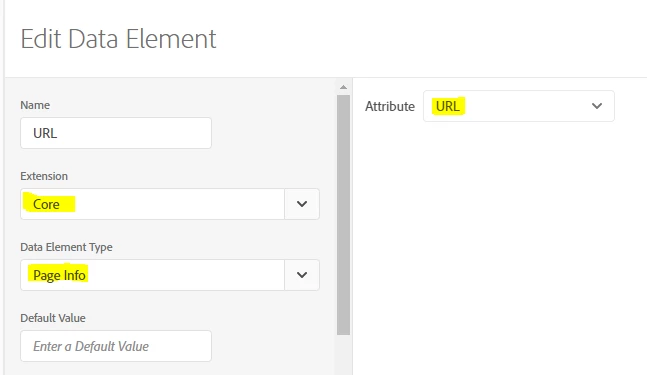
I set Page URL within Launch as usual:

I'm sure that it picks up the hash part because I see it in Adobe Debugger. So the URL is sent to Adobe in full (with hash), but in the reports it's displayed truncated (without hash).

Are you saying that the only way to get the hash part displayed is to pass page URL  as Page Name (and not as Page URL)?

Urs_Boller
Community Advisor
Community Advisor
October 24, 2019

I would make a data warehouse export for "page URL" and "pagename" and check data if it really gets through or if its truncated while processing

Level 2
October 28, 2019

I exported Page URL from the warehouse. It contains full URLs, with hash symbols and values after it.

So it means that it's getting truncated somewhere between the warehouse and AA reports... any ideas?

thanks

Andrew_Wathen_
Community Advisor
Community Advisor
October 28, 2019

Is it possible you have a conflicting Adobe Analytics processing rule which is overwriting the value with just the URL path?

Can't think of any other way data would be affected between data warehouse and the reporting interface.

Level 2
October 28, 2019

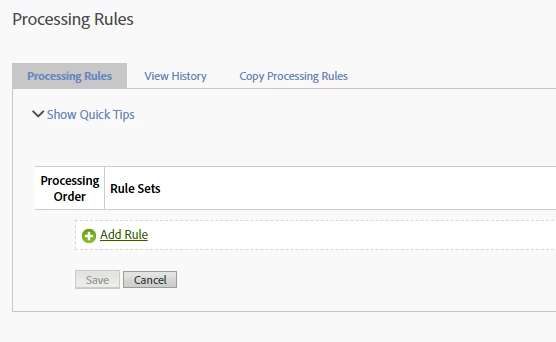
I've checked that... There are no processing rules at all:

Should I ask Adobe to check Vista rules?..

Did you guys work with history fragments and were they properly displayed in AA?

thanks

Urs_Boller
Community Advisor
Community Advisor
October 28, 2019

A Wathen​ isn't there an old feature that lets you override/map the default "pagename"? I remember having read about it but never used ...

Urs_Boller
Community Advisor
Community Advisor
October 28, 2019

I would check the data in warehouse (page and URL), maybe its just a reporting issue...

Pablo_Childe
Community Advisor
Community Advisor
October 29, 2019

I am going to guess but are all these pages part of a SPA? Single Page app? If so I recommend you look at Direct call rules. They work great and are very efficient for state changes.

Soe trick to follow some SPA you need to disable first time load. You also should make sure you check logic for a user doing a manual reload.

GLTU