Thanks Jennifer,
The video you shared is very interesting. I have followed it and done the following steps. But still I cannot see the data flowing through.
Most likely I'm missing something or maybe this plugin still doesn't work for WebSDK.
1. Added the AA via AEP Web SDK Extension
2. Added the custom code in extension
// Adobe Analytics Custom Code
s.usePlugins = true
s.doPlugins = function() {
if(s.pageName) getPageLoadTime();
if(window._pltPreviousPage)
{
s.prop100 = window._pltLoadTime;
s.eVar100 = window._pltPreviousPage
s.events = "event100=" + window._pltLoadTime;
}
}
/******************************************* BEGIN CODE TO DEPLOY *******************************************/
/* Adobe Consulting Plugin: getPageLoadTime v3.0 */
!function(){let e=globalThis.window||this;e.getPageLoadTime=function(t){let i=function(){if(e.s_c_il){for(let t in e.s_c_il)if("s_c"===e.s_c_il[t]._c)return e.s_c_il[t]}}();function n(){var i=performance.timing;i.loadEventEnd>0&&(clearInterval(e.pi),""===e.cookieRead("s_plt")&&e.cookieWrite("s_plt",function e(t,i){if(t>=0&&i>=0)return t-i<6e4&&t-i>=0?parseFloat((t-i)/1e3).toFixed(2):60}(i.loadEventEnd,i.navigationStart)+","+t)),e.ptc=i.loadEventEnd}if(i&&(i.contextData.getPageLoadTime="3.1"),t=t||i&&i.pageName||document.location.href,e.cookieWrite=e.cookieWrite||function(t,i,n){if("string"==typeof t){if(g=function(){var t=e.location.hostname,i=e.location.hostname.split(".").length-1;if(t&&!/^[0-9.]+$/.test(t)){i=2<i?i:2;var n=t.lastIndexOf(".");if(0<=n){for(;0<=n&&1<i;)n=t.lastIndexOf(".",n-1),i--;n=0<n?t.substring(n):t}}return n}(),i=void 0!==i?""+i:"",n||""===i){if(""===i&&(n=-60),"number"==typeof n){var o=new Date;o.setTime(o.getTime()+6e4*n)}else o=n}return!!t&&(document.cookie=encodeURIComponent(t)+"="+encodeURIComponent(i)+"; path=/;"+(n?" expires="+o.toUTCString()+";":"")+(g?" domain="+g+";":""),"undefined"!=typeof cookieRead)&&cookieRead(t)===i}},e.cookieRead=e.cookieRead||function(e){if("string"!=typeof e)return"";e=encodeURIComponent(e);var t=" "+document.cookie,i=t.indexOf(" "+e+"="),n=0>i?i:t.indexOf(";",i);return(e=0>i?"":decodeURIComponent(t.substring(i+2+e.length,0>n?t.length:n)))?e:""},e.p_fo=e.p_fo||function(t){return e.__fo||(e.__fo={}),!e.__fo[t]&&(e.__fo[t]={},!0)},performance&&e.p_fo("performance")){var o=performance;o.clearResourceTimings(),""!==e.cookieRead("s_plt")&&(o.timing.loadEventEnd>0&&clearInterval(e.pi),this._pltLoadTime=e.cookieRead("s_plt").split(",")[0],this._pltPreviousPage=e.cookieRead("s_plt").split(",")[1],e.cookieWrite("s_plt","")),0===o.timing.loadEventEnd?e.pi=setInterval(function(){n()},250):o.timing.loadEventEnd>0&&(e.ptc?e.ptc===o.timing.loadEventEnd&&1===o.getEntries().length&&(e.pwp=setInterval(function(){var i;(i=performance).getEntries().length>0&&(e.ppfe===i.getEntries().length?clearInterval(e.pwp):e.ppfe=i.getEntries().length),""===e.cookieRead("s_plt")&&e.cookieWrite("s_plt",((i.getEntries()[i.getEntries().length-1].responseEnd-i.getEntries()[0].startTime)/1e3).toFixed(2)+","+t)},500)):n())}},e.getPageLoadTime.getVersion=function(){return{plugin:"getPageLoadTime",version:"3.0"}}}();
/******************************************** END CODE TO DEPLOY ********************************************/
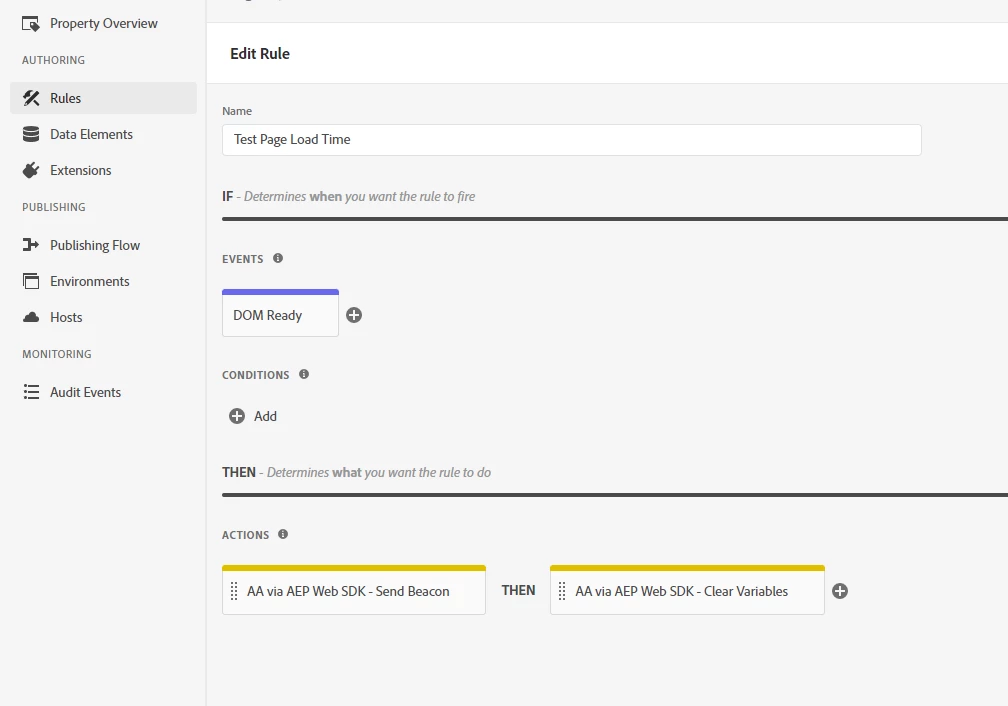
3. Created a rule firing sending the Beacon and clearing variables.
Regards,
Abraham