page load rule with google analytics | Community
Skip to main content
krishy71667478
Level 2
January 8, 2019
Solved

page load rule with google analytics

  • January 8, 2019
  • 3 replies
  • 3067 views

Hi All,

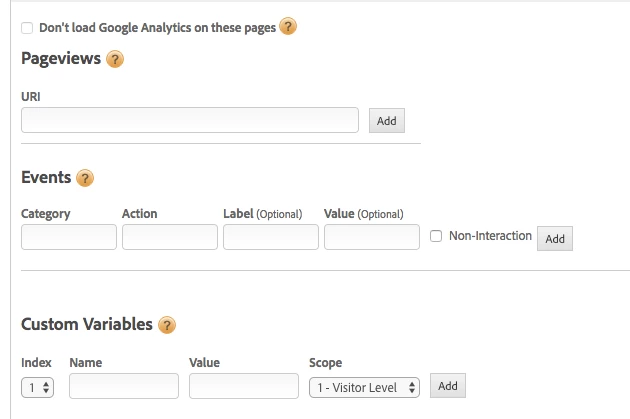
I created a page load rule in DTM and I want to see the data in google analytics and I am seeing the google analytics section. What I have to include to see data in google analytics.
This post is no longer active and is closed to new replies. Need help? Start a new post to ask your question.
Best answer by kishorepvsk

Hey,

Once you add the Google Analytics Tool within DTM by giving the account ID for both staging and production, it automatically acts as a page load rule and will trigger a default tag which you will be able to observe in any debugger.

In addition to that, if you want to capture any new attributes or variables on any specific pages, that's when you will create a new page load rule and configure accordingly.

Hope this helps.

3 replies

kishorepvsk
kishorepvskAccepted solution
Level 3
January 9, 2019

Hey,

Once you add the Google Analytics Tool within DTM by giving the account ID for both staging and production, it automatically acts as a page load rule and will trigger a default tag which you will be able to observe in any debugger.

In addition to that, if you want to capture any new attributes or variables on any specific pages, that's when you will create a new page load rule and configure accordingly.

Hope this helps.

krishy71667478
Level 2
January 9, 2019

Hi,

I have a productView report on the adobe omniture. How i can configure same product view in the google analytics section in DTM?

And I want to see the specific page report in google analytics by adding the information to the google analytics section in the dtm rule.

Thanks,

krishna.

kishorepvsk
Level 3
January 9, 2019

Hi Krishna,

You can do it by creating a new page load rule in DTM, use a condition which matches the product page where a product is viewed. then, you can add under events a category, action, and label (Ex: prodView as a category, View as Action and the Product Name as a label.

or

you can simply use custom variables Name & Value and under Name, you can use the product name and under the value, you can add a counter or prod view.

For any of these, you can create data elements within DTM and you can use them while populating these values in GA page load rule.

Let me know if you need any more details here.

Thanks!