Organic vs paid traffic | Community
Skip to main content
Level 4
December 29, 2023
Solved

Organic vs paid traffic

  • December 29, 2023
  • 2 replies
  • 1798 views

Can anyone tell me how to create report in workspace for organic vs paid traffic using marketing channel reports.

This post is no longer active and is closed to new replies. Need help? Start a new post to ask your question.
Best answer by Jennifer_Dungan

First you need to configure your "Paid Search" detection.


Admin > Report Suites > (Select Suite) > General > Paid Search Detection


Here you can set up rules for specific search engines, or all search engines based on your known query strings for Paid Search.


Some common items are utm_medium=cpc (cost per click) and utm_medium=ppc (pay per click), but this will completely depend on what you are passing in your various paid search campaigns.


This will then drive the Marketing Channel Rules for:
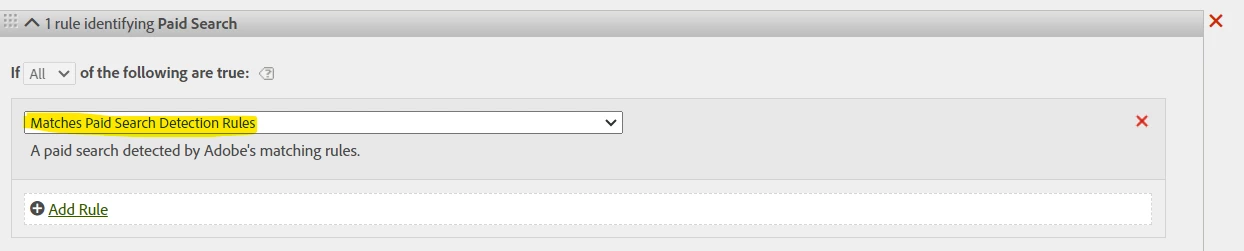
and
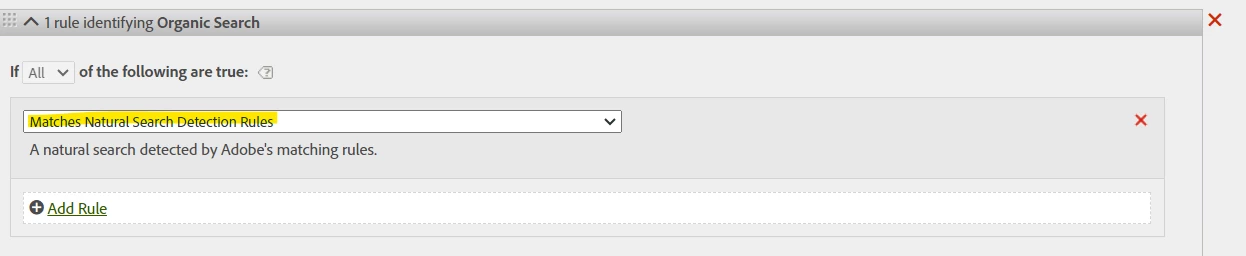


You can also add additional query string rules if needed here, but if "Paid Search" is set up correctly, then traffic from search engines should already be properly segmented into these two buckets for you on each visit (then your Marketing Channel will bring the attribution up to whatever you have set in your Marketing Channel expiry - default if 30 days, but you can modify this to suit your needs)


Now, assuming you have the above rules all set correctly, the report is super easy... but do you need just Paid and Organic Search (out of all your various Marketing Channels)?


Workspace is drag and drop... do you want to see your Marketing Channels as columns, with a breakdown by day? Do you just want to see the aggregate data by Marketing Channel for your Reporting Period? There are many ways to report on this data, each has a different usage... without knowing what you are trying to achieve I could list 10-20 different ways to create a report and not get to what you are looking for....


What Metric are you looking at? Marketing Channel by Visits? Visitor? Orders? Keep in mind that both Visits and Visitors can have cross-over between the two buckets:


Example:

  • User does a Search on Google
  • Clicks on a Paid Result
  • Comes to Site
    • This Page View and Entry to the Site will be mapped to Paid Search
  • Makes an Order
    • This Order will be attributed to Paid
  • Hits Back
  • Clicks on a Natural / Organic Search Result
  • Comes to Site
    • This Page View and Entry to the Site will be mapped to Organic Search
  • Makes an Order
    • This Order will be attributed to Organic


The Visit and Visitor will have both Paid and Organic Marketing Channels, but the two Orders will be associate to the last Channel that was recorded before the Order occurred.

2 replies

Jennifer_Dungan
Community Advisor and Adobe Champion
Jennifer_DunganCommunity Advisor and Adobe ChampionAccepted solution
Community Advisor and Adobe Champion
December 29, 2023

First you need to configure your "Paid Search" detection.


Admin > Report Suites > (Select Suite) > General > Paid Search Detection


Here you can set up rules for specific search engines, or all search engines based on your known query strings for Paid Search.


Some common items are utm_medium=cpc (cost per click) and utm_medium=ppc (pay per click), but this will completely depend on what you are passing in your various paid search campaigns.


This will then drive the Marketing Channel Rules for:

and


You can also add additional query string rules if needed here, but if "Paid Search" is set up correctly, then traffic from search engines should already be properly segmented into these two buckets for you on each visit (then your Marketing Channel will bring the attribution up to whatever you have set in your Marketing Channel expiry - default if 30 days, but you can modify this to suit your needs)


Now, assuming you have the above rules all set correctly, the report is super easy... but do you need just Paid and Organic Search (out of all your various Marketing Channels)?


Workspace is drag and drop... do you want to see your Marketing Channels as columns, with a breakdown by day? Do you just want to see the aggregate data by Marketing Channel for your Reporting Period? There are many ways to report on this data, each has a different usage... without knowing what you are trying to achieve I could list 10-20 different ways to create a report and not get to what you are looking for....


What Metric are you looking at? Marketing Channel by Visits? Visitor? Orders? Keep in mind that both Visits and Visitors can have cross-over between the two buckets:


Example:

  • User does a Search on Google
  • Clicks on a Paid Result
  • Comes to Site
    • This Page View and Entry to the Site will be mapped to Paid Search
  • Makes an Order
    • This Order will be attributed to Paid
  • Hits Back
  • Clicks on a Natural / Organic Search Result
  • Comes to Site
    • This Page View and Entry to the Site will be mapped to Organic Search
  • Makes an Order
    • This Order will be attributed to Organic


The Visit and Visitor will have both Paid and Organic Marketing Channels, but the two Orders will be associate to the last Channel that was recorded before the Order occurred.

Josh Stephens
Community Advisor
Community Advisor
December 29, 2023

If you want to look at all paid vs. all organic channels, you can also classify marketing channels


This would allow you to see, for example

Organic Total 

  Natural Search

  Direct

  Session Refresh

  ...

Paid Total

  Paid Search

  Email

  Paid Social

  Display

  ...