Order metric incremented because of external links? | Community
Skip to main content
catalinmartin
Level 2
July 20, 2018
Solved

Order metric incremented because of external links?

  • July 20, 2018
  • 13 replies
  • 5527 views

On our ecommerce website, I have an issue with the calculation of order metric.

Once I arive on the confirmation page (/payment-successful.html), an Adobe Analytics server call is made, which is ok. But here I have a button for a contest and if you click it, you will be redirected to an external link AND another Adobe Analytics server call is made on my page, with EXIT LINK: undefined and the orderid itself is incremented again.

This will result in my adobe analytics report that for the same order id, I will have 2 orders (or more, depending on how many times you click on that contest button). For data accuracy, I created a custom metric which will count only the unique values of order id, but I don't like this workaround.
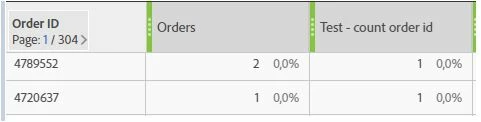
I should mention that we tested and there is no possibility that the same order id to be generated for another order (after few days or weeks or months).

Our devs suggested to turn off tracking of external links, is that a solution?

Please let me know if any of you had a similar issue and how you solved it.

Thank you!
This post is no longer active and is closed to new replies. Need help? Start a new post to ask your question.
Best answer by Stewart_Schilling

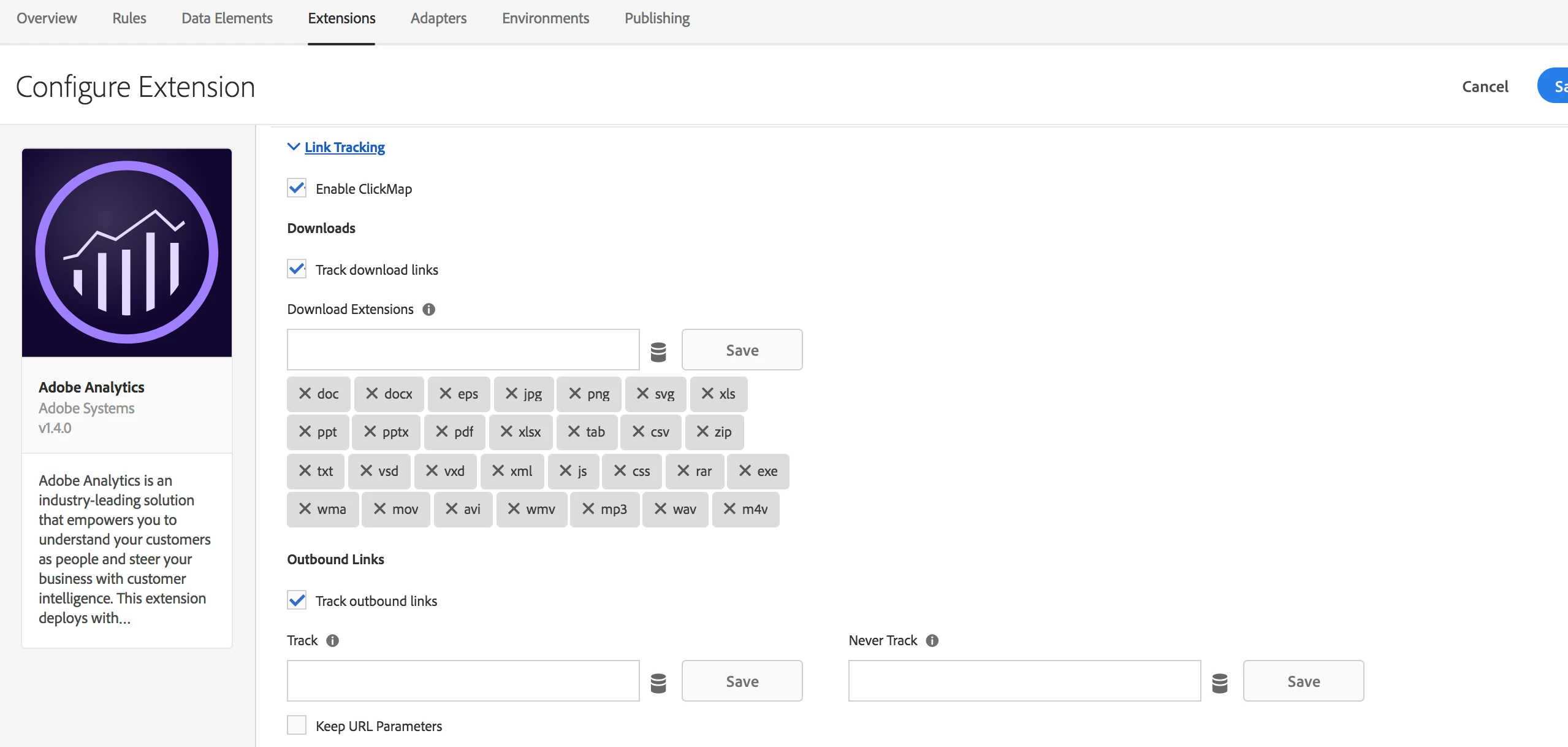
Yes, you can suppress the exit link tracking.  This can be done selectively within the Link Tracking configuration of your AA Launch Extension (or DTM AA Tool).  Below is the section for the Adobe Analytics extension in Launch. Note that "Track Outbound Links" is selected.  This checkbox enables automatic exit link tracking.  Under that is a widget labeled "Never Track".  You can add the domain of your exit link here to indicate that it should not be tracked.  In your case, the link you speak of might be on "paypal.com", so you'd enter that in the never tack list.

This will probably solve the issue that you are facing, but it will only resolve a symptom.  From what you've said, I think you might want to call s.clearVars() after you send the purchase beacon.  This would keep you from sending the purchase event inadvertently on subsequent beacons sent from the same page.  For this, I'd suggest adding the AA Clear Variables action after the Send Beacon action (if you are using Launch).  Or, a solution that would work in both DTM & Launch is to add the following to your AA custom code:

s.registerPostTrackCallback(function(){

  if (s.events && s.events.match(/purchase/)){

    s.clearVars();

  }

});

13 replies

Stewart_Schilling
Community Advisor
Stewart_SchillingCommunity AdvisorAccepted solution
Community Advisor
July 23, 2018

Yes, you can suppress the exit link tracking.  This can be done selectively within the Link Tracking configuration of your AA Launch Extension (or DTM AA Tool).  Below is the section for the Adobe Analytics extension in Launch. Note that "Track Outbound Links" is selected.  This checkbox enables automatic exit link tracking.  Under that is a widget labeled "Never Track".  You can add the domain of your exit link here to indicate that it should not be tracked.  In your case, the link you speak of might be on "paypal.com", so you'd enter that in the never tack list.

This will probably solve the issue that you are facing, but it will only resolve a symptom.  From what you've said, I think you might want to call s.clearVars() after you send the purchase beacon.  This would keep you from sending the purchase event inadvertently on subsequent beacons sent from the same page.  For this, I'd suggest adding the AA Clear Variables action after the Send Beacon action (if you are using Launch).  Or, a solution that would work in both DTM & Launch is to add the following to your AA custom code:

s.registerPostTrackCallback(function(){

  if (s.events && s.events.match(/purchase/)){

    s.clearVars();

  }

});

Gigazelle
Adobe Employee
Adobe Employee
July 23, 2018

You'll also want to make sure linkTrackVars doesn't have your order eVar, and linkTrackEvents doesn't include purchases. If you don't have this variable defined, then it will send all variables in your image request. Stewart's recommendation on using clearVars() would also be a viable solution.

catalinmartin
Level 2
August 2, 2018

Thanks for you help, that piece of code in custom code solved my issue.