Opt-out tracking in Adobe Analytics | Community
Skip to main content
November 12, 2024
Question

Opt-out tracking in Adobe Analytics

  • November 12, 2024
  • 1 reply
  • 2243 views

Hi,


I am currently exploring options to be able to track basic traffic data on our web and in mobile app in opt-out scenario. In our current situation, Adobe Analytics tracking is strictly bound to opt-in scenario, meaning if the customer declines analytics cookies, Adobe Analytics in not fired at all.


According to this video on experience league, it should be possible to collect certain minimum data even if the customer opts-out and be in compliance with GDPR:
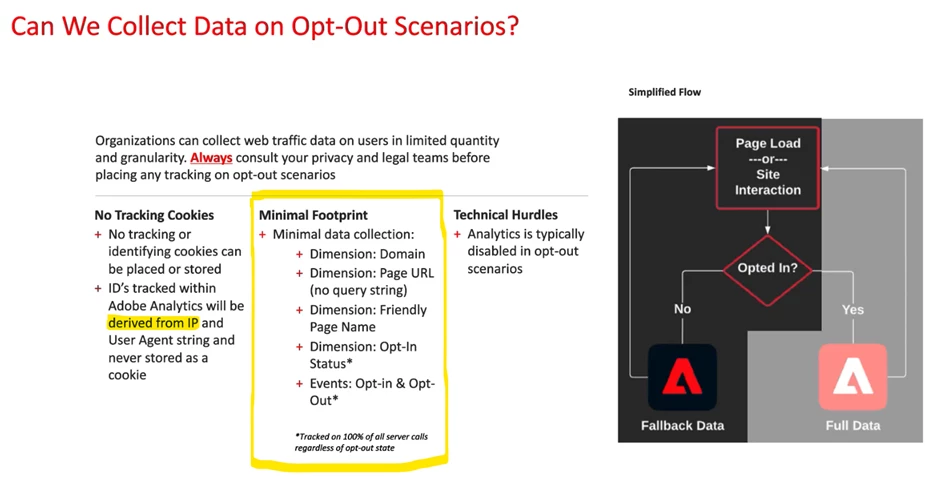
 

Does anyone have any experience with this solution? What would be the requirements to implement the opt-out tracking via tag manager? Also, according to the screenshot above, only opt-in status and opt-in/opt-out events are tracked on all server calls. Does that mean that even with this solution, it is not possible e.g. to see all traffic on a specific URL or Page Name?


Thanks!


This post is no longer active and is closed to new replies. Need help? Start a new post to ask your question.

1 reply

Jennifer_Dungan
Community Advisor and Adobe Champion
November 12, 2024

Hi, 


So first off, it comes down to:

1. Is the user opting out of cookies?

2. Or is the user opting out of tracking?


Those are very different things....


As far as most policies seem to indicate, the opt out is about cookies (specifically cookies that "fingerprint" a user.


So in Adobe, this means that you need to make sure your ECID isn't set in this scenario.


Now, if you are using the old AppMeasurement.js tracking... there are still the s cookies (which will get set in the absence of the ECID)... but in the Analytics Extension, there is an option to set the cookie lifetime to session which should qualify under your policy... as once the user leave, then next time they come back they will get an all new cookie... thus, they are not being "followed". (Make sure you test that to be sure it's working as expected).


So now that you have the cookie settings in place, you shouldn't have to prevent tracking from firing in an opt-out situation... you just need to ensure that the ECID isn't being set (for opt outs), and that the s cookies expire between sessions... The ECID can be set for opted-in.


This will of course inflate your UVs, so you might want to have a dimension to indicate what users are opted in and which are opted out (so that you can create segments to isolate the behaviours).


If you are using WebSDK, I am not sure what cookies are set here, but if there are any sort of fallback cookies to the ECID, I would expect a similar "session" expiry setting or some sort of cookie opt out option....


For Apps, this is a little odd...  since an app is installed to a specific device, and there are so many "device identifiers" I am not really sure what an opt out would do? I mean, I suppose you could prevent the ECID from being set, and generate a new "visitor id" on each use for an opt out... that should prevent you from following the user from visit to visit....  Now, I can understand the opt-out for advertiser ids... since no one likes the creepy ads that start to follow you based on what you did in an app... but from an analytics perspective, if someone installed an app, that is essentially identifying yourself as a regular user... not sure why you would opt out of that... but I am sure with some creative visitor ids, you could replicate a "non-following behaviour" in the app....

Jennifer_Dungan
Community Advisor and Adobe Champion
November 12, 2024

One more thing, if your opt out is actually opting out of "detailed" tracking... you would essentially have to create two tracking profiles....


If you have a lot of variables set in your Analytics extension, you may have to move those out to the "opt-in rules", and create a counter-part "opt-out" rule with less data collection...


All rules could require two versions depending on what you are tracking.... and you would control them with conditions... "Rule A - if opted in" and "Rule B - if opted out".


It all comes down to what your policy says and what is needed to comply.

bjoern__koth
Community Advisor and Adobe Champion
November 13, 2024

Well, we don't have a cookieless Analytics yet.

A possibility to go cookieless could be sending your tracking request through a CNAME'd proxy that strips any outgoing and incoming cookie headers.


My opinion: no means no. If the user opts out of tracking, he does not want to be tracked. And that means absolutely no, not even cookieless tracking. And that should be respected. Even if you manage to set up a cookieless tracking as above, the requests will still be visible to the tech savvy user and browser extensions.


To me, this is a measure of building trust and respecting your visitors. Forget about less data. Analytics is all about trends anyway.

Cheers from Switzerland!