
[Novice Question]: How to see what articles are generating leads? | Community
Skip to main content
JordanAbbott
Level 2
February 16, 2018
Solved

[Novice Question]: How to see what articles are generating leads?

  • February 16, 2018
  • 6 replies
  • 4326 views

I am trying to see which articles are causing users to take an eventual path to completing a lead. Please take a look and let me know if I am thinking about this path in the correct way?

I used the fallout path to see which users who have viewed a specific segment of articles and took an eventual path to completing a lead. According to the report, there are 25 visitors who have done this. How do I find which articles lead these 25 visitors to complete a lead?
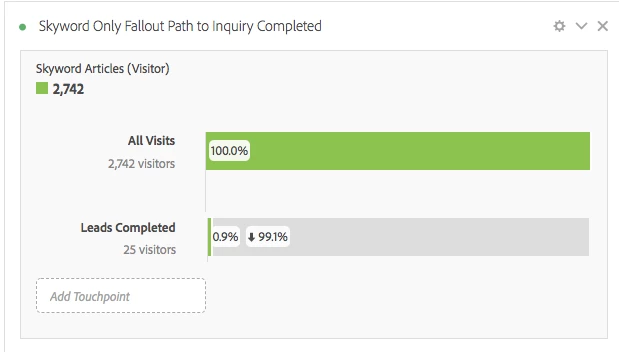
Thanks for your help and continual guidance, AAC!

This post is no longer active and is closed to new replies. Need help? Start a new post to ask your question.
Best answer by nikitaf2673776

If you're not as much interested in the path itself, but you are interested in which articles were involved in visits that completed leads, there is an alternative method.

You would create a calculated metric with your Lead Completed event. Instead of the default allocation, set it to visit participation. What this does is give every page/article (and other evars if you use it this way), seen before the event full credit for the event. So you will see which pages/articles are contributing to Lead Completes.

References:

Participation

Add Participation Metrics

6 replies

PratheepArunRaj
Community Advisor and Adobe Champion
February 16, 2018

Dear Jordan,

Create a visit segment with 'Lead Completed' exists.

Go to 'Page Path' report and see the eventual path.

Thank You

Arun

Thank You, Pratheep Arun Raj B (Arun) | Xerago | Terryn Winter Analytics
nikitaf2673776Accepted solution
Level 4
February 16, 2018

If you're not as much interested in the path itself, but you are interested in which articles were involved in visits that completed leads, there is an alternative method.

You would create a calculated metric with your Lead Completed event. Instead of the default allocation, set it to visit participation. What this does is give every page/article (and other evars if you use it this way), seen before the event full credit for the event. So you will see which pages/articles are contributing to Lead Completes.

References:

Participation

Add Participation Metrics

JordanAbbott
Level 2
February 20, 2018

Hi nikitarama,

Yes, this is precisely what I am trying to see!

This Youtube video from AA was helpful but I'm still having difficulty: Using Participation Metrics in Analysis Workspace - YouTube

Here's the participation metric with lead completed event

And here's what it's showing in Analysis Workspace. I even tried the segments by visit, visitor, and hit, but no luck.

Any thoughts on where I'm going wrong? Also tried to create a path where a lead exists.

Level 4
February 21, 2018

That seems about right to me, with the volume of total Leads. You could look at a simple table with Page as the dimension and your Participation Lead as the metric, but I believe this will show you the same two articles.

Looks like during that time period you had two articles that were involved in visits that also included a Lead Complete.

JordanAbbott
Level 2
August 8, 2018

Hey Nikitarama,

Sorry for such a late response. Our team is circling back on this and we're trying to understand what type of lead was created from these articles? We have about 70+ different types of leads/products they could have inquired about.

We just want to know which articles/blogs are yielding leads for which products.

Level 4
August 8, 2018

When your Lead Complete event is fired, how do you capture the product? Is it in the Product dimension? Assuming so, just use that to slice your data.

E.g. create a simple table with Page as the dimension and Participation Lead as the metric. Then drag in the specific items in the Product dimension you are curious about underneath the Participation Lead metric so that you have one column for each product. This would show you, for a given product, which pages most often participated in a visit that included a Lead Complete.

Or do the same, but this time break down the Pages you're interested in by the whole Product dimension. This will show you, for a given page, in visits where users looked at that page and then had a Lead Complete, what product was that lead complete for?