Next pages % adds up to more than 100$ in flow diagram | Community
Skip to main content
January 25, 2023
Solved

Next pages % adds up to more than 100$ in flow diagram

  • January 25, 2023
  • 1 reply
  • 894 views

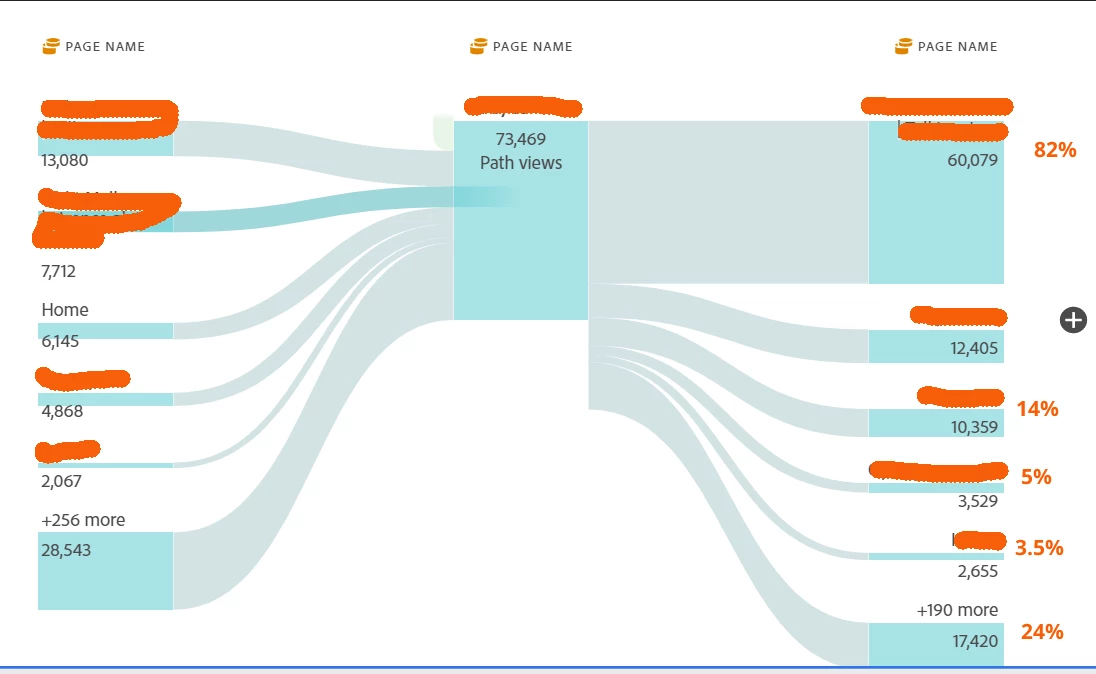
When I use the flow diagram to see which pages users are going to next (from page name in centre), I would have thought the next pages % breakdown would all add up to 100% but it doesn't. Can somehow explain how to get an accurate picture of where users are going to?


This post is no longer active and is closed to new replies. Need help? Start a new post to ask your question.
Best answer by Jennifer_Dungan

By any chance do you have a segment applied to the panel that might be causing an issue...


I find it strange that there are entries, but no exits from your page in the middle... I suspect there are a number of users exiting the site from that page, but there is a segment applied that is preventing it from properly showing in the diagram?
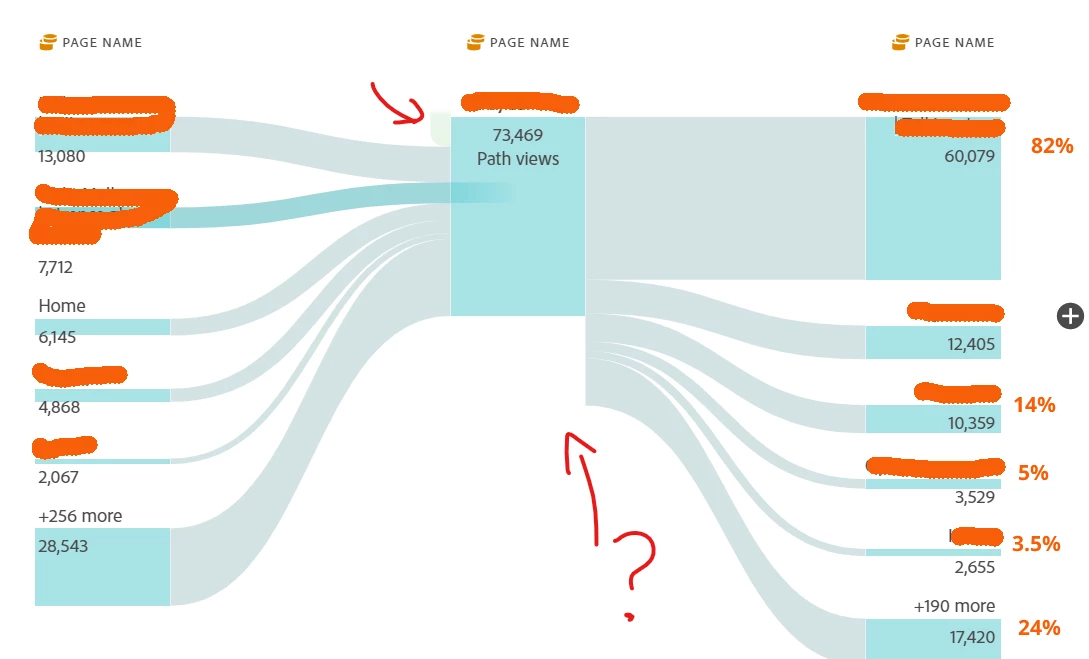


The little green spot at the top left of the page is entries, normally there should be a corresponding "exits"

 

Update: I should add that a segment could be causing a lot of different oddities with how this is displaying... when I try this, my totals line up... so I don't think it's an inherent issue with the flow diagram, but something on top that is resulting is less than desired results....
1 reply

Jennifer_Dungan
Community Advisor and Adobe Champion
Jennifer_DunganCommunity Advisor and Adobe ChampionAccepted solution
Community Advisor and Adobe Champion
January 25, 2023

By any chance do you have a segment applied to the panel that might be causing an issue...


I find it strange that there are entries, but no exits from your page in the middle... I suspect there are a number of users exiting the site from that page, but there is a segment applied that is preventing it from properly showing in the diagram?


The little green spot at the top left of the page is entries, normally there should be a corresponding "exits"


Update: I should add that a segment could be causing a lot of different oddities with how this is displaying... when I try this, my totals line up... so I don't think it's an inherent issue with the flow diagram, but something on top that is resulting is less than desired results....

January 26, 2023

Thanks Jennifer! The only segment I am using is a basic geographical one - filtering activity by to a single city. When I remove this however you are right, exits appear and the next pages add up to 100%. Must be something in the config of the segment? Thanks. 

Jennifer_Dungan
Community Advisor and Adobe Champion
January 26, 2023

Well that is odd.. you wouldn't think that just limiting the data based on a geographical location would cause that... was your segment Hit, Visit, or Visitor level attribution? Hit should be the safest...