'Next page exists' segment | Community
Skip to main content
Level 2
August 10, 2023
Solved

'Next page exists' segment

  • August 10, 2023
  • 2 replies
  • 1596 views

Hello team,


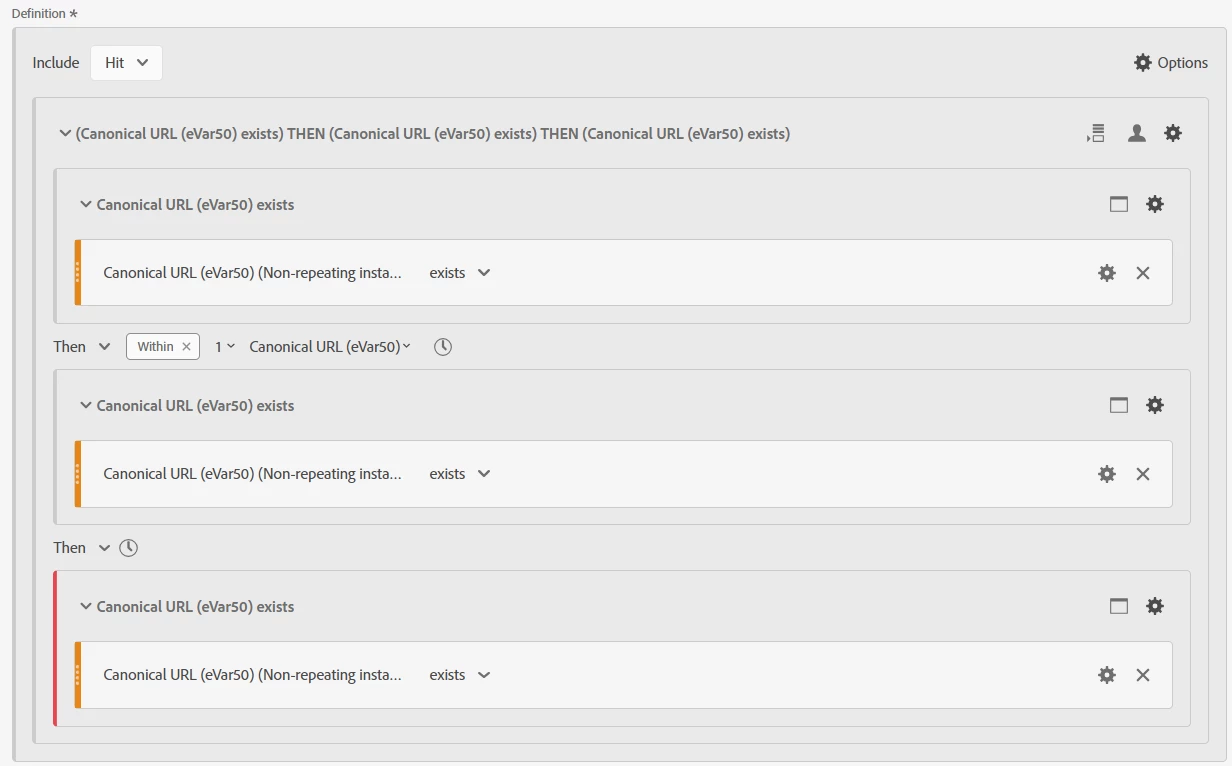
I need to create a 'Next page exists' segment in AA so I can see the percentage of users that had a next page in their visit (not necessary a list of pages that they visited) when I report on a single page or a list of pages in the table format.

 

In AA we have two ways to create a view of pages that users visit after a specific page ('Flow visualization' and Next of Previous item' panel). So to create a segment, I made a copy of the segment that Adobe creates when using 'Next item' panel for a specific page and then updated the logic in the segment to be high level without a specific page URL in it.


Would this set up work/make sense? I compared some data points and overall the numbers weren't that far off if I used Adobe's Next item panel vs. applying my segment in the table. But wanted to get an opinion. Can you please take a look?


Thank you!

This post is no longer active and is closed to new replies. Need help? Start a new post to ask your question.
Best answer by MandyGeorge

Do you capture anything like 'previous page' in either a prop or an evar? In the past, when I've wanted to look at next page in a freeform table, I put my "page" as the previous page, and then break it down by page. Which is a way of looking at where people are going next.

If you capture the page you want to see if they moved on from as your 'previous page', then there would have to be a next page. So a sequential segment with "previous page = page you're interested in THEN page exists".

2 replies

Jennifer_Dungan
Community Advisor and Adobe Champion
August 10, 2023

It's certainly looks logical.. I've never used such a segment, but if I were, I would probably take the same approach you did... taking Adobe's segment for "Next Page" and making it "exists" as opposed to a specific value.


Now, one consideration is that Adobe's segment uses "non-repeating" to make sure that the "next page" is different from the one you are on (to avoid refresh data). That particular logic may not make sense to you... you may want to consider someone who refreshes the page (to see new content) as a "next page" in this scenario (or possibly not)... just something to think about.

MandyGeorge
Community Advisor and Adobe Champion
MandyGeorgeCommunity Advisor and Adobe ChampionAccepted solution
Community Advisor and Adobe Champion
August 10, 2023

Do you capture anything like 'previous page' in either a prop or an evar? In the past, when I've wanted to look at next page in a freeform table, I put my "page" as the previous page, and then break it down by page. Which is a way of looking at where people are going next.

If you capture the page you want to see if they moved on from as your 'previous page', then there would have to be a next page. So a sequential segment with "previous page = page you're interested in THEN page exists".

Jennifer_Dungan
Community Advisor and Adobe Champion
August 11, 2023

There is also the Activity Map page (which tracks automatically if enabled)... but if you have some "non-standard navigation" elements (like clickable divs) Activity Map won't actually capture anything.....