Need help sorting out developer access for Adobe Analytics API | Community
Skip to main content
hazelnut_spread
August 22, 2022
Solved

Need help sorting out developer access for Adobe Analytics API

  • August 22, 2022
  • 3 replies
  • 1367 views

Hi there -- I'm trying to query the Adobe Analytics API, but I'm unsure that we have the right permissions in place.


I've received confirmation that our account has "Web service access" enabled -- however, Adobe Analytics does not appear as an option when I try to "create a project" on API via Adobe I/O. As a result, I'm blocked from actually trying out the API in that environment.


Are there any other permissions I need to request from the Admin?


Do I need to have some sort of Developer Access in place in addition to "Web service access"? Is it possible to have one without the other?

Any guidance would be a big help -- thanks
This post is no longer active and is closed to new replies. Need help? Start a new post to ask your question.
Best answer by yuhuisg

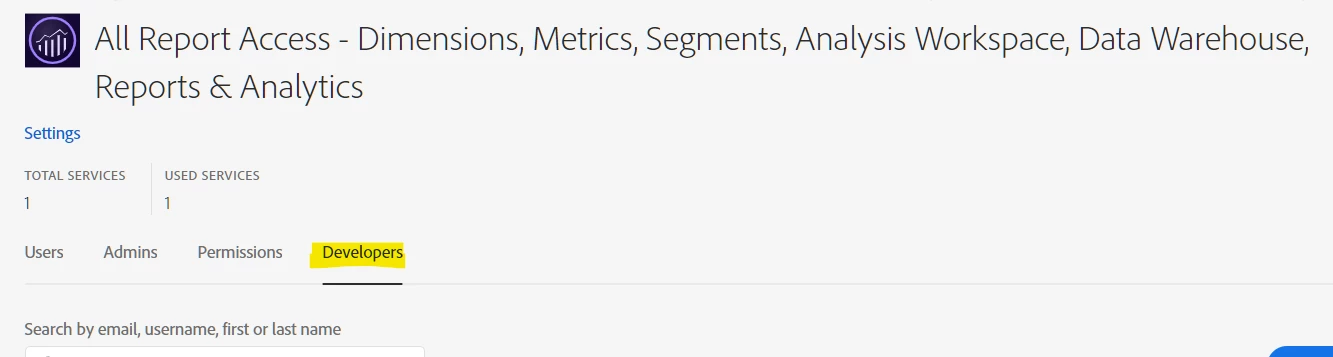
In addition to what @jennifer_dungan said, you need to ensure that you have been added as a Developer in the appropriate Adobe Analytics product profile. Your Adobe admin will need to handle this from https://adminconsole.adobe.com.


3 replies

Jennifer_Dungan
Community Advisor and Adobe Champion
August 23, 2022

This might be a silly question.. but with the Web Services Access, you did provide access to one or more reporting suites, right? The Web Services Access gives you tool access, but you still need the rights to access the report data.... 


August 23, 2022

It's not a silly question at all, but I may give a silly answer in response. Our user has access to the right reporting suite in the app itself, and we're also able to pull the data through an outside extraction tool -- but can't get any further than merely logging into Adobe I/O.

Jennifer_Dungan
Community Advisor and Adobe Champion
August 24, 2022

Interesting... I've not had to set up access here.. I know I have access, but I am also the admin so I can't really compare my own permissions to fill in the missing pieces. I would try @yuhuisg's suggestion, and try adding the user as a developer....

yuhuisg
Community Advisor
yuhuisgCommunity AdvisorAccepted solution
Community Advisor
August 23, 2022

In addition to what @jennifer_dungan said, you need to ensure that you have been added as a Developer in the appropriate Adobe Analytics product profile. Your Adobe admin will need to handle this from https://adminconsole.adobe.com.


August 23, 2022

Thanks, looking into this -- I've suspected this might be the missing piece.

Alexis_Cazes_
Level 10
August 23, 2022

Check this: https://developer.adobe.com/analytics-apis/docs/2.0/guides/ as it goes over permission. I would have expected Adobe I/O to show you all services available in the company when creating a project and if permissions are not correct they would have failed during runtime.


Are you sure you are logged in to correct company ? 

August 23, 2022

I'm an external user, but I should only have access to one company. FWIW, I'm able to access the right reporting suite within the Adobe Analytics platform itself.

Alexis_Cazes_
Level 10
August 24, 2022

I believe Adobe I/O does not use Single Sign On so if your company uses SSO you might be using different accounts as the one you would use on Adobe I/O would be your Adobe ID where in SSO it would be the Enterprise ID even if you are using same email.