Multiple strings to match Query string parameter in Marketing Processing Rules | Community
Skip to main content
JyotiSharmaV
Community Advisor
Community Advisor
October 11, 2022
Solved

Multiple strings to match Query string parameter in Marketing Processing Rules

  • October 11, 2022
  • 1 reply
  • 5122 views


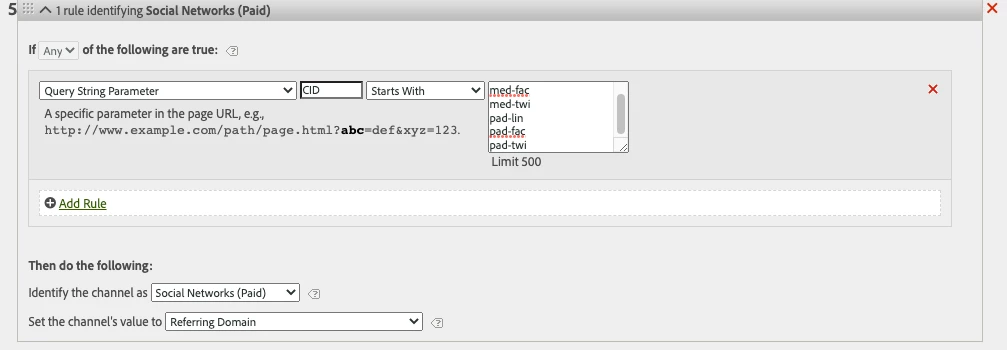
Hi, I am fixing my marketing channel processing rules. Can I use multiple values like below screen shot or do I have to add separate rules for each of the strings to match? 


Thanks


This post is no longer active and is closed to new replies. Need help? Start a new post to ask your question.
Best answer by Jennifer_Dungan

@jennifer_dungan Makes sense to me. But If I try to put different values in a list format in a rule then its by default is "ALL" operator instead "Any" and for one rule it doesn't allow you to choose "Any"...


In my previous response where I shared a screenshot for paid social, you saw a list of values with "Any" operator. It came for me when I clicked ADD New rule and removed it. That way I selected "Any"


So I want to confirm from this ASK is if I put values as list in rule and keep "ALL" then my condition will work or not? 


The "All" and "Any" in that initial drop down reflects the rules/boxes/blocks in the rule set (the ones that you can remove with the x, or add with "Add rule"):
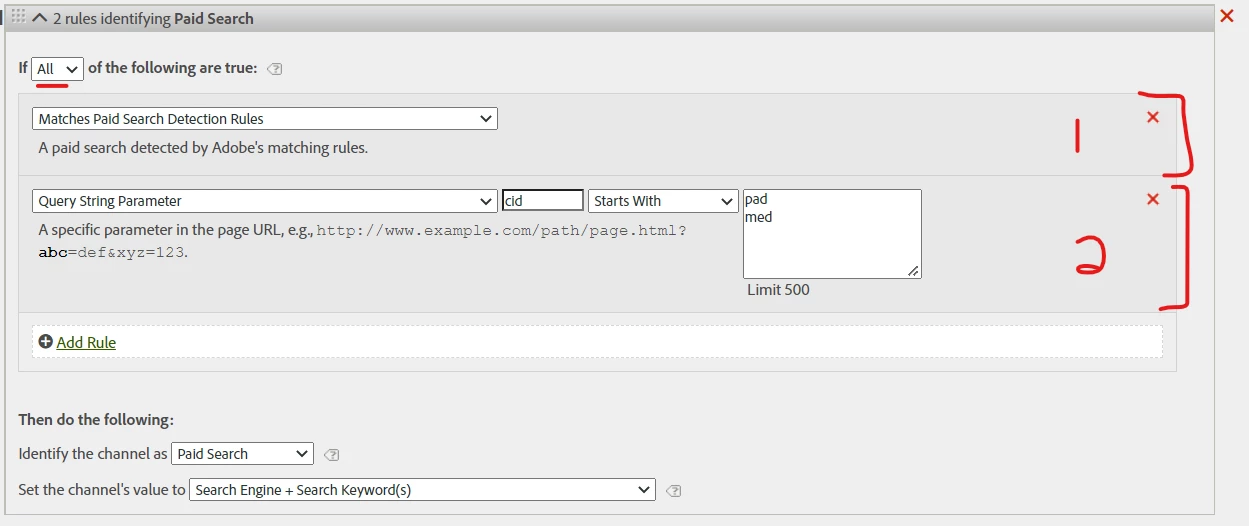


In this case, in order to be identified as "Paid Search" the channel must BOTH match the "paid search detection rules" AND the "cid" must start with "pad" or "med".


If you change it to "ANY" at this point, then it need to match either (or both, its not an exclusive or) "Paid Search Detection" OR "cid starts with one of the listed items"


This list block is always going to be an "OR" list, no matter what is selected in the All/Any dropdown:
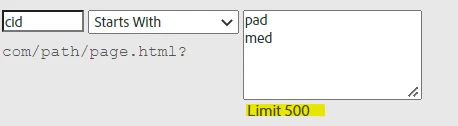


I don't know why you are saying this can only be an "ALL" rules... you should see "ANY" in the dropdown, if you have more than 1 rule in your rule set.....
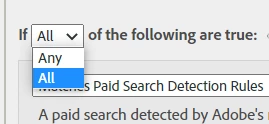
 

Unless you removed the "matches paid search detection rules" like so:
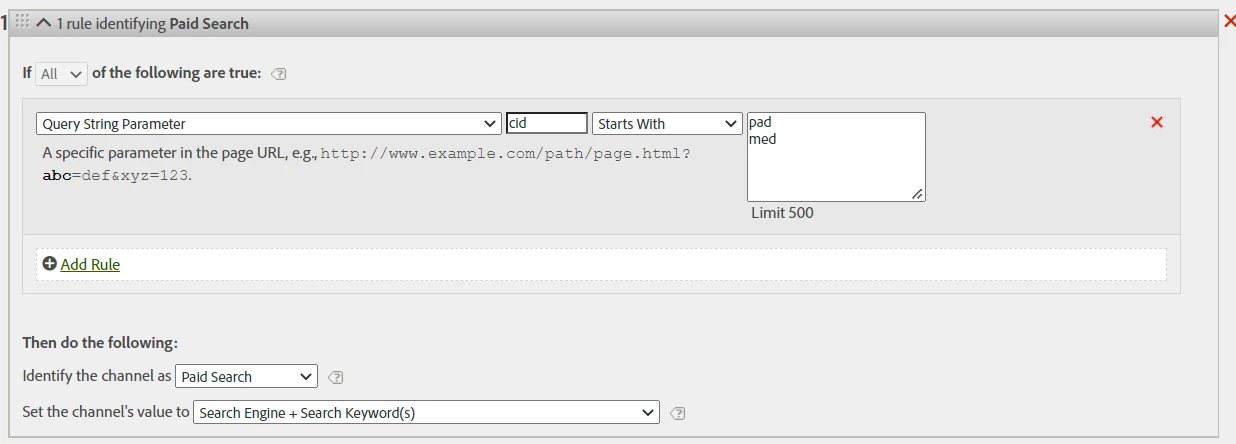


But still, the ANY/ALL refers to the blocks, not to the list items... the list would be useless in 99% of cases if it was processed as an "AND"... IF you need something to "contain X and Y" then you would make sure you have "ALL" selected, and create 2 rules:

cid contains "X"
cid contains "Y"
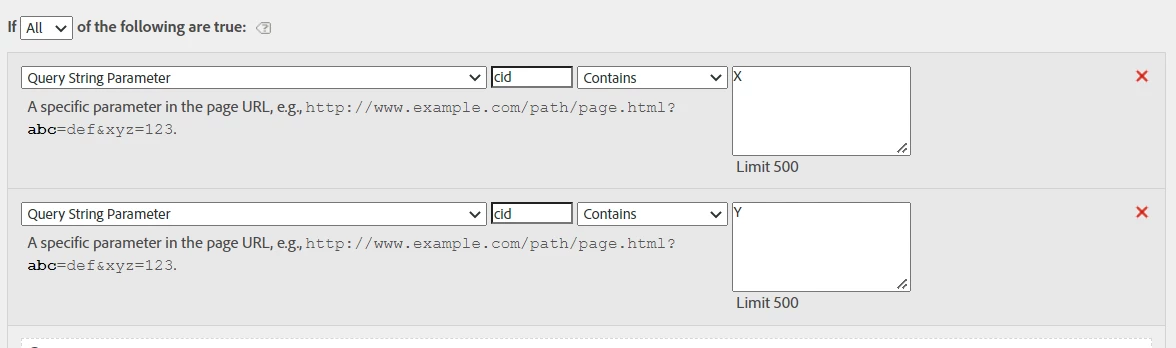
cause you need BOTH to be true... and they are not mutually exclusive.

1 reply

Jennifer_Dungan
Community Advisor and Adobe Champion
October 12, 2022

That should work.. the rule specifies "Any Of" which means it should look for cid to start with any of the listed options.


Are you getting strange results? Or is this just very new and you are just looking for a second opinion before it runs for a while?


For what it's worth, this looks absolutely correct to me.

JyotiSharmaV
Community Advisor
Community Advisor
October 12, 2022

Hey @jennifer_dungan  its all new cid codes for social paid that we are going to opt so looking to add it in marketing channels processing rules so that they can be bucketed in correct dimension item of Marketing channels ie. social paid. From that perspective does it looks correct? I am just confused between "All" or "Any" in rule


Because for social organic we use "All" for a list and this is advised 


JyotiSharmaV
Community Advisor
Community Advisor
October 14, 2022

Hi,


I believe that you would want "other" farther down... since the rules process in order you want to make sure your specific rules come first, followed by your more generic rules.


One thing to note, I did notice on your Paid Social Media rule, you specified cid starting with pad and med, but didn't specify known social media networks like your later rule for Organic Social Media.... If you are sure that you will have no other campaigns that will come from other sources that potentially start with pad or med, you might be okay.. but it may be an idea to add that extra specificity. 


But other than that, this looks like you have covered your bases... the last thing as always is to test with live data and make sure there's no oddities....


@jennifer_dungan As we use CIDs for both social paid and social organic buckets. I placed "Other Campaigns" bucket after "Social paid" and "Social Organic" buckets in the below order so that what is not captured above can go into "other campaigns"

Lastly, I came across the list of Social Network links on this doc page: https://experienceleague.adobe.com/docs/analytics/components/dimensions/referrer-type.html?lang=en


Can I use it exactly and paste it into here below section?