Month over Month Change | Community
Skip to main content
Level 2
January 22, 2025
Solved

Month over Month Change

  • January 22, 2025
  • 3 replies
  • 1849 views

Hi Everyone 

I have Months and Users metric in my Adobe Analytics, I wanted to see the month on month change in Users i.e.
                     Users    Change
Month      
October        100       0 (as there is no previous month)
Nove             150      50%
December     120     -20% 

I want to create a Change kind of metric which can help me to see the Month over Month Change 
Can anyone please help me to do so ?

Best answer by Harveer_SinghGi1

Haha, well the Infinity can be removed easily. But the overall average does not seem to compute.

God I wished that one could define named components like "delta to previous value" instead of always copying the whole definition into the formula.


@mandygeorge any idea how to also get the average in the column header?


Honestly I don't think we need to compute for overall % change. Think about it, when calculating the overall % change what value will the metric logic compare against the total UVs to.

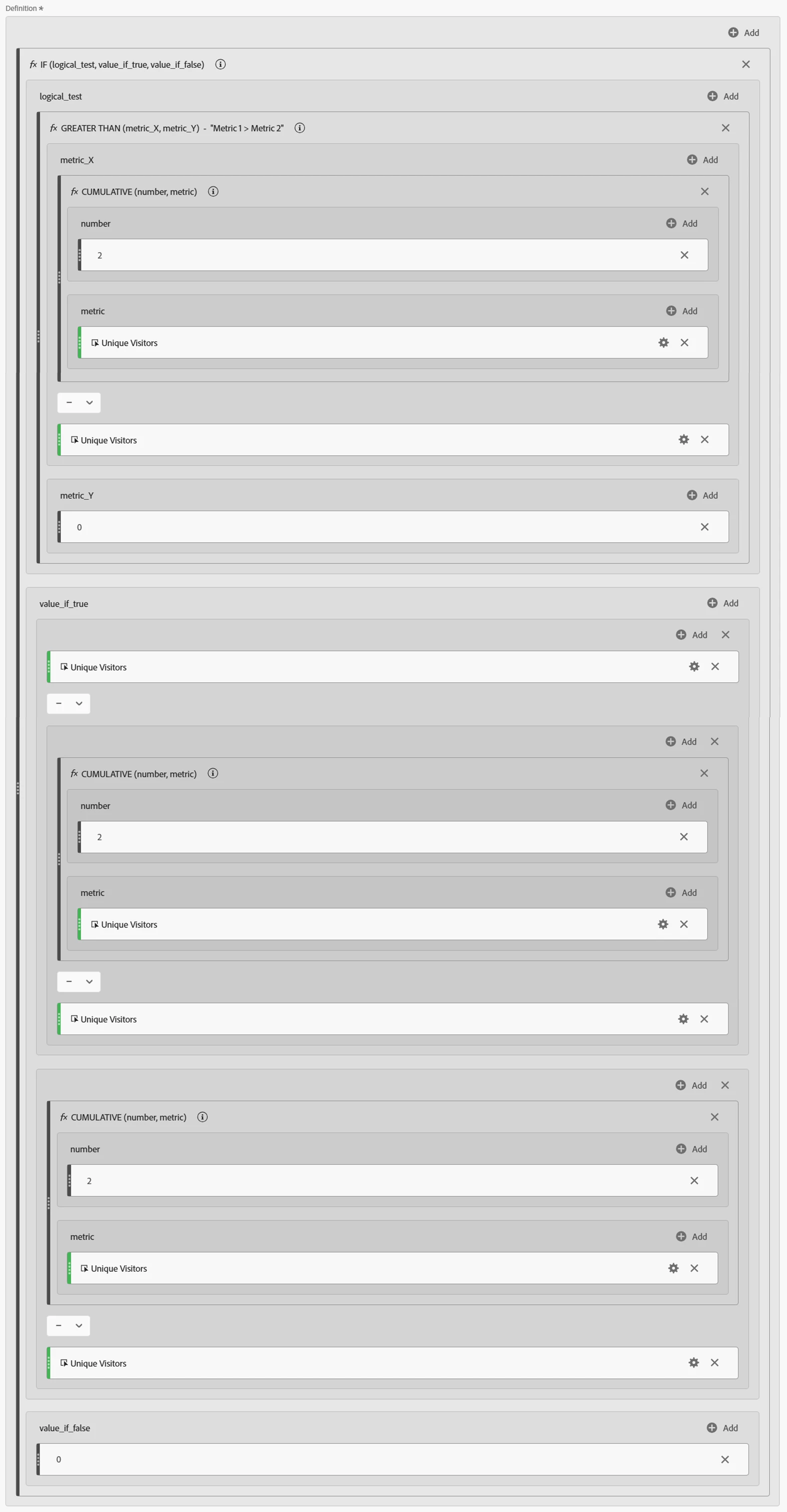
I believe the this metric definition is good enough,

Cheers!

3 replies

Isha__Gupta
Community Advisor and Adobe Champion
January 22, 2025

Hi @rajatar2 ,


One suggestion - You can maybe create 12 different calculated metrics one for each month like below. This would be one time set up but should give you the required metric nonetheless. Hopefully, some other expert may come up with more optimal solution. But till then, you may get your data through this set up!


Best,

Isha


Harveer_SinghGi1
Community Advisor
Community Advisor
January 22, 2025

Hi @rajatar2 ,

You can create a decimal type calculated metric with below definition,

Works on row level where it calculates the % change based on previous row UVs.

Here's this metric with daily trend,

Here it is with monthly trend,

Cheers!

bjoern__koth
Community Advisor and Adobe Champion
January 22, 2025

Hah, you were faster.

Now, any idea how we can get the actual average value into the column header?


I tried removing the Infinity with an If function, returning 0 if the previous value was actually 0.

Yet it will still not generate the overall average.

Cheers from Switzerland!
Harveer_SinghGi1
Community Advisor
Community Advisor
January 22, 2025

Hey @bjoern__koth , trying to solve for that but it doesn't seem that straight forward as the metric logic is looking for previous value which is not available in the column total and that is where I believe it fails.

I'll post here if I'm able to work it out.

Cheers!

bjoern__koth
Community Advisor and Adobe Champion
January 22, 2025

Props to @isha__gupta  and @harveer_singhgi1 's solutions!

Great to see what complex setups can be solved with different approaches!

Cheers from Switzerland!