Mobile browser "None" | Community
Skip to main content
Level 4
October 4, 2021
Solved

Mobile browser "None"

  • October 4, 2021
  • 3 replies
  • 2704 views

Hi Community,

I'm asking your help because I'm seeing a lot of "None" browsers in my reports for mobile devices.

It seems to be weird as all browsers are located at the same place (Courbevoie, a city near to Paris).

See the screenshot below:
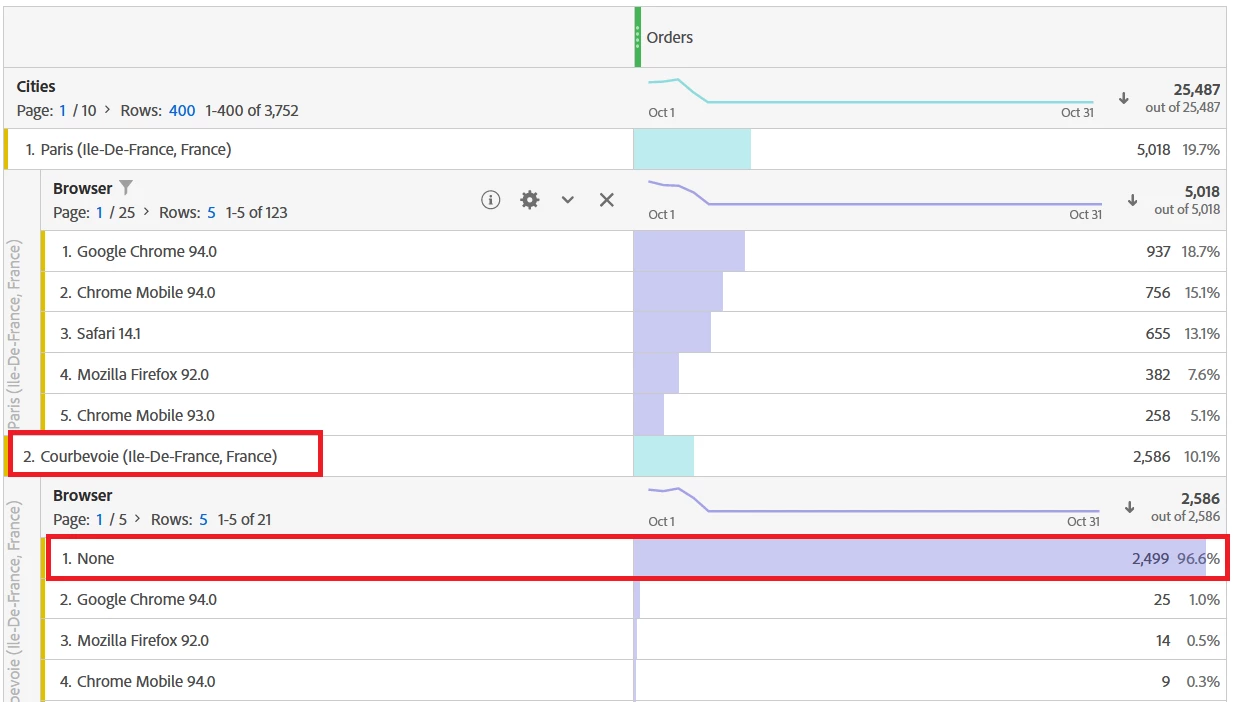
Also, I check a bit in reports to understand why I get this kind of data, it seems that the Session is restarting when the user land on a page tracked "server-side".

Until now, only few pages of my website are being tracked through server-side technology. Is there a correlation between these 2 elements? If you have any suggestions for investigation, it will be really helpful.

Thank you very much.

This post is no longer active and is closed to new replies. Need help? Start a new post to ask your question.
Best answer by khurshid

If the browser id None, that means the data was sent via Data Sources or Data Insertion APIs. Since the page shows "server-side", I guess it is Data Insertion. Can you check internally? You may also check data feed column hit_source and code_ver to validate the source.

3 replies

Pablo_Childe
Community Advisor
Community Advisor
October 4, 2021

Do you capture transaction ID as well? If you did try and compare the IDs and see if you can correlate it to a specific customer...


khurshid
Adobe Employee
khurshidAdobe EmployeeAccepted solution
Adobe Employee
October 5, 2021

If the browser id None, that means the data was sent via Data Sources or Data Insertion APIs. Since the page shows "server-side", I guess it is Data Insertion. Can you check internally? You may also check data feed column hit_source and code_ver to validate the source.

Swanan_Author
Level 4
October 5, 2021

Hi @khurshid,


Thanks for your advices ! I'll double check this with my team.

Swanan_Author
Level 4
October 14, 2021

Hi @khurshid@pablo_childe,


Thanks again for your advices on this topic.

@khurshid I'm still waiting a feedback from my team about the documentation you told me to check.


In the meantime, I would like to add the fact that this issue is happening only on server-side tracked pages.

Even when the entry page is tracked server-side. So it's not a matter of "restarting session" as I mentioned first.


And so I can't use @pablo_childe solution to use Transaction IDs to match the customer journey as sometimes the visitor only sees server-side tracked pages.

Does it change anything in your recommendations? Do you have any other suggestions that I could investigate?


Thank you for your help.

khurshid
Adobe Employee
Adobe Employee
October 14, 2021

@swanan_ It does not change anything in my comments. I still believe this could be due to Data Insertion APIs being used in server side pages. 

Swanan_Author
Level 4
October 14, 2021

Ok thank you, I'll wait the feedback from my team then, thank you !