Mismatch in the Visits counts | Community
Skip to main content
Level 2
October 18, 2024
Question

Mismatch in the Visits counts

  • October 18, 2024
  • 1 reply
  • 1721 views

Hi Team,

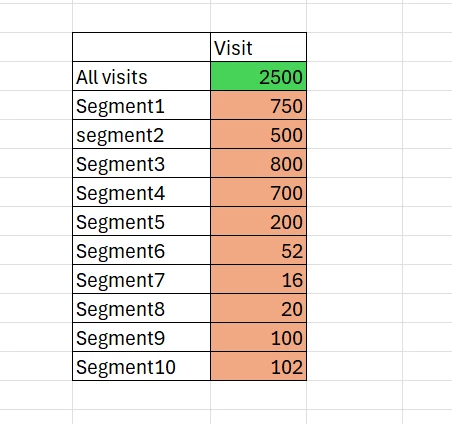
I am trying to work on one of the reports, where we are using a dimension, ALL VISIT segment against the metric Visits. Also im using few segments along with the all visit dimension. So when we combine all this segments it should be equal to the all visit dimension.
Example : ALL VISIT is a standard segment from Adobe. Segment 1 to segment 10 are different segments that have a count of certain visitors. when we sum up all these segments, it is greater that the all visit count.
NOTE: In all this 10 segments there are no duplicates.
So when i combine all this segments from 1 to 10 it should be equal to all visits, instead it is more than ALL VISITS. Can i know what could be the different scenarios of this visits mismatch. 
 

This post is no longer active and is closed to new replies. Need help? Start a new post to ask your question.

1 reply

Isha Gupta
Community Advisor and Adobe Champion
October 18, 2024

Hey @udayashrigo1 ,

Are you using Visitor container in your segment definition? Because that is going to return all visits by visitors lying in that segment which is going to inflate the number of visits you are looking to query. Maybe try to use hit level container for more accuracy.

If not, let's see what @jennifer_dungan has to say of the matter since she is the segment expert here!


Best,

Isha


Jennifer_Dungan
Community Advisor and Adobe Champion
October 18, 2024

Weighing in here... 


Can we get some more details about your Segment definitions so that we can try to replicate your issue?


As @isha__gupta said, I also suspect overlap...


If your segments are HIT based, I don't see how you wouldn't have overlap at the visit level (unless every single visit was a single hit... which is extremely unlikely).


While your HITs might be isolated from one another:


Example:


Hit

   Page equals home


OR


Hit

    Page equals section


OR


Hit

    Page equals detail


^ the hits won't overlap


But a Visit that looks like:


  • Home
  • Section
  • Detail
  • Section
  • Detail
  • etc


All three segments will count against the VISIT (and adding up those Visits will create an inflated total)


    Page View Visits
Segments   5 3
  Home Segment 1 1
  Section Segment 2 1
  Detail Segment 2 1


Keep in mind that when you breakdown using Segments, stacking metrics like Visits and Unique Visitors are not de-duplicated... the total because a simple "column sum". Unlike using a dimension as your breakdown:


    Page View Visits
Pages   5 1
  Home 1 1
  Section 2 1
  Detail 2 1


Level 2
October 24, 2024

Hi @jennifer_dungan , Thanks for the reply, 

SO Im using 12 different segments

Segment Definition:

Segment1

At hit level using 2 conditions in one container

Dimension equals to anyof (xyz, abc, stu, vwx........)

Similarly there are 12 different segments upto segments 12.

So when we are breaking down this ALL VISITS , with this 12 segments against visits metrics, The count of all visits should be equal to this 12 segments visits count. and all these segments are created from the same report suite.