Metrics by Unique Visitors | Community
Skip to main content
February 16, 2023
Solved

Metrics by Unique Visitors

  • February 16, 2023
  • 2 replies
  • 2292 views

Hi! I'm trying to calculate some metrics such as conversion, orders, average order value and revenue, but all by unique visitors. Can some please explain how can I do that? Thanks!

This post is no longer active and is closed to new replies. Need help? Start a new post to ask your question.
Best answer by Jennifer_Dungan

Hi,


So for non-calculated metrics (like orders), you can create the segment as I mentioned above...


But for calculated metrics, like Conversion Rate, so I am going to assume the metric is "Orders / UV"....


You can pull in a column for Orders, and another column for Unique Visitors.. select the two columns and right click to bring up the context menu... select "Create Metric from Selection" > "Divide"
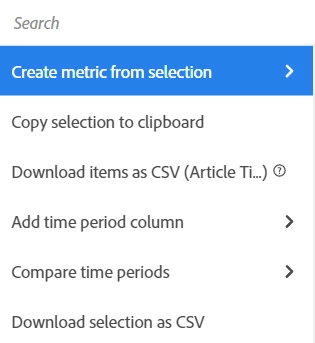
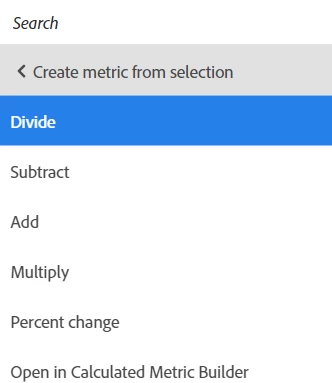


You may want to edit the resulting calculated metric (give it a better name than what is auto generated, make it display as decimal or % and the number of decimal points, etc, and make sure the division is in the correct order...


If you need a more complex conversion.. like "Orders per UV (that actually makes an order)", then you can create a segment for "Visitors with Orders"  (and make sure that you look for orders made within an appropriate time frame by adding a date range into your segment - you don't want any visitors who have ever made an order in the entire history of your site)... then you can stack that segment with your metrics, and create a calculated metric that includes the segment.... 

2 replies

Jennifer_Dungan
Community Advisor and Adobe Champion
February 16, 2023

I generally use a segment such as:


Hit level:

      Order exists


Then I stack that segment with Unique Visitor, then no matter what breakdown I am using (Page, Month, etc), I know that the scope the "order" isn't greedily grabbing more than I expect, and the UV metric will de-duplicate multiple orders by User.

mns740Author
February 16, 2023

Thanks for your response! Is that something that'd work only for orders? I tried creating a segment for conversion rate the same way but cannot pull in conversion rate in custom segment. 

Jennifer_Dungan
Community Advisor and Adobe Champion
February 16, 2023

Ohh.. probably cause conversion rate is a calculated metric... you should be able to create your own conversion by UV....

Level 2
February 21, 2023

Hi 

Did you find out how to do this one ? I am also working on the same issue . Can you please explain me

Thank you

Jennifer_Dungan
Community Advisor and Adobe Champion
Jennifer_DunganCommunity Advisor and Adobe ChampionAccepted solution
Community Advisor and Adobe Champion
February 21, 2023

Hi,


So for non-calculated metrics (like orders), you can create the segment as I mentioned above...


But for calculated metrics, like Conversion Rate, so I am going to assume the metric is "Orders / UV"....


You can pull in a column for Orders, and another column for Unique Visitors.. select the two columns and right click to bring up the context menu... select "Create Metric from Selection" > "Divide"


You may want to edit the resulting calculated metric (give it a better name than what is auto generated, make it display as decimal or % and the number of decimal points, etc, and make sure the division is in the correct order...


If you need a more complex conversion.. like "Orders per UV (that actually makes an order)", then you can create a segment for "Visitors with Orders"  (and make sure that you look for orders made within an appropriate time frame by adding a date range into your segment - you don't want any visitors who have ever made an order in the entire history of your site)... then you can stack that segment with your metrics, and create a calculated metric that includes the segment.... 

Level 2
February 21, 2023

I hope this helps .. will try and check.. Thankyou
